
The Razer Ornata V3 is the strongest match here for a full-size low-profile gaming keyboard with a wrist rest included, while the ASUS ROG Falchion RX Low Profile is the one to look at when desk space is tight. The other three cover wireless play, per-key lighting and a compact tenkeyless layout.
We compared all five on switch type, layout, RGB lighting, connectivity, dimensions and weight, using only the details in each listing. The longest stated side runs from 10.89 inches on the TKL to 18.4 inches on the Alienware board.
As an Amazon Associate, we earn from qualifying purchases.


Pick by Your Need
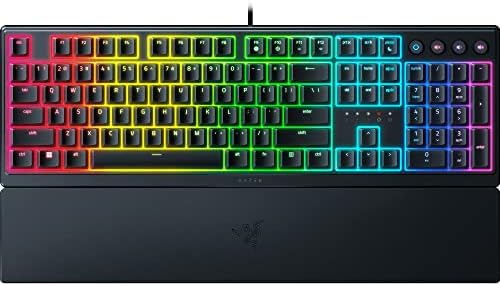
- Best overall: Razer Ornata V3. Full-size layout, 10-zone RGB lighting and a magnetic wrist rest.
- Best wireless: Razer BlackWidow V4 Low Profile. Green mechanical switches with 1.2 mm actuation, 2.4 GHz and Bluetooth.
- Best compact mecha-membrane: Razer Ornata V3 TKL. The same mecha-membrane switches as the full-size Ornata V3 in a 10.89-inch body.
- Best per-key RGB: Alienware AW510K. Cherry MX Low Profile Red switches, per-key AlienFX lighting and USB passthrough.
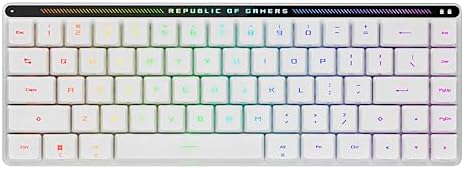
- Best 65% tri-mode: ASUS ROG Falchion RX Low Profile. A 65% layout with Bluetooth, 2.4 GHz, wired USB and a touch panel.
Quick Answer
Choose the Razer Ornata V3 for a full-size board with a wrist rest and 10-zone RGB lighting, or the Ornata V3 TKL for the same switch style in a smaller body. Pick the BlackWidow V4 Low Profile for wireless play with mechanical switches, the Alienware AW510K for per-key RGB with Cherry MX Low Profile Red switches, and the ASUS ROG Falchion RX Low Profile for a 65% board that connects three ways.
Comparison Table
| Keyboard | Layout | Switch type | RGB lighting | Connectivity | Dimensions (inches) | Buy |
|---|---|---|---|---|---|---|
| Ornata V3 | Full-size | Mecha-membrane | 10-zone RGB | not stated | 17.46 x 5.68 x 1.23 | View on Amazon |
| BlackWidow V4 Low Profile | Full-size | Green mechanical, 1.2 mm, 45 g | not stated | 2.4 GHz and Bluetooth | 18.12 x 6.32 x 1.37 | View on Amazon |
| Ornata V3 TKL | Tenkeyless | Mecha-membrane | 8-zone RGB | not stated | 10.89 x 5.68 x 1.22 | View on Amazon |
| Alienware AW510K | Full-size | Cherry MX Low Profile Red | Per-key RGB | USB passthrough | 18.4 x 6.1 x 1.2 | View on Amazon |
| ROG Falchion RX Low Profile | 65% | ROG RX Red optical | RGB | Bluetooth, 2.4 GHz, wired USB | 12.05 x 4.33 x 1.04 | View on Amazon |
Decision Guide
Start with layout. The Ornata V3 at 17.46 inches and the Alienware AW510K at 18.4 inches on their longest sides need the most room, while the Ornata V3 TKL at 10.89 inches and the ASUS board at 12.05 inches on their longest sides leave far more space for mouse movement.
Next, match the switch type. Mecha-membrane switches on both Ornata V3 models fuse the snappy, clicky feedback of a mechanical switch with the familiar feel of a conventional keyboard, while the BlackWidow V4 Low Profile uses Green mechanical switches at 1.2 mm and 45 g. The Alienware AW510K uses Cherry MX Low Profile Red switches, and the ASUS board uses ROG RX Red optical switches.
Connectivity comes third. The BlackWidow V4 Low Profile connects over 2.4 GHz wireless and toggles between 3 Bluetooth devices. The ASUS board offers Bluetooth for up to 3 devices, 2.4 GHz RF and wired USB, with up to 430+ hours of battery life. The Alienware AW510K adds USB passthrough, and the two Ornata V3 models give no connection type.
The Alienware AW510K is the only board here with per-key RGB lighting, while the Ornata V3 gives you 10 zones and the TKL gives you 8. The BlackWidow V4 Low Profile adds a roller and 11 control buttons, and the ASUS board adds a touch panel and cover.
1. Razer Ornata V3 — Best overall
Razer pairs mecha-membrane switches with slimmer keycaps on this full-size board, the only one of the five that combines a full-size layout with 10-zone RGB lighting and a magnetic wrist rest. Its UV-coated keycaps are described as more fade-resistant than regular keycaps, and its backlit media keys can pause, play, skip and adjust brightness and volume. At 3.1 pounds, it is the heaviest board among the three with a stated weight.
| Spec | From the listing |
|---|---|
| Switch type | Mecha-membrane |
| RGB lighting | 10-zone RGB |
| Dimensions | 17.46 x 5.68 x 1.23 inches |
| Weight | 3.1 pounds |
2. Razer BlackWidow V4 Low Profile — Best wireless
Green mechanical switches set the BlackWidow apart from the other four, rated at 1.2 mm actuation and 45 g of force, and its front height is 18.5 mm. At 18.12 inches on its longest side it trails only the Alienware at 18.4 inches, and a clickable roller with 11 control buttons, including 4 macro buttons, gives it more onboard controls than any other board here. Skip it if you need a stated battery figure or weight, because the listing names long battery life without giving hours.
| Spec | From the listing |
|---|---|
| Switch type | Green mechanical switches |
| Actuation | 1.2 mm, 45 g |
| Dimensions | 18.12 x 6.32 x 1.37 inches |
| Weight | The listing does not state it |
3. Razer Ornata V3 TKL — Best compact mecha-membrane
The tenkeyless Ornata keeps the same mecha-membrane switches, UV-coated keycaps and backlit media keys as the full-size model, but in a body measuring 10.89 by 5.68 by 1.22 inches. That makes it the narrowest board here, while keeping the magnetic wrist rest. Its RGB lighting covers 8 zones with 16.8 million colors, two fewer than the full-size model, and it is spill-resistant. The trade-off is the tenkeyless layout, which leaves more mouse space in exchange for the narrower body, 10.89 inches on its longest side.
| Spec | From the listing |
|---|---|
| Switch type | Mecha-membrane |
| RGB lighting | 8-zone RGB, 16.8 million colors |
| Dimensions | 10.89 x 5.68 x 1.22 inches |
| Weight | 0.66 pounds |
4. Alienware AW510K Low-Profile RGB — Best per-key RGB
Cherry MX Low Profile Red switches define the Alienware board, described as linear with low actuation force and shorter travel. It is also the only board here with per-key RGB lighting and the only one with a stated 100 million keystroke life cycle. Floating keys with full N-key rollover and on-board memory round out its feature set. At 18.4 inches on its longest side, it is the longest board here.
| Spec | From the listing |
|---|---|
| Switch type | Cherry MX Low Profile Red |
| RGB lighting | Per-key AlienFX RGB, 16.8 million colors |
| Keystroke life cycle | 100 million keystrokes |
| Dimensions | 18.4 x 6.1 x 1.2 inches |
| Weight | 0.91 pounds |
5. ASUS ROG Falchion RX Low Profile — Best 65% tri-mode
The ASUS board fits a 65% layout into a 60% frame, measuring 12.05 by 4.33 by 1.04 inches, the slimmest height here. Its tri-mode connectivity covers Bluetooth for up to 3 devices, 2.4 GHz RF and wired USB, with up to 430+ hours of battery life with RGB off. Pre-lubed ROG RX Red optical switches have shorter actuation points and travel distance, and a touch panel handles media, volume and lighting. Skip it if you need a wrist rest or a stated weight, because the listing names neither.
| Spec | From the listing |
|---|---|
| Switch type | ROG RX Red optical, low-profile |
| Connectivity | Bluetooth, 2.4 GHz RF, wired USB |
| Battery life | Up to 430+ hours with RGB off |
| Dimensions | 12.05 x 4.33 x 1.04 inches |
Buying Checklist
- Measure your desk first and compare it with each stated longest side, from 10.89 inches for the TKL to 18.4 inches for the Alienware board.
- Decide between a full-size, tenkeyless or 65% layout; the full-size boards measure 17.46 to 18.4 inches on their longest side, while the tenkeyless model is 10.89 inches and the 65% model is 12.05 inches.
- Match the switch type to your preference: mecha-membrane, Green mechanical at 1.2 mm and 45 g, Cherry MX Low Profile Red, or ROG RX Red optical.
- Check how the board connects, since two boards here give no connection type, and compare RGB lighting by zone count or per-key control.
- Check the return window on the product page, and compare finalists on layout, switches and connectivity.
FAQ
How do I choose between a full-size and a compact low-profile gaming keyboard?
Start with desk space and layout. Full-size boards here measure 17.46 to 18.4 inches on their longest side, while the tenkeyless model is 10.89 inches and the 65% model is 12.05 inches. Pick a full-size board for the wider key set; go compact for more mouse space.
What is the difference between mecha-membrane and mechanical switches in this group?
Mecha-membrane switches, used on both Ornata V3 models, fuse the snappy, clicky feedback of a mechanical switch with the familiar feel of a conventional keyboard. The BlackWidow V4 Low Profile uses Green mechanical switches rated at 1.2 mm and 45 g, and the Alienware board uses Cherry MX Low Profile Red switches described as linear with shorter travel. Optical switches appear only on the ASUS board, which uses ROG RX Red optical switches.
Which board should I pick if I want to switch between several devices?
The ASUS ROG Falchion RX Low Profile connects over Bluetooth to up to 3 devices, plus 2.4 GHz RF and wired USB. The BlackWidow V4 Low Profile also toggles between 3 Bluetooth devices and can pair a compatible Razer mouse to the same dongle. The other three boards give no multi-device switching figure.
Final Verdict
The Razer Ornata V3 is the most complete package, with a full-size layout, 10-zone RGB lighting, a magnetic wrist rest and backlit media keys. For wireless play, the BlackWidow V4 Low Profile adds 2.4 GHz and Bluetooth with Green mechanical switches, while the ASUS ROG Falchion RX Low Profile is the pick for small desks, with a 65% layout and tri-mode connectivity. The Alienware AW510K brings per-key RGB and Cherry MX Low Profile Red switches, and the Ornata V3 TKL brings the Ornata switch style in the narrowest body here.
Prime covers fast, free delivery on eligible items. See whether a Prime free trial is available for your account.
Check Prime on Amazon →Types of Mechanical Keyboards and Switches
Mechanical keyboards are grouped mainly by switch feel. Linear switches move straight down with no bump or click. Tactile switches add a bump with no click. Clicky switches add both. Switch testers let a few sample switches be tried by hand before committing to a full keyboard's switch type.
Hot-swappable keyboards let switches be changed without soldering, so the typing feel can be adjusted later without replacing the whole board, which matters most for anyone unsure which switch type they'll prefer long-term.
Frequently Asked Questions
What's a switch tester used for?
It lets a few individual switches of different types be pressed and compared by hand before buying a full keyboard, since switch feel is hard to judge from specs alone.
What's the difference between linear, tactile, and clicky switches?
Linear switches move straight down with no bump or click; tactile switches add a bump partway down with no click; clicky switches add both a bump and an audible click.
Related Guides
 Best Keycaps Low Profile: Five Slim Keyboard Sets ComparedCompare five low-profile keycap sets by key count, material, shine-through legends, and layout fit,…Read next →
 Best Gaming Headset Detachable Mic Picks: 5 ComparedCompare five gaming headsets with detachable mics on drivers, connections, weight and mic type,…Read next →
 Best Keyboard and Mouse Combo Wireless Gaming PicksCompare five gaming keyboard and mouse combos on battery life, backlight modes, DPI settings,…Read next →





Write Your Review
No reviews yet. Be the first to share your experience!