
For most gamers who want a cable-free desk, the ULSOU full-size set is the strongest starting point, because its keyboard carries a 3150 mAh battery and its mouse offers four DPI settings, while the RedThunder K10 Pro suits longer sessions with a 3000 mAh keyboard battery and an 800 mAh mouse battery. The two 60% sets from CHONCHOW and Snpurdiri suit smaller desks, and the BlueFinger set is the odd entry here: it connects by USB wire, not wirelessly, so it belongs on a desk where a cord is acceptable.
This guide compares all five sets on connection type, battery figures, backlight options, DPI settings, and stated size and weight, using only the listing details for each product. Three of the five share one 2.4G USB receiver between keyboard and mouse, while the BlueFinger set uses separate USB wires for its keyboard and mouse plus a mouse pad in the box, and the RedThunder listing states 2.4G wireless without naming a shared receiver. Where a listing gives no figure, this guide says so and tells you to check the product page.
As an Amazon Associate, we earn from qualifying purchases.


Pick by Your Need
- Best overall: ULSOU Full-Size Wireless Combo. Its 3150 mAh keyboard battery and 800 mAh mouse battery are the largest pair of figures in this set.
- Best for long sessions: RedThunder K10 Pro Wireless Combo. Its 3000 mAh keyboard battery and 800 mAh mouse battery run for 8 hours with the light on.
- Best compact 60% set: CHONCHOW 60% Wireless Combo. Its 68-key layout and 10-meter wireless range suit a small desk.
- Best small-desk set: Snpurdiri 60% Wireless Combo. Its keyboard runs for more than 44 hours after a 2-hour charge.
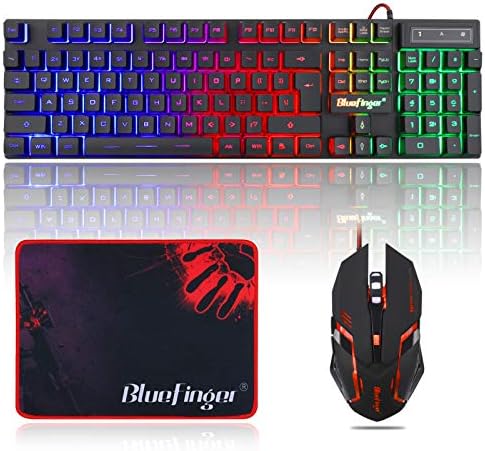
- Best wired set: BlueFinger Wired RGB Combo. Its 104-key keyboard and included mouse pad suit a corded setup.
Quick Answer
Pick the ULSOU set for the largest stated batteries and a full-size layout with four DPI settings. Pick the RedThunder K10 Pro when you want a 3000 mAh keyboard battery, an 800 mAh mouse battery, and a 10,000,000-keystroke key rating. Pick the CHONCHOW or Snpurdiri 60% set when desk space is tight, and pick the BlueFinger set only when a wired USB connection is acceptable, because it is not wireless.
Comparison Table
| Product | Connection | Keyboard battery | Mouse battery | Backlight | Size and weight | Buy |
|---|---|---|---|---|---|---|
| CHONCHOW 60% Wireless Combo | 2.4G wireless, shared USB adapter | 2000 mAh | 500 mAh | 4 brightness levels, 3 breathing speeds, mouse in 7 colors | 15.75 x 5.31 x 1.77 in; 1.43 lb | View on Amazon |
| RedThunder K10 Pro Wireless Combo | 2.4G wireless | 3000 mAh | 800 mAh | 4 dynamic backlights, 8 static lights, 3 brightness levels, 4 breathing speeds | Size not stated; weight 2.31 lb | View on Amazon |
| Snpurdiri 60% Wireless Combo | 2.4G wireless, one USB receiver | 2000 mAh | not stated | RGB backlit | not stated | View on Amazon |
| ULSOU Full-Size Wireless Combo | 2.4G wireless, one USB receiver | 3150 mAh | 800 mAh | 8 backlight patterns | 17.27 x 5.32 x 1.69 in; weight not stated | View on Amazon |
| BlueFinger Wired RGB Combo | USB wired | not stated | not stated | Rainbow backlight, 4 LED breathing colors on mouse | Mouse pad 11.8 x 9.8 in; keyboard and mouse size not stated | View on Amazon |
Decision Guide
Start with the connection, because it splits this set into four wireless combos and one wired combo. The CHONCHOW, RedThunder, Snpurdiri, and ULSOU sets all connect over 2.4G wireless, and the CHONCHOW, Snpurdiri, and ULSOU sets share a single USB receiver between keyboard and mouse, which leaves one USB port free for something else. The BlueFinger set is the mismatch for the wireless keyword: its keyboard connects by a 61-inch USB braided wire and its mouse by a 59-inch USB braided wire, so it needs two USB ports and a cable path across the desk. If a wire-free desk is the point of the purchase, rule out the BlueFinger set first.
Next, compare battery figures, because they decide how often each set needs charging. The ULSOU set leads on stated capacity with a 3150 mAh keyboard battery and an 800 mAh mouse battery, and the RedThunder K10 Pro follows with a 3000 mAh keyboard battery and an 800 mAh mouse battery. Both the RedThunder and ULSOU listings state 8 hours of continuous use with the light on, so their runtime claims match even though the ULSOU keyboard battery is 150 mAh larger. The CHONCHOW set states a 2000 mAh keyboard battery and a 500 mAh mouse battery, the smallest pair of stated figures here, and it adds an energy-saving sleep mode that wakes on any key press. The Snpurdiri set states a 2000 mAh keyboard battery with more than 44 hours of continuous use after a 2-hour charge by 5V/1A, but it gives no mouse battery figure, so the mouse runtime cannot be compared against the other four.
Then weigh size and layout, because the five sets cover two very different footprints. The ULSOU set is a full-size keyboard here at 17.27 x 5.32 x 1.69 inches, and the BlueFinger set is the only other set with a full 104-key keyboard. The CHONCHOW and Snpurdiri sets both use a 60% layout, with the CHONCHOW set listing 68 keys and the Snpurdiri set described as a mini 60% keyboard, so both suit a desk where a full-size board would crowd out the mouse. The CHONCHOW set is the only one of the two compact sets with stated measurements, at 15.75 x 5.31 x 1.77 inches and 1.43 pounds, while the Snpurdiri listing gives no dimensions or weight, so its footprint cannot be checked against the CHONCHOW set before ordering. The RedThunder listing also gives no dimensions, though it does state a weight of 2.31 pounds, the heaviest stated weight in this set.
Backlight options differ more than the battery figures do. The RedThunder keyboard offers the widest stated range with 4 dynamic backlights, 8 static lights, 3 brightness levels, and 4 breathing speeds, and the listing notes that the letters, logo, gaps, and surroundings all light up. The ULSOU set offers 8 backlight patterns with adjustable lighting speed and lightness for the keyboard and mouse. The CHONCHOW keyboard offers 4 brightness levels and 3 breathing speeds, and its mouse comes in seven colors. The Snpurdiri set is described only as RGB backlit, with no count of modes or brightness levels stated, so its lighting range cannot be compared against the other three wireless sets. The BlueFinger keyboard uses a rainbow backlight that turns on and off with the Scroll Lock key, and its mouse cycles through 4 LED breathing colors automatically.
Mouse control is the last split worth checking. The ULSOU mouse offers 4 DPI settings at 800, 1200, 1600, and 2400, and the current setting shows through the flashing frequency of the indicator. The BlueFinger mouse also offers 4 DPI settings, at 800, 1200, 1600, and 2000, plus a forward key and a DPI key for turning the mouse on and off. The CHONCHOW, RedThunder, and Snpurdiri listings state no DPI figures, so their pointer speed cannot be compared against the ULSOU and BlueFinger mice. The Snpurdiri mouse is the only one described as a vertical-feeling mouse, which sets its shape apart from the other four mice in this set.
1. CHONCHOW 60% Wireless Combo — Best compact 60% set
The CHONCHOW set pairs a 68-key 60% keyboard with a wireless mouse over a shared 2.4G USB adapter, and the listing states an effective wireless distance of 10 meters. Its keyboard carries a 2000 mAh battery and its mouse a 500 mAh battery, both rechargeable, with an energy-saving sleep mode that wakes on any key press. The keyboard offers 4 brightness levels and 3 breathing speeds, while the mouse comes in seven colors. The trade-off is capacity: its 2000 mAh keyboard battery and 500 mAh mouse battery are the smallest stated pair in this set, so it will need charging sooner than the RedThunder or ULSOU sets.
| Spec | From the listing |
|---|---|
| Layout | 60% compact, 68 keys |
| Connection | 2.4G wireless, shared USB adapter |
| Wireless range | 10 meters |
| Keyboard battery | 2000 mAh |
| Mouse battery | 500 mAh |
| Size and weight | 15.75 x 5.31 x 1.77 in; 1.43 lb |
2. RedThunder K10 Pro Wireless Combo — Best battery life
The RedThunder K10 Pro pairs a 3000 mAh keyboard battery with an 800 mAh mouse battery, and the listing states 8 hours of continuous use with the light on. Its keyboard offers 4 dynamic backlights, 8 static lights, 3 brightness levels, and 4 breathing speeds, the widest stated lighting range in this set. The keys carry a 10,000,000-keystroke lifetime rating, and the ABS keycaps use a two-color injection molding process so the letters never fade. The trade-off is missing measurements: the listing states a weight of 2.31 pounds but gives no length, width, or height, so the keyboard footprint cannot be checked before ordering.
| Spec | From the listing |
|---|---|
| Connection | 2.4G wireless |
| Keyboard battery | 3000 mAh |
| Mouse battery | 800 mAh |
| Continuous use with light | 8 hours |
| Keystroke lifetime | 10,000,000 keystrokes |
| Weight | 2.31 pounds |
3. Snpurdiri 60% Wireless Combo — Best small-desk set
The Snpurdiri set pairs a mini 60% keyboard with a pocket-sized mouse in a black-white combination, and both share only one USB receiver stored under the bottom of the keyboard. Its keyboard carries a 2000 mAh battery that charges in 2 hours by 5V/1A and runs for more than 44 hours of continuous use, the longest stated runtime in this set. The mouse has a vertical-feeling shape, the only mouse shape of its kind here, and the keyboard key height follows an ergonomic design. The trade-off is missing figures: the listing gives no dimensions, no weight, and no mouse battery figure, so the mouse runtime and the set footprint cannot be compared against the other four sets.
| Spec | From the listing |
|---|---|
| Layout | 60% compact, mini keyboard |
| Connection | 2.4G wireless, one USB receiver |
| Keyboard battery | 2000 mAh |
| Charge time | 2 hours by 5V/1A |
| Continuous use | More than 44 hours |
| Dimensions and weight | The listing does not state it |
4. ULSOU Full-Size Wireless Combo — Best full-size set
The ULSOU set is a full-size keyboard in this group, and it carries the largest stated batteries here with a 3150 mAh keyboard battery and an 800 mAh mouse battery. The listing states 8 hours of continuous use with the light on, the same runtime figure as the RedThunder set, and the keyboard offers 8 backlight patterns with adjustable lighting speed and lightness. Its mouse offers 4 DPI settings at 800, 1200, 1600, and 2400, and the current setting shows through the flashing frequency of the indicator. The trade-off is weight: the listing gives the keyboard size at 17.27 x 5.32 x 1.69 inches but states no weight, so the set cannot be compared on heft against the CHONCHOW or RedThunder sets.
| Spec | From the listing |
|---|---|
| Layout | Full size |
| Connection | 2.4G wireless, one USB receiver |
| Keyboard battery | 3150 mAh |
| Mouse battery | 800 mAh |
| Continuous use with light | 8 hours |
| Backlight | 8 backlight patterns |
5. BlueFinger Wired RGB Combo — Best wired set
This BlueFinger set is a mismatch for the wireless keyword, and that comes first: it connects by USB wire, not wirelessly, with a 61-inch braided wire on the keyboard and a 59-inch braided wire on the mouse. Its 104-key keyboard carries a rainbow backlight that turns on and off with the Scroll Lock key, and the keyboard has a built-in steel plate with 19 non-conflict keys. The mouse offers 4 DPI settings at 800, 1200, 1600, and 2000, plus a forward key and a DPI key, and the set includes a mouse pad measuring 11.8 x 9.8 inches. The trade-off is the cord itself: two USB wires and two occupied USB ports replace the single shared receiver of the wireless sets, so this set suits a desk where wires are acceptable and a mouse pad is wanted in the box, and skip it if a wire-free desk is the goal, because this set has no wireless connection at all.
| Spec | From the listing |
|---|---|
| Layout | 104 keys |
| Connection | USB wired |
| Keyboard wire | 61-inch braided wire |
| Mouse wire | 59-inch braided wire |
| Mouse DPI | 800, 1200, 1600, 2000 |
| Mouse pad | 11.8 x 9.8 in |
Buying Checklist
- Measure the desk first, and compare the stated sizes: 17.27 inches long for the ULSOU set against 15.75 inches for the CHONCHOW set, with no dimensions stated for the RedThunder or Snpurdiri sets.
- Check the connection type before ordering: three sets share a 2.4G wireless receiver, while the BlueFinger set needs two USB ports for its wired keyboard and mouse, and the RedThunder listing states 2.4G wireless without naming a shared receiver.
- Compare the stated battery figures: 3150 mAh and 3000 mAh keyboard batteries on the ULSOU and RedThunder sets against 2000 mAh on the CHONCHOW and Snpurdiri sets.
- Check the mouse controls: only the ULSOU and BlueFinger mice state DPI settings, so confirm pointer speed on the product page for the other three.
- Confirm the return window on the product page before ordering, and compare two or three finalists side by side on battery, size, and backlight range.
FAQ
How do I choose a wireless gaming keyboard and mouse combo?
Start with the connection and the layout. Three sets here connect over 2.4G wireless with a shared USB receiver, while the BlueFinger set is wired, so rule it out when a cable-free desk matters; the RedThunder set also connects over 2.4G wireless, though its listing names no shared receiver. Then pick a 60% layout when desk space is tight or a full-size layout when a number row and full key set matter, and compare the stated battery figures before choosing.
Which combo has the longest stated battery life?
The Snpurdiri keyboard states more than 44 hours of continuous use after a 2-hour charge, the longest stated runtime in this set, though its mouse battery figure is not stated. The ULSOU set states the largest battery capacities at 3150 mAh for the keyboard and 800 mAh for the mouse, and both the ULSOU and RedThunder sets state 8 hours of continuous use with the light on.
What should I check on the product page before ordering?
Check the dimensions and weight, since the RedThunder listing states no dimensions and the Snpurdiri listing states no dimensions, weight, or mouse battery figure. Check the DPI settings as well, because only the ULSOU and BlueFinger mice state them. Confirm the connection type too, since the BlueFinger set is wired while the other four are wireless.
Final Verdict
For most gamers who want a wireless set, the ULSOU full-size combo is the pick, with the largest stated batteries and four DPI settings on the mouse. The RedThunder K10 Pro is the pick for lighting range and a 10,000,000-keystroke key rating, while the Snpurdiri set is the pick for the longest stated keyboard runtime at more than 44 hours. The CHONCHOW set suits the smallest desk among the wireless options with stated measurements, and the BlueFinger set suits only a corded desk, since it is wired rather than wireless.
Prime covers fast, free delivery on eligible items. See whether a Prime free trial is available for your account.
Check Prime on Amazon →Types of Keyboard and Mouse Combos
Keyboard and mouse combos are grouped mainly by connection type and by switch technology. Wireless combos use a single USB receiver or Bluetooth for both devices, reducing desk clutter. Mechanical combos pair physical keyboard switches with a matching mouse, less common than standard membrane combo sets.
A shared wireless receiver for both devices means losing that one receiver affects both the keyboard and mouse at once, which is worth checking against combos that instead pair each device separately.
Frequently Asked Questions
Does a wireless combo use one receiver for both devices?
Many do, which simplifies setup but means losing that single receiver disables both the keyboard and mouse together, unlike combos that pair each device independently.
Are mechanical keyboard and mouse combos common?
Less common than membrane combos -- most combo sets use membrane keys for cost and simplicity, so a mechanical combo is a smaller, more specific category.
Related Guides
- Best Keyboard and Mouse Combo Mechanical
- Best Keyboard and Mouse Set for Gaming
- Best Kensington Wireless Mouse
- Best Keyboard with Switches










Write Your Review
No reviews yet. Be the first to share your experience!