
If you run two external monitors from a laptop, start with the Anker PowerExpand, an 8-in-1 hub with dual HDMI, and move to the Dell Pro Dock WD25 only for up to four displays. The other three trade on port count, video outputs, or dual 4K at 60Hz, so the pick depends on your screens and system.
One limit shapes every choice here. Anker, Selore, HODO, and UANTIN all state that on macOS both external monitors show the same image, mirror only, while Windows supports an extended dual-monitor setup. Check your operating system first, then match the outputs, power, and ports to your monitors.
As an Amazon Associate, we earn from qualifying purchases.



Pick by Your Need
- Best overall: Anker PowerExpand 8-in-1. Two HDMI ports, 85W charging, 1Gbps Ethernet, 0.2 pounds.
- Best for four displays: Dell Pro Dock WD25. Up to four displays, up to 100W.
- Best for dual 4K at 60Hz: Selore 8-in-1. Both HDMI ports at 4K and 60Hz, 85W output.
- Best for most video outputs: HODO 8-in-1. Four video outputs: 2 HDMI, DisplayPort, VGA.
- Best for most ports: UANTIN 10-in-1. Ten ports: 2 USB-C, 3 USB-A.
Quick Answer
Pick the Anker PowerExpand, a dual-HDMI hub with 85W charging and wired networking for a Windows laptop. Pick the Selore if both monitors run at 4K and 60Hz, the only hub stating that rate on both ports. Pick the Dell for up to four displays, and the HODO for VGA.
Comparison Table
| Dock | Video outputs | HDMI resolution | Max power | Size (inches) | Weight | Buy |
|---|---|---|---|---|---|---|
| Anker PowerExpand 8-in-1 | 2 HDMI | 4K@60Hz / 4K@30Hz | 85W | 4.65×2.01×0.69 | 0.2 lb | View on Amazon |
| Dell Pro Dock WD25 | DP + HDMI, 4 max | not stated | 100W | 8.07×3.54×1.39 | 1.21 lb | View on Amazon |
| Selore 8-in-1 | 2 HDMI | 4K@60Hz both | 85W/100W | 5.0×0.7×0.13 | 0.22 lb | View on Amazon |
| HODO 8-in-1 | 2 HDMI, DP, VGA | 4K@60Hz, 4K@30Hz | 87W/100W | not stated | 0.29 lb | View on Amazon |
| UANTIN 10-in-1 | 2 HDMI | 4K@30Hz both | 85W/100W | not stated | not stated | View on Amazon |
Decision Guide
Start with the operating system: it decides whether dual monitors extend or mirror. On Windows, Anker, Selore, HODO, and UANTIN all support an extended setup, so a Windows laptop gets two independent screens. On macOS, those same four docks mirror the same image on both monitors, while the Dell gives no macOS statement, so check the product page before choosing it for a Mac desk.
The Selore is the only pick that states 4K at 60Hz on both HDMI ports. The Anker and HODO each run one HDMI port at 4K and 60Hz and the other at 4K and 30Hz, while the UANTIN caps both at 4K and 30Hz. The Dell gives no HDMI resolution figure, so confirm that number on the product page first.
Then weigh the video outputs against your monitors. The HODO is the only dock here with four video outputs, and its VGA port covers an older monitor, but connecting VGA limits every display to 1080p. The Anker, Selore, and UANTIN use two HDMI ports only, for desks where both monitors accept HDMI.
Power is the next split. The Dell states up to 100W to the laptop, the highest here, while the HODO outputs up to 87W from a 100W input, and the Anker, Selore, and UANTIN each deliver up to 85W. The Anker needs a 100W charger and cable, neither included; the Selore ships without a charger and cable, and the HODO needs at least a 65W adapter, not included.
Finally, count the USB and card ports against the accessories on your desk. The UANTIN leads with 10 ports: 2 USB-C data ports, 3 USB-A ports, and SD and microSD slots. The Anker and Selore each offer 8 ports, the Anker with 1Gbps Ethernet, the Selore with a card reader up to 104 Mbps. The HODO has only 3 USB 2.0 ports at 480Mbps, for a keyboard and mouse, not fast storage.
1. Anker PowerExpand 8-in-1 Dual HDMI Dock — Best overall
This hub covers the common dual-monitor desk: two HDMI ports, 85W pass-through charging, a 1Gbps Ethernet port, and a microSD and SD card reader, in a gray body measuring 4.65 by 2.01 by 0.69 inches and weighing 0.2 pounds. One display runs at 4K and 60Hz; two run at 4K and 30Hz. The trade-off is the charger: it needs a 100W wall charger and a USB-C to USB-C cable, and neither is included.
| Spec | From the listing |
|---|---|
| HDMI resolution | 4K@60Hz / 4K@30Hz |
| Power delivery | Up to 85W |
| Dimensions | 4.65×2.01×0.69 inches |
| Weight | 0.2 pounds |
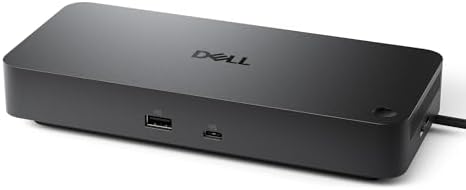
2. Dell Pro Dock WD25 Quad Display Dock — Best for four displays
This dock is the only pick here that supports up to four displays, and it delivers up to 100W of power to the laptop, the highest figure in this group. Its 8.07×3.54×1.39 inch body weighs 1.21 pounds, the largest here, and the heaviest stated weight, with an ambidextrous USB-C cable that routes left or right. Skip it if you need a stated HDMI resolution, because no HDMI resolution figure is given, so verify that number on the product page first.
| Spec | From the listing |
|---|---|
| Power delivery | Up to 100W |
| HDMI resolution | The listing does not state it |
| Dimensions | 8.07×3.54×1.39 inches |
| Weight | 1.21 pounds |
3. Selore 8-in-1 Dual 4K HDMI Dock — Best for dual 4K at 60Hz
This dock is the only one here that runs both HDMI ports at 4K and 60Hz, the pick for two 4K monitors that both need the higher refresh rate. It takes 100W in and passes up to 85W to the laptop, with a USB-C port and 2 USB-A 3.0 ports at up to 5Gbps. The trade-off: Windows gets an extended dual display, macOS mirrors both monitors, and the charger and cable are not included.
| Spec | From the listing |
|---|---|
| Video outputs | 2 HDMI ports |
| HDMI resolution | 4K@60Hz on both ports |
| Power delivery | 100W input, 85W output |
| USB data ports | 1 USB-C, 2 USB-A 3.0, 5Gbps |
| Dimensions | 5.0×0.7×0.13 inches |
| Weight | 0.22 pounds |
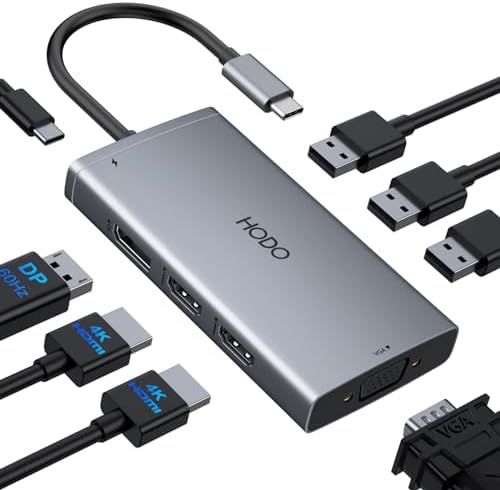
4. HODO 8-in-1 Quad Display USB-C Dock — Best for most video outputs
This dock offers four video outputs: 2 HDMI ports, 1 DisplayPort, and 1 VGA port. One HDMI port runs at 4K and 60Hz, the other at 4K and 30Hz; the DisplayPort runs at 4K and 60Hz, and VGA runs at 1080p. The catch: connecting VGA caps every display at 1080p, and all four outputs together also run at 1080p at 60Hz. Skip it if you need fast USB storage, because its 3 USB 2.0 ports top out at 480Mbps.
| Spec | From the listing |
|---|---|
| Video outputs | 2 HDMI, 1 DisplayPort, 1 VGA |
| HDMI resolution | 4K@60Hz, 4K@30Hz |
| DisplayPort resolution | 4K@60Hz |
| Power delivery | 100W input, 87W output |
| USB ports | 3 USB 2.0 at up to 480Mbps |
5. UANTIN 10-in-1 Dual HDMI Dock — Best for most ports
This dock packs the most ports in the group, 10 in total: dual HDMI, 2 USB-C data ports, 3 USB-A ports, and SD and microSD slots, on a 30 cm, or 0.98 ft, nylon braided cable. It takes up to 100W in and delivers up to 85W to the laptop, reserving about 15W for itself. The trade-off is resolution: both HDMI ports top out at 4K and 30Hz, so two 4K monitors at 60Hz need the Selore instead, and macOS mirrors both monitors.
| Spec | From the listing |
|---|---|
| Video outputs | 2 HDMI ports |
| HDMI resolution | 4K@30Hz on both ports |
| Power delivery | 100W input, 85W output |
| USB data ports | 2 USB-C, 1 USB-A 3.0 at 5Gbps; 2 USB-A 2.0 |
| Cable length | 30 cm, or 0.98 ft |
Buying Checklist
- Confirm a full-featured USB-C port with DisplayPort Alt Mode and power delivery; a data-only port will not carry video.
- Check whether your system extends or mirrors dual monitors; four of these five docks mirror on macOS.
- Match the stated power delivery to your laptop, and check whether the charger and cable are included.
- Compare each port’s HDMI resolution with your monitors; the HODO drops to 1080p when VGA is connected.
- Check the return window on the product page, and compare finalists side by side before choosing.
FAQ
Can I extend two different screens on a Mac with these docks?
No, not with the four docks that state macOS behavior. Anker, Selore, HODO, and UANTIN all state that on macOS both external monitors show the same image, so a Mac user gets a mirrored pair, not two independent screens. Windows laptops get an extended display on all four.
Which dock runs two 4K monitors at 60Hz?
The Selore 8-in-1 is the only pick that states 4K at 60Hz on both HDMI ports. The Anker and HODO each offer 4K at 60Hz on one HDMI port and 30Hz on the other, while the UANTIN caps both at 4K and 30Hz. The Dell gives no HDMI resolution figure, so its 4K rate is unconfirmed.
What should I check about power delivery before choosing?
Check input and output watts separately, because several docks take 100W in and pass less to the laptop. The Anker, Selore, and UANTIN each deliver up to 85W, the HODO up to 87W, and the Dell up to 100W. Also check whether a charger and cable are included; the Anker, Selore, and HODO all need one not included.
Final Verdict
The Anker PowerExpand is the pick for most dual-monitor desks, with two HDMI ports, 85W charging, wired networking, and a 0.2-pound body. The Selore leads when both monitors are 4K at 60Hz, the Dell is the only route to four displays, and the HODO is the only option with VGA. The UANTIN suits a desk full of accessories: 10 ports, dual HDMI at 4K and 30Hz. Confirm the macOS behavior, HDMI resolution, and charger situation first.
Prime covers fast, free delivery on eligible items. See whether a Prime free trial is available for your account.
Check Prime on Amazon →Types of Computer Monitors
Monitors outside gaming-specific models are grouped mainly by resolution and by panel size. 1080p and 1440p monitors cover most general and productivity use. 4K monitors show more detail but need more GPU power to drive at full resolution for demanding tasks.
Panel type (IPS, VA, OLED) affects color accuracy and viewing angle even for non-gaming use, which matters for tasks like photo editing or general color-sensitive work as much as for competitive gaming.
Frequently Asked Questions
What resolution is a reasonable default for general desk use?
1440p is a common middle ground, offering more detail than 1080p without the GPU demands or price premium of a 4K panel at typical desk viewing distances.
Does monitor panel type matter outside of gaming?
Yes -- color accuracy and viewing angle differences between IPS, VA, and OLED panels affect everyday tasks like photo editing or video watching, not just competitive gaming responsiveness.
Related Guides
 Best 4K Monitor With KVM: 5 Picks for Two-PC DesksCompare five 4K monitor with KVM options by panel, refresh rate, ports and switching,…Read next →Best Thread Border Router Hub: 5 Hubs Compared Side by SideCompare five Thread border router hubs for Matter and Zigbee homes, from a 20-device…Read next →
Product and ASIN Reference
| Product | ASIN |
|---|---|
| Anker PowerExpand 8-in-1 USB C Hub | B0874M3KW4 |
| Dell Pro Dock WD25 | B0FCSHJGGK |
| Selore USB C Docking Station | B0BTD871Y3 |
| HODO USB C Docking Station | B0CRDJRZP6 |
| UANTIN USB C Docking Station | B0GX4MGD9X |










Write Your Review
No reviews yet. Be the first to share your experience!