
Shoppers who need to read both old IDE drives and newer SATA drives should consider the Unitek, VoroDcip and FIDECO adapters first, while shoppers needing only SATA drives should consider the SABRENT docking station and the EYOOLD cable adapter. All five state USB 3.0 host connections, but only one states a USB-C adapter.
That split matters more than the shared USB 3.0 label, so the sections below separate IDE-capable adapters from SATA-only ones and flag each listing’s stated limits.
As an Amazon Associate, we earn from qualifying purchases.



Pick by Your Need
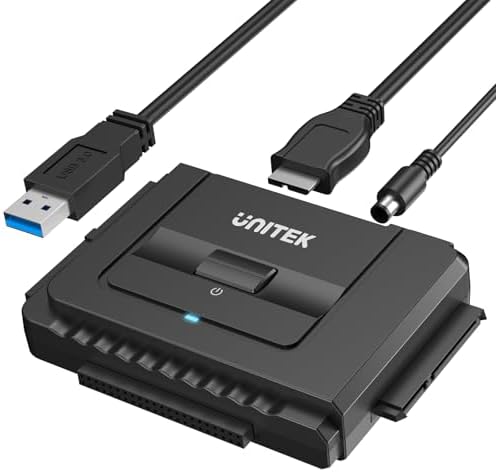
- Best dual-drive IDE and SATA option: Unitek Adapter. It supports one IDE and one SATA drive at the same time, with SATA III at up to 6Gbps.
- Best SATA-only docking station: SABRENT Docking Station. It works with 2.5-inch and 3.5-inch SATA drives only, with UASP support stated.
- Best for USB-C and large stated capacity: VoroDcip Adapter. It includes a USB-C to USB adapter and states drives up to 20TB.
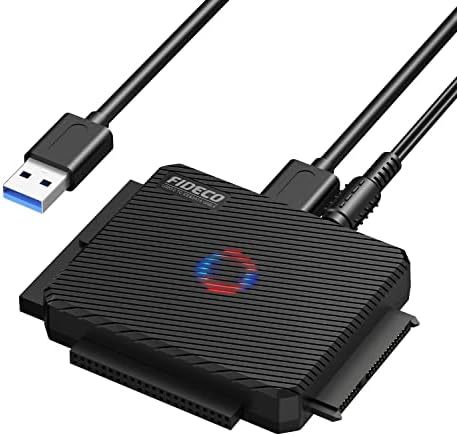
- Best for three drives at once: FIDECO Adapter. It states three hard drives simultaneously, across IDE and SATA.
- Best SATA-only cable adapter with stated console compatibility: EYOOLD Adapter. It states PS4 and Xbox compatibility, and SATA drives up to 6TB.
Quick Answer
The Unitek adapter leads for mixed old and new drives, with stated simultaneous IDE and SATA use and SATA III at up to 6Gbps. The VoroDcip and FIDECO adapters also state IDE support, while the SABRENT and EYOOLD adapters state SATA only and fit buyers with no IDE drive to read.
Comparison Table
| Product | Best for | Key stated figure | Trade-off | Buy |
|---|---|---|---|---|
| Unitek Adapter | One IDE and one SATA drive at once | SATA III up to 6Gbps | 12V/2A adapter must always be connected | View on Amazon |
| SABRENT Docking Station | A SATA-only dock | Typical HDD speeds of 100-160 MB/s | SATA only; no IDE, M.2 NVMe or SAS support stated | View on Amazon |
| VoroDcip Adapter | USB-C hosts, drives up to 20TB | SATA up to 5Gbps; IDE up to 133Mbps | IDE stated at 133Mbps, far below SATA | View on Amazon |
| FIDECO Adapter | Three drives at the same time | USB 3.0 up to 5Gbps | No weight and no maximum capacity stated | View on Amazon |
| EYOOLD Adapter | SATA drives on a computer or console | Up to 5Gbps with UASP | SATA only, stated maximum 6TB | View on Amazon |
How We Choose
We compared only the figures stated in the five listings, ranking the adapters by drive interfaces, drives used at once, the stated transfer figure for each interface, host connection, stated power requirement, and stated maximum capacity.
- We used only stated figures, treating a figure for one interface as applying to that interface.
- We ranked drive support first, because an adapter stating no IDE support cannot read an IDE drive.
- We flagged any figure stated two ways as not settled, and treated a missing figure as a limit.
- We compared stated power requirements directly, because a 3.5-inch drive needing a wall adapter behaves differently.
- We used no unstated claim, and did not treat a missing figure as evidence of a feature.
Decision Guide
If you need to read an IDE drive, choose the Unitek, the VoroDcip or the FIDECO. The Unitek states one IDE drive and one SATA drive at the same time, the VoroDcip states 2.5-inch and 3.5-inch SATA and IDE drives, and the FIDECO states three drives at once: one 2.5-inch IDE, one 3.5-inch IDE and one SATA drive. The SABRENT listing states SATA only and no IDE or PATA support, while the EYOOLD listing states SATA only.
If you need the highest stated SATA figure, choose the Unitek, at up to 6Gbps through SATA III. The VoroDcip, FIDECO and EYOOLD listings state up to 5Gbps, while the SABRENT listing states typical mechanical hard drive speeds of 100-160 MB/s, described as the drive’s own limit. For a USB-C host, choose the VoroDcip, the only listing stating a USB-C to USB adapter in the box.
For the largest stated maximum capacity, choose the VoroDcip, which states drives up to 20TB, against the EYOOLD, which states up to 6TB. The other three listings state no maximum capacity. For a 3.5-inch drive, check power first: the Unitek and SABRENT listings state a 12V/2A adapter is included and needed, and the FIDECO listing states a 4-pin power cable is needed for a 3.5-inch IDE drive.
1. Unitek Adapter — Best dual-drive IDE and SATA option
This adapter states support for connecting one IDE drive and one SATA drive at the same time, covering 2.5-inch and 3.5-inch IDE hard drives, 2.5-inch and 3.5-inch SATA hard drives and SSDs, and optical drives. It states transfer rates up to 6Gbps through SATA III, with USB 3.0 backward compatible with USB 2.0 and 1.1, and it states that the computer needs a USB-A port. The included 12V/2A power adapter is described as essential for stable performance, especially with two drives at once. It also states plug-and-play use with no driver installation, hot-swapping, an On/Off switch and an LED indicator; skip it if your computer has only USB-C ports.
| Spec | From the listing |
|---|---|
| Drive support | One IDE and one SATA at once; both sizes, IDE and SATA |
| Interface | SATA III up to 6Gbps; USB 3.0, 2.0 and 1.1 compatible |
| Power | Included 12V/2A adapter, essential for stable performance |
| Design | Plug-and-play, hot-swapping, On/Off switch, LED indicator |
| Size and weight | 3.8 x 2.7 x 0.63 in; 0.45 lb |
2. SABRENT Docking Station — Best SATA-only docking station
This docking station states support for SATA I, II and III hard drives and SSDs in both sizes, and no support for IDE or PATA, M.2 NVMe, M.2 SATA, SAS, or drives already in a USB enclosure. It states USB 3.0 with UASP support, UASP-capable host required, and typical mechanical hard drive speeds of 100-160 MB/s, described as the drive’s own limit. The host cable ends in USB Type-A, and a USB-C to USB-A adapter is not included. A 12V/2A adapter is included and a wall outlet is needed, because 3.5-inch drives cannot run on USB power alone; skip it if you need an IDE drive.
| Spec | From the listing |
|---|---|
| Drive support | SATA I, II and III HDDs and SSDs, both sizes |
| Not supported | IDE/PATA, M.2 NVMe, M.2 SATA, SAS, enclosed drives |
| Host connection | USB Type-A cable; USB-C adapter not included |
| Speed | USB 3.0 with UASP; typical HDD 100-160 MB/s |
| Power and size | Included 12V/2A adapter, wall outlet needed; 7.09 x 4.8 x 1.6 in; 0.47 lb |
3. VoroDcip Adapter — Best for USB-C and large stated capacity
This adapter states support for 2.5-inch and 3.5-inch SATA hard drives and SSDs, 2.5-inch and 3.5-inch IDE drives, and SATA or IDE internal Blu-ray drives, for retrieving old files, backup, cloning and data recovery. It includes a USB-C to USB adapter, supporting USB and USB-C port devices, and it states maximum rates of 5Gbps for SATA and 133Mbps for IDE. It states plug-and-play use with no additional drivers, an On/Off power switch, and support for drives up to 20TB, the largest stated maximum here. At 0.55 pounds, it states the heaviest weight among the three listings that state a weight; skip it if you need fast IDE transfers.
| Spec | From the listing |
|---|---|
| Drive support | SATA and IDE, both sizes; Blu-ray drive |
| Host connection | USB 3.0, USB-C to USB adapter included |
| Speed | SATA up to 5Gbps; IDE up to 133Mbps |
| Capacity | Supports drives up to 20TB |
| Size and weight | 6.0 x 4.5 x 2.0 in; 0.55 lb |
4. FIDECO Adapter — Best for three drives at once
This adapter states compatibility with 2.5-inch and 3.5-inch SATA and IDE hard drives, and support for three hard drives simultaneously: one 2.5-inch IDE drive, one 3.5-inch IDE drive, and one SATA drive. It states compatibility with Windows, Mac OS and Linux, plug-and-play, no driver needed. It states a USB 3.0 port with speeds up to 5Gbps, backward compatible with USB 2.0 and 1.1. Set-up is inserting the drive, connecting power and USB, and pressing the power switch, with a 4-pin cable needed for a 3.5-inch IDE drive; skip it if you need a stated weight or maximum capacity, since neither is stated.
| Spec | From the listing |
|---|---|
| Drive support | SATA/IDE hard drives, both sizes; three drives at once |
| Systems | Windows, Mac OS, Linux; plug-and-play, no driver needed |
| Speed | USB 3.0 up to 5Gbps, USB 2.0 and 1.1 compatible |
| Power | Power adapter and USB cable; 4-pin cable for 3.5-inch IDE HDD |
| Size | 2.3 x 0.43 x 1.44 in; Black |
5. EYOOLD Adapter — Best SATA-only cable adapter with stated
This cable adapter states quick access to 2.5-inch and 3.5-inch SATA SSDs and hard drives, for copying an internal drive to a new SSD without installing it in an enclosure. It states SuperSpeed up to 5Gbps with UASP support, described as 70% faster than traditional USB 3.0, and backward compatibility with USB 2.0 and 1.1. It states plug-and-play operation with no drivers needed and hot-swap support. It states compatibility with PS4, Xbox, Windows 10, 8.1, 8, 7, Vista and XP, and Mac OS, and support for SATA drives up to 6TB maximum; skip it if you need an IDE drive, since the listing states SATA only.
| Spec | From the listing |
|---|---|
| Drive support | SATA SSD and HDD, both sizes |
| Speed | Up to 5Gbps with UASP, USB 2.0 and 1.1 compatible |
| Operation | Plug-and-play, no drivers needed, hot-swap supported |
| Compatibility | PS4, Xbox, Windows 10/8.1/8/7/Vista/XP, Mac OS |
| Capacity and size | Up to 6TB max; 9.0 in long; 12V adapter included |
Shopping Checklist
Check the product page for current details before ordering. Then work through these steps:
- Confirm the adapter states support for your drive interface and size, SATA or IDE, 2.5-inch or 3.5-inch.
- Check how many drives the listing states can be used at once, and whether that covers IDE, SATA, or both.
- Compare the stated transfer figure for each interface; a SATA figure does not apply to IDE.
- Check the host connection stated, USB-A or USB-C, against the ports on your computer.
- Check the stated power requirement, including whether a 12V/2A adapter is included and a wall outlet is needed.
- Check the stated maximum capacity, included items, and return window on the product page.
FAQ
Does every adapter here support IDE drives?
No. Three listings state IDE support: the Unitek, the VoroDcip and the FIDECO. The SABRENT listing states SATA drives only and no IDE or PATA support, and the EYOOLD listing states SATA support only, with no IDE support stated.
Which adapter states the highest transfer figure, and for which interface?
The Unitek states the highest SATA figure here, at up to 6Gbps through SATA III. The VoroDcip, FIDECO and EYOOLD listings each state up to 5Gbps, while the SABRENT listing states typical mechanical hard drive speeds of 100-160 MB/s. The VoroDcip states 5Gbps for SATA and 133Mbps for IDE.
Which adapter should I choose if my computer has only USB-C ports?
Choose the VoroDcip, the only one of the five that states a USB-C to USB adapter in the box and support for USB and USB-C port devices. The SABRENT listing states its host cable ends in USB Type-A and that a USB-C to USB-A adapter is not included.
Final Verdict
For a hard drive adapter buyer who needs to read both old IDE drives and newer SATA drives, the Unitek leads with stated simultaneous IDE and SATA use and SATA III at up to 6Gbps, while the VoroDcip suits buyers needing a USB-C adapter and a stated 20TB maximum, and the FIDECO suits buyers needing three drives at once. The SABRENT suits buyers needing a SATA-only dock, and the EYOOLD suits buyers needing a SATA-only cable adapter with stated console compatibility.
Prime covers fast, free delivery on eligible items. See whether a Prime free trial is available for your account.
Check Prime on Amazon →Related Guides
- Best Hard Drive Enclosure for Plex
- Best Hard Drive for NAS Drive
- Best Hard Drive NVMe
- Best HDMI Adapter for USB-C Laptop
Product and ASIN Reference
| Product | ASIN | Buy |
|---|---|---|
| Unitek Adapter | B00EHDTRJ6 | View on Amazon |
| SABRENT Docking Station | B00LS5NFQ2 | View on Amazon |
| VoroDcip Adapter | B0DRHVTPB4 | View on Amazon |
| FIDECO Adapter | B077N2KK27 | View on Amazon |
| EYOOLD Adapter | B08HQQNSZN | View on Amazon |


Write Your Review
No reviews yet. Be the first to share your experience!