
If you need the most capacity in one desktop drive, start with the 26TB WD Elements; if you need a drive recognized by both Windows and Mac computers on setup, look at the two Seagate Expansion models; and if 16TB covers your archive, the 16TB WD Elements is the smallest capacity here. All five are desktop external hard drives for storage, so the choice comes down to stated capacity, dimensions and weight, USB wording, and platform setup.
We compared only the supplied listing details. Capacities run from 16TB to 26TB and stated weights from 1.24 pounds to 2.95 pounds. The listings differ on Mac setup: WD listings describe reformatting for Mac use or list Windows compatibility, while Seagate listings describe recognition of Windows and Mac computers, with reformatting required for Time Machine.
As an Amazon Associate, we earn from qualifying purchases.



Pick by Your Need
- Best overall: WD 20TB Elements Desktop. A middle capacity with the same stated footprint as the 16TB WD model.
- Largest capacity: WD 26TB Elements Desktop. It states 26TB, the highest capacity here.
- Best for Windows and Mac setup: Seagate Expansion 24TB. Its listing states recognition of Windows and Mac computers.
- Smallest capacity: WD 16TB Elements Desktop. It states 16TB and the lowest stated weight, at 1.24 pounds.
- Best for a stated recovery service: Seagate Expansion 20TB. Its name includes Rescue Data Recovery Services.
Quick Answer
The WD 20TB Elements is the middle option, with 20TB, a 5.31 by 1.89 by 6.53 inch stated size, and plug-and-play wording for Windows PCs. For more room, the Seagate Expansion 24TB and WD 26TB Elements state the two largest capacities. For platform setup, the Seagate listings state recognition of Windows and Mac computers, while WD listings state reformatting steps or Windows-focused compatibility.
Comparison Table
| Product | Best for | One key stated figure | One trade-off | Buy |
|---|---|---|---|---|
| WD 20TB Elements Desktop | Middle capacity with a shared WD footprint | 20TB capacity | Listing states reformatting is required for use with MacOS | View on Amazon |
| Seagate Expansion 24TB | Large capacity plus Windows and Mac recognition | 24TB capacity | Heaviest stated weight in this group, at 2.95 pounds | View on Amazon |
| WD 16TB Elements Desktop | Lowest capacity and lowest stated weight | 16TB capacity | Smallest capacity among the five listings | View on Amazon |
| WD 26TB Elements Desktop | Largest stated capacity | 26TB capacity | Largest stated dimensions in this group, at 14.88 by 9.25 by 8.5 inches | View on Amazon |
| Seagate Expansion 20TB | 20TB capacity plus a named recovery service | 20TB capacity | Listing states reformatting is required for use with Time Machine | View on Amazon |
Decision Guide
If you need the largest single-drive archive, choose the WD 26TB Elements Desktop, because its listing states 26TB, 2TB more than the Seagate Expansion 24TB and 10TB more than the WD 16TB Elements. Check the product page for current details before ordering. That capacity comes with the largest stated size here, 14.88 inches by 9.25 inches by 8.5 inches, so measure your space first; the other four all state lengths between 5.31 inches and 7.04 inches.
If you need a drive for a Windows PC, choose a WD Elements model, because the listings state plug-and-play ready for Windows PCs or plug-and-play expandability. The WD 20TB and WD 16TB models share stated dimensions of 5.31 inches by 1.89 inches by 6.53 inches, so between them the differences are capacity, 20TB against 16TB, and weight, 1.98 pounds against 1.24 pounds.
If you need a drive a listing describes as recognized by both Windows and Mac computers, choose a Seagate Expansion model, because both Seagate listings state that recognition. The 24TB model states a length of 7.04 inches and a weight of 2.95 pounds; the 20TB model states 6.93 inches and 2.59 pounds. Both also state reformatting is required for use with Time Machine.
If you need the lightest stated drive, choose the WD 16TB Elements at 1.24 pounds, below the 1.98 pounds stated for both larger WD models and the 2.59 and 2.95 pounds stated for the Seagate models. If the named Rescue Data Recovery Services matter, narrow the choice to the two Seagate models, named only in their product names; the listings state no terms or coverage for it.
1. WD 20TB Elements Desktop External Hard Drive — Best overall
This WD model sits in the middle on capacity, with 20TB stated, 4TB more than the WD 16TB model and 6TB less than the WD 26TB model. Its listing states dimensions of 5.31 inches by 1.89 inches by 6.53 inches, a weight of 1.98 pounds, and plug-and-play ready for Windows PCs over USB 3.0. Its platform note is narrower than the Seagate notes: the listing states compatibility with Windows 10 plus and reformatting required for use with MacOS.
| Spec | From the listing |
|---|---|
| Capacity | 20TB |
| Color | Black |
| Length | 5.31 inches |
| Width | 1.89 inches |
| Height | 6.53 inches |
| Weight | 1.98 pounds |
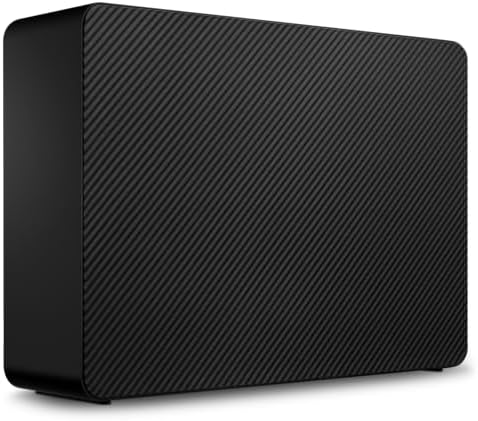
2. Seagate Expansion 24TB External Hard Drive — Best for large archives
This Seagate model states 24TB, the second-largest capacity here, behind only the 26TB WD model. Its listing states dimensions of 7.04 inches by 1.65 inches by 4.92 inches and a weight of 2.95 pounds, the heaviest stated weight among the five. The listing describes setup as plugging in the power adapter and USB cable, states drag-and-drop file saving right out of the box, and states automatic recognition of Windows and Mac computers, with the interface listed as USB 3.3 in the listing facts.
| Spec | From the listing |
|---|---|
| Capacity | 24TB |
| Color | DESKTOP |
| Length | 7.04 inches |
| Width | 1.65 inches |
| Height | 4.92 inches |
| Weight | 2.95 pounds |
3. WD 16TB Elements Desktop External Hard Drive — Best for a smaller archive
This WD model states 16TB, the smallest capacity here, and 1.24 pounds, the lowest stated weight among the five. Its stated dimensions are 5.31 inches by 1.89 inches by 6.53 inches, identical to those stated for the WD 20TB model, so the two differ by 4TB of capacity and 0.74 pounds of weight, not by stated footprint. The listing states fast data transfers and plug-and-play ready for Windows PCs over USB 3.0, and lists the specific use as Personal.
Skip it if your archive needs more than 16TB, because the other four state 20TB, 24TB, or 26TB.
| Spec | From the listing |
|---|---|
| Capacity | 16TB |
| Color | Black |
| Length | 5.31 inches |
| Width | 1.89 inches |
| Height | 6.53 inches |
| Weight | 1.24 pounds |
4. WD 26TB Elements Desktop External Hard Drive — Best largest capacity
This WD model states 26TB, the largest capacity here, and its listing describes storing up to 26TB for archiving photos, videos, music, and important and historical documents. Its stated dimensions are 14.88 inches by 9.25 inches by 8.5 inches, far larger than those stated for the other four, while its stated weight is 1.98 pounds, the same as the WD 20TB model. The listing states plug-and-play expandability, names the interface as SuperSpeed USB 3.2 Gen 1/USB 3.0 at 5Gbps, and notes actual user capacity may be less depending on operating environment.
Skip it if your space cannot fit the stated 14.88 by 9.25 by 8.5 inch size, because the other four state lengths up to 7.04 inches.
| Spec | From the listing |
|---|---|
| Capacity | 26TB |
| Color | Black |
| Length | 14.88 inches |
| Width | 9.25 inches |
| Height | 8.5 inches |
| Weight | 1.98 pounds |
5. Seagate Expansion 20TB External Hard Drive — Best with a named recovery service
This Seagate model states 20TB, matching the WD 20TB Elements, and its product name includes Rescue Data Recovery Services, as the 24TB Seagate name does. Its listing states dimensions of 6.93 inches by 1.44 inches by 4.75 inches and a weight of 2.59 pounds, 0.61 pounds heavier than the WD 20TB model at the same capacity. The listing states USB 3.0, drag-and-drop file saving right out of the box, and automatic recognition of Windows and Mac computers, with a power adapter and USB cable as the stated setup steps.
| Spec | From the listing |
|---|---|
| Capacity | 20TB |
| Color | DESKTOP |
| Length | 6.93 inches |
| Width | 1.44 inches |
| Height | 4.75 inches |
| Weight | 2.59 pounds |
Shopping Checklist
- Compare the capacity your files need with the stated capacities, from 16TB to 26TB.
- Measure your space and check it against the stated length, width, and height of your finalist.
- Check the platform wording, including any stated reformatting step for MacOS or Time Machine.
- Check the USB wording in the listing against your computer setup.
- Check the return window on the product page.
- Compare finalists side by side on capacity, dimensions, and weight.
FAQ
How much capacity should I choose from these five drives?
Start from the size of the collection you plan to store, then match it to the stated capacities here: 16TB, 20TB, 24TB, and 26TB. The listings state no recommended collection size, so the stated terabyte figure is the only capacity guide given. If two capacities cover your files, compare dimensions and weight next.
Do these drives work with both Windows and Mac computers as the listings describe them?
The listings differ on platform setup. Seagate listings state recognition of Windows and Mac computers, with reformatting required for Time Machine, while the WD 20TB listing states Windows 10 plus compatibility and reformatting required for MacOS. The WD 16TB and WD 26TB facts state no Mac setup step.
Why do the stated dimensions differ so much between drives of similar capacity?
Based on the listing details, the two 20TB drives state different sizes: the WD model states 5.31 by 1.89 by 6.53 inches, while the Seagate model states 6.93 by 1.44 by 4.75 inches. The 26TB WD model states 14.88 by 9.25 by 8.5 inches. The listings state no reason for the differences, so measure your space against the stated dimensions.
Final Verdict
Based on the listing details, the WD 20TB Elements is the balanced pick, with 20TB, a stated weight of 1.98 pounds, and the same stated footprint as the 16TB WD model. Choose the WD 26TB Elements if capacity matters most and its stated 14.88 by 9.25 by 8.5 inch size fits your space. Choose a Seagate Expansion model if recognition of Windows and Mac computers or the named Rescue Data Recovery Services matters most. Choose the WD 16TB Elements if 16TB covers your archive and the lowest stated weight, 1.24 pounds, is the priority.
Prime covers fast, free delivery on eligible items. See whether a Prime free trial is available for your account.
Check Prime on Amazon →Types of External Hard Drives
External hard drives are grouped mainly by physical size and by connection type. 2.5-inch portable drives often run entirely on USB power. 3.5-inch desktop drives hold more capacity per drive but typically need external power beyond USB alone.
An external hard drive is still meaningfully cheaper per terabyte than an external SSD at high capacities, which is part of why it remains common for bulk backup and archival storage despite being slower than flash-based storage.
Frequently Asked Questions
What's the difference between a 2.5-inch and 3.5-inch external hard drive?
2.5-inch (portable) drives are smaller and often run entirely on USB power; 3.5-inch (desktop) drives hold more capacity per drive but usually need external power.
Is an external hard drive still worth buying over an external SSD?
For bulk or archival backup, yes -- hard drives remain meaningfully cheaper per terabyte, even though external SSDs are faster for frequently accessed files.
Related Guides
No internal links were supplied for this post.
Product and ASIN Reference
| Product | ASIN | Buy |
|---|---|---|
| WD 20TB Elements Desktop External Hard Drive | B09VCXWPQG | View on Amazon |
| Seagate Expansion 24TB External Hard Drive | B0DVM1Z46T | View on Amazon |
| WD 16TB Elements Desktop External Hard Drive | B08KTRKB6S | View on Amazon |
| WD 26TB Elements Desktop External Hard Drive | B0DYQN227W | View on Amazon |
| Seagate Expansion 20TB External Hard Drive | B0B2PZWD81 | View on Amazon |







Write Your Review
No reviews yet. Be the first to share your experience!