
Buyers who want the most memory and storage should look first at the HP EliteDesk 800 G3, buyers who want a complete desk with 22-inch screens should look first at the Dell OptiPlex 3070, and buyers who already own screens should pick the Dell Pro Tower. Four of the five arrive with two monitors in the box, while the Dell Pro Tower is the mismatch: its HDMI 2.1 and DisplayPort 1.4 ports support dual monitors, but no monitors are included.
That split is the first thing to settle: the four Renewed bundles are complete desk setups and the Dell Pro Tower is a tower only. Memory here runs from 8GB to 32GB, storage from 512GB to 3TB in total, and screens from 19 to 24 inches per monitor.
As an Amazon Associate, we earn from qualifying purchases.


Pick by Your Need
- Best overall: Dell OptiPlex 3070. 6-core i5-9500, 16GB RAM, 512GB SSD, two 22-inch monitors.
- Best for maximum memory: HP EliteDesk 800 G3. 32GB RAM, 1TB SSD plus 2TB hard drive, two 24-inch monitors.
- Best for large hard-drive storage: Dell OptiPlex 9020. 16GB RAM, 2TB hard drive, two 24-inch monitors.
- Best for pairing with screens you already own: Dell Pro Tower. i3-14100, 8GB RAM, 512GB SSD, HDMI and DisplayPort, no monitors.
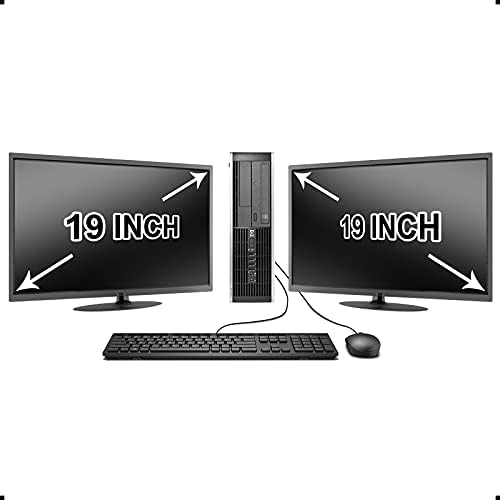
- Best for smaller screens: HP Elite Desktop. i5 at 3.1GHz, 8GB RAM, 1TB hard drive, two 19-inch monitors.
Quick Answer
For most buyers who want a complete two-screen desk, the Dell OptiPlex 3070 and the HP EliteDesk 800 G3 cover the middle and the top of this group: the Dell pairs 16GB of RAM with two 22-inch monitors, and the HP pairs 32GB of RAM with two 24-inch monitors. The Dell Pro Tower fits only buyers who already own two monitors.
Comparison Table
| Product | Best for | Key figure | Trade-off | Buy |
|---|---|---|---|---|
| Dell OptiPlex 3070 | Overall | 16GB, 512GB SSD, two 22-inch monitors | 30.0 pounds | View on Amazon |
| Dell OptiPlex 9020 | Large storage | 16GB, 2TB drive, two 24-inch monitors | Storage label conflicts | View on Amazon |
| HP EliteDesk 800 G3 | Maximum memory | 32GB, 1TB SSD + 2TB HDD, two 24-inch monitors | No weight given | View on Amazon |
| Dell Pro Tower | Owned screens | i3-14100 up to 4.7GHz, 8GB, 512GB SSD, no monitors | Monitors bought separately | View on Amazon |
| HP Elite Desktop | Smaller screens | i5 3.1GHz, 8GB, 1TB HDD, two 19-inch monitors | 19-inch monitors | View on Amazon |
Decision Guide
Start with the monitor question, because it divides this group in two. Four computers include two monitors: two 22-inch LED monitors with the Dell OptiPlex 3070, two 24-inch monitors with the Dell OptiPlex 9020 and the HP EliteDesk 800 G3, and two 19-inch LCD monitors with the HP Elite Desktop. The Dell Pro Tower includes no monitors and instead offers HDMI 2.1 and DisplayPort 1.4 for dual-monitor support, so buyers who choose it need two screens first.
Next, weigh memory and storage together. The HP EliteDesk 800 G3 holds 32GB of DDR4 RAM, twice the 16GB in the two Dell OptiPlex picks and four times the 8GB in the Dell Pro Tower and the HP Elite Desktop, and it combines a 1TB M.2 NVMe SSD with a 2TB hard drive for 3TB in total. The Dell OptiPlex 3070 and the Dell Pro Tower each hold a single 512GB SSD, the Dell OptiPlex 9020 holds a single 2TB drive, and the HP Elite Desktop holds a 1TB hard drive.
Processor figures need care, because the listings state them in different ways. The Dell OptiPlex 3070 names an i5-9500 with 6 cores, a 3.0GHz base speed and a 4.40GHz boost speed, and the Dell Pro Tower names an i3-14100 with 4 cores, 8 threads, turbo speeds up to 4.7GHz and 12MB of cache, the highest boost figure here. The HP EliteDesk 800 G3 names an i7-6700 with no clock speed given, the Dell OptiPlex 9020 names an i5 with no model or clock speed given, and the HP Elite Desktop names an i5 at 3.1GHz.
1. Dell OptiPlex 3070 With Dual 22-Inch Monitors — Best overall
This Dell pairs an Intel Core i5-9500 with 6 cores, a 3.0GHz base speed and a 4.40GHz boost speed with 16GB of DDR4 memory and a 512GB SSD, plus two 22-inch LED monitors and a wireless keyboard and mouse. The trade-off is the stated weight of 30.0 pounds.
| Spec | From the listing |
|---|---|
| Processor | i5-9500, 6 cores, 3.0GHz base, up to 4.40GHz boost |
| Storage | 512GB SSD; 16GB DDR4 RAM |
| Monitors | Dual 2 x 22-inch LED monitors |
| Dimensions and weight | 24.0 x 17.0 x 15.0 inches; 30.0 pounds |
2. Dell OptiPlex 9020 With Dual 24-Inch Monitors — Best for large hard-drive storage
This Dell pairs 16GB of RAM with a 2TB drive and two 24-inch LCD monitors, and it adds WiFi, Bluetooth 4.0 and a DVD-RW drive, a combination no other pick here repeats. The trade-off is a conflict in the storage label: one label names a 2TB hard drive, while the size field names a 2TB SSD, so check the product page before ordering.
| Spec | From the listing |
|---|---|
| Processor | Intel Core i5, no model or clock speed given |
| Storage | 2TB hard drive in one label; size field names a 2TB SSD |
| Monitors | Dual 24-inch LCD monitors |
| Dimensions | 12.3 x 3.7 x 11.4 inches; weight: The listing does not state it |
3. HP EliteDesk 800 G3 With Dual 24-Inch Monitors — Best for maximum memory
This HP holds 32GB of DDR4 memory, a 1TB M.2 NVMe SSD and a 2TB hard drive, leading this group on memory and total storage at 3TB across two drives. Its two 24-inch KOORUI monitors have ultra-thin bezels, and it includes WiFi 6, Bluetooth 5 and a wireless keyboard and mouse. The trade-off is size: 24.0 by 20.0 by 16.0 inches, the largest here.
| Spec | From the listing |
|---|---|
| Processor | Intel Core i7-6700 |
| Storage | 1TB NVMe SSD + 2TB hard drive; 32GB DDR4 |
| Monitors | Dual 24-inch monitors |
| Dimensions | 24.0 x 20.0 x 16.0 inches; weight: The listing does not state it |
4. Dell Pro Tower With Dual-Monitor Support, No Monitors — Best tower without included monitors
This Dell is the mismatch in this group: it supports dual monitors through DisplayPort 1.4 and HDMI 2.1, but it ships with no monitors at all, so buyers need two screens of their own. Its Intel Core i3-14100 has 4 cores, 8 threads, turbo speeds up to 4.7GHz and 12MB of cache, the highest boost speed here, with 8GB of DDR5 RAM and a 512GB PCIe SSD. Skip it if two monitors still need to be bought, because the four bundles here include screens.
| Spec | From the listing |
|---|---|
| Processor | i3-14100, 4 cores, 8 threads, up to 4.7GHz, 12MB cache |
| Storage | 512GB PCIe SSD; 8GB DDR5 |
| Monitors | None included; DisplayPort 1.4 and HDMI 2.1 support dual monitors |
| Dimensions and weight | 12.77 x 6.06 x 11.54 inches; 9.17 pounds |
5. HP Elite Desktop With Dual 19-Inch Monitors — Best for smaller screens
This HP pairs an Intel Core i5 at 3.1GHz with 8GB of RAM, a 1TB hard drive and two 19-inch LCD monitors, the smallest screens here at 5 inches less per screen than the 24-inch pairs. Windows 10 is named as the operating system. Skip it if 24-inch screens or 16GB of RAM are needed, because this pick has neither. It also names up to 2TB of hard-drive space, up to 16GB of RAM and a 256GB SSD as options, which conflict with the named configuration, so check the product page.
| Spec | From the listing |
|---|---|
| Processor | Intel Core i5, 3.1GHz |
| Storage | 1TB hard drive, 8GB RAM; up to 2TB and 16GB as options |
| Monitors | Dual 19-inch LCD monitors |
| Dimensions | 14.9 x 13.3 x 3.9 inches; weight: The listing does not state it |
Buying Checklist
- Measure the desk first: two 24-inch monitors need more width than two 19-inch monitors.
- Check whether monitors are included: four picks include two, and the Dell Pro Tower includes none.
- Compare memory: 32GB, 16GB and 8GB across the five picks.
- Compare storage: 512GB SSD, 1TB SSD plus 2TB hard drive, 2TB drive and 1TB hard drive.
- Check the return window on the product page, and confirm any conflicting storage label.
FAQ
Do all five computers come with two monitors?
No. Four include two monitors: two 22-inch LED monitors with the Dell OptiPlex 3070, two 24-inch monitors with the Dell OptiPlex 9020 and the HP EliteDesk 800 G3, and two 19-inch LCD monitors with the HP Elite Desktop. The Dell Pro Tower includes no monitors and instead supports two through HDMI 2.1 and DisplayPort 1.4, so two screens are needed separately.
Which pick has the most memory and storage?
The HP EliteDesk 800 G3 leads on both, with 32GB of DDR4 RAM and a 1TB M.2 NVMe SSD plus a 2TB hard drive, giving 3TB in total across two drives. The next memory figure is 16GB on the two Dell OptiPlex picks, while the other two each hold 8GB.
How should I choose between a 512GB SSD and a larger hard drive?
Match the drive to the files kept on the computer: a 512GB SSD, as named on the Dell OptiPlex 3070 and the Dell Pro Tower, suits documents, browser work and a modest set of programs. A 2TB drive on the Dell OptiPlex 9020, or the 3TB total on the HP EliteDesk 800 G3, suits larger collections of photos, videos, games and media.
Final Verdict
The HP EliteDesk 800 G3 is the pick for the most memory and storage with two 24-inch monitors, while the Dell OptiPlex 3070 is the general pick for a complete desk with 16GB of RAM and two 22-inch monitors. The Dell OptiPlex 9020 suits two 24-inch monitors with a 2TB drive, and the HP Elite Desktop suits the smallest screens here at 19 inches each. The Dell Pro Tower remains the mismatch: it supports dual monitors and ships with none, so choose it only when two monitors are already on the desk.
Prime covers fast, free delivery on eligible items. See whether a Prime free trial is available for your account.
Check Prime on Amazon →Types of Computer Monitors
Monitors outside gaming-specific models are grouped mainly by resolution and by panel size. 1080p and 1440p monitors cover most general and productivity use. 4K monitors show more detail but need more GPU power to drive at full resolution for demanding tasks.
Panel type (IPS, VA, OLED) affects color accuracy and viewing angle even for non-gaming use, which matters for tasks like photo editing or general color-sensitive work as much as for competitive gaming.
Frequently Asked Questions
What resolution is a reasonable default for general desk use?
1440p is a common middle ground, offering more detail than 1080p without the GPU demands or price premium of a 4K panel at typical desk viewing distances.
Does monitor panel type matter outside of gaming?
Yes -- color accuracy and viewing angle differences between IPS, VA, and OLED panels affect everyday tasks like photo editing or video watching, not just competitive gaming responsiveness.
Related Guides
- Best Desktop Computers for Home Offices
- Best Dual Monitor Stands for Two Screens
- Best Wireless Keyboards and Mice
- Best 24-Inch Monitors
Product and ASIN Reference
| Product | ASIN | Buy |
|---|---|---|
| Dell OptiPlex 3070 | B0FKTLM1VY | View on Amazon |
| Dell OptiPlex 9020 | B07TDMT4W2 | View on Amazon |
| HP EliteDesk 800 G3 | B0C3L375LT | View on Amazon |
| Dell Pro Tower | B0GTNTNQTZ | View on Amazon |
| HP Elite Desktop | B07P14TFWJ | View on Amazon |







Write Your Review
No reviews yet. Be the first to share your experience!