
If you scan in large batches, start with the Visioneer Xerox W130 for its 500 sheet tray and stated duty cycle; if invoices and receipts are the main job, start with the ScanSnap iX1600 Receipt Edition or the Canon imageFORMULA R40 Receipt Edition, and if you need wired network connection plus passport and booklet handling, start with the Fujitsu fi-8150. All five are document scanners for PC use, so the choice comes down to feeder capacity, stated speed, connectivity, and software.
Feeder capacity runs from an 80-page feeder on the DocuMate 6440 to a 500 sheet tray on the W130, while the two receipt editions state no feeder capacity.
As an Amazon Associate, we earn from qualifying purchases.

Pick by Your Need
- Best for high volume: Visioneer Xerox W130. It states a 500 sheet tray and a duty cycle of 100,000 pages per day.
- Best for invoices and receipts: ScanSnap iX1600 Receipt Edition. It scans invoices and receipts into QuickBooks Online from its touch panel.
- Best for searchable files: Visioneer Xerox DocuMate 6440. It converts paper documents into searchable PDF files.
- Best for network connection: Fujitsu fi-8150. It lists USB 3.2 and LAN interfaces.
- Best for receipt data extraction: Canon imageFORMULA R40 Receipt Edition. Its software extracts payee, amount, and date.
Quick Answer
For the largest stated volume, choose the Visioneer Xerox W130, with a 500 sheet tray and a duty cycle of 100,000 pages per day. For invoice and receipt work tied to QuickBooks Online, choose the ScanSnap iX1600 Receipt Edition or the Canon imageFORMULA R40 Receipt Edition. For a wired LAN connection and booklet scanning up to 7 mm thick, choose the Fujitsu fi-8150.
Comparison Table
| Product | Best for | Key stated figure | Trade-off |
|---|---|---|---|
| Visioneer Xerox W130 | High-volume office batches | 500 sheet input tray | The listing gives the W130 speed as 135 ppm in its name and 130 ppm/260 ipm in its details |
| ScanSnap iX1600 Receipt Edition | Invoices and receipts into QuickBooks Online | 4.3 inch touch screen | The listing states no scan speed and no feeder capacity |
| Visioneer Xerox DocuMate 6440 | Searchable PDF organisation | 80-page automatic document feeder | At 13.25 pounds, it is the heaviest of the four listings that state a weight |
| Fujitsu fi-8150 | USB and wired LAN connection | 100 sheet feeder capacity | The listing states no weight, and its stated footprint is the largest here |
| Canon imageFORMULA R40 Receipt Edition | Receipt and invoice data extraction | Top speed of up to 40 pages per minute | The listing states no feeder capacity and no duty cycle |
Decision Guide
If you need the largest feeder, choose the W130. Its 500 sheet input tray is five times the 100 sheet capacity stated for the fi-8150 and above the 80-page feeder of the DocuMate 6440, and its duty cycle of 100,000 pages per day is far above the 9,000 pages per day stated for the DocuMate 6440. Note one conflict: The listing gives the W130 speed as 135 ppm in its name and 130 ppm/260 ipm in its details.
If you need invoice and receipt data in accounting software, choose between the two receipt editions. The ScanSnap scans into QuickBooks Online from a touch panel and extracts data into editable fields, with up to 30 customizable profiles. The Canon R40 extracts payee, amount, and date and uploads information directly to Intuit QuickBooks Online, at up to 40 pages per minute.
If you need a wired network connection, compare the W130 and the fi-8150. The W130 lists USB or ethernet connectivity and VAST Network technology with TWAIN direct for sharing on a local network. The fi-8150 lists USB 3.2 and LAN interfaces. Neither listing states wireless connectivity.
If you scan thicker items, check the media lists. The fi-8150 supports booklets and passports up to 7 mm thick, plus C4-sized envelopes. The DocuMate 6440 lists plastic cards, passports, and checks. For desk space, the ScanSnap has the smallest stated footprint at 11.5 inches by 6.0 inches, while the fi-8150 is the largest at 18.5 inches by 12.2 inches. Check the product page for current details before ordering.
1. Visioneer Xerox W130 Scanner — Best for High Volume

The W130 is the volume outlier here, with a 500 sheet input tray and a duty cycle of 100,000 pages per day, compared with 9,000 pages per day for the DocuMate 6440. It measures 12.5 inches by 6.6 inches by 7.5 inches and weighs 10.0 pounds. One figure needs care: The listing gives the W130 speed as 135 ppm in its name and 130 ppm/260 ipm in its details. It also describes VAST Network technology with TWAIN direct and Visioneer Acuity technology.
Pros
- 500 sheet input tray, the largest feeder capacity stated in this roundup
- Duty cycle stated at 100,000 pages per day
- USB or ethernet connectivity to PC, with network sharing described in the listing
Cons
- The listing gives conflicting speed figures in its name and its details
- The listing states no optical resolution figure
| Spec | From the listing |
|---|---|
| Colour | XW130N-w/ImpA |
| Size | White and Blue |
| Dimensions | 12.5 x 6.6 x 7.5 inches |
| Weight | 10.0 pounds |
| Input tray | 500 sheets |
| Duty cycle | 100,000 pages/day |
2. ScanSnap iX1600 Receipt Edition — Best for Invoices and Receipts
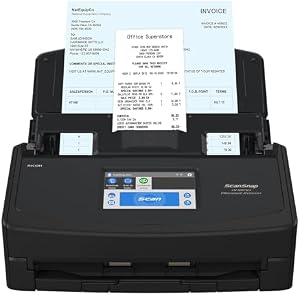
The iX1600 Receipt Edition is built around finance paperwork: its listing states that invoices and receipts scan into QuickBooks Online from a preconfigured touch panel, and that processing extracts data into reviewable and editable fields. It has a 4.3 inch touch screen, supports up to 30 customizable profiles, measures 11.5 inches by 6.0 inches by 6.3 inches, and weighs 7.5 pounds. Unlike the other listings, it states no scan speed and no feeder capacity.
Pros
- Scans invoices and receipts into QuickBooks Online from the touch panel
- Extracts invoice and receipt data into reviewable and editable fields
- Up to 30 customizable profiles, set on the 4.3 inch touch screen
Cons
- The listing states no scan speed figure
- The listing states no automatic document feeder capacity
| Spec | From the listing |
|---|---|
| Colour | Black |
| Size | ScanSnap iX1600 Receipt Edition |
| Dimensions | 11.5 x 6.0 x 6.3 inches |
| Weight | 7.5 pounds |
| Touch screen | 4.3 inch |
| Profiles | Up to 30 customizable profiles |
3. Visioneer Xerox DocuMate 6440 — Best for Searchable PDFs

The DocuMate 6440 pairs an 80-page feeder with a speed of up to 40 ppm/80 ipm at 300 dpi and a duty cycle of 9,000 pages per day. Its listing emphasises converting paper documents into searchable PDF files, and lists plastic cards, passports, photos, documents, receipts, and checks as media. It measures 12.5 inches by 9.4 inches by 26.8 inches as stated and weighs 13.25 pounds, the heaviest of the four listings that state a weight. It also uses Visioneer Acuity technology.
Pros
- Converts paper documents into searchable PDF files
- Stated speed of up to 40 ppm/80 ipm at 300 dpi
- Media list includes plastic cards, passports, photos, and checks
Cons
- Heaviest stated weight in this group at 13.25 pounds
- Feeder holds 80 pages, well below the 500 sheet tray of the W130
Skip it if your main job is receipt data extraction into accounting software, since this listing describes searchable PDFs rather than extraction fields.
| Spec | From the listing |
|---|---|
| Colour | White & Navy |
| Dimensions | 12.5 x 9.4 x 26.8 inches |
| Weight | 13.25 pounds |
| Feeder | 80-page automatic document feeder |
| Scan speed | Up to 40 ppm/80 ipm at 300 dpi |
| Duty cycle | 9,000 pages/day |
4. Fujitsu fi-8150 Document Scanner — Best for Network and Booklets

The fi-8150 states a speed of 50 ppm / 100 ipm, a 100 sheet feeder, and an optical resolution of up to 600 dpi, the only optical resolution figure stated among these five. It connects by USB 3.2 or wired LAN, with a manual feed mode via a button on the operator panel. Its media range covers documents, business cards, receipts, passports, and booklets up to 7 mm thick, plus C4-sized envelopes. It measures 18.5 inches by 12.2 inches by 9.84 inches, and the listing does not state a weight.
Pros
- USB 3.2 and LAN interfaces for cable or wired network connection
- Optical resolution stated at up to 600 dpi
- Booklet and passport scanning up to 7 mm thick, plus C4-sized envelopes
Cons
- The listing does not state a weight
- Largest stated footprint in this group at 18.5 x 12.2 inches
| Spec | From the listing |
|---|---|
| Colour | multicoloured |
| Dimensions | 18.5 x 12.2 x 9.84 inches |
| Weight | The listing does not state it |
| Scan speed | 50 ppm / 100 ipm |
| Feeder capacity | 100 sheets |
| Optical resolution | Up to 600 dpi |
5. Canon imageFORMULA R40 Receipt Edition — Best for Receipt Data Extraction
The R40 Receipt Edition turns receipts and invoices into data: its included software extracts contents such as payee, amount, and date, and uploads information directly to Intuit QuickBooks Online or another third-party option. It also creates keyword searchable and editable files, with single-button operation and a top speed of up to 40 pages per minute. It measures 9.5 inches by 15.0 inches by 12.5 inches and weighs 6.17 pounds, the lightest of the four listings that state a weight, but it states no feeder capacity and no duty cycle.
Pros
- Extracts payee, amount, and date from receipts and invoices
- Uploads information directly to Intuit QuickBooks Online
- Lightest stated weight in this group at 6.17 pounds
Cons
- The listing states no feeder capacity
- The listing states no duty cycle
Skip it if you need a stated high-volume duty cycle, since none is given for this model in its listing.
| Spec | From the listing |
|---|---|
| Colour | White |
| Size | One Size |
| Dimensions | 9.5 x 15.0 x 12.5 inches |
| Weight | 6.17 pounds |
| Top scanning speed | Up to 40 pages per minute |
| Operation | Single-button operation |
Shopping Checklist
- Measure your desk or shelf space and compare it with each scanner’s stated dimensions.
- Check the stated feeder capacity and duty cycle against your normal batch sizes.
- Check the stated connectivity, whether USB, ethernet, or wired LAN, against your PC and network.
- Check the media list for items you scan, such as plastic cards, passports, booklets, or checks.
- Check the return window on the product page.
- Compare your two finalists side by side on speed, feeder capacity, and software.
FAQ
How do I choose between a high-volume scanner and a receipt edition?
Start with the job you do most. The W130 states a 500 sheet tray and a duty cycle of 100,000 pages per day, which suits large batches. A receipt edition such as the ScanSnap iX1600 or the Canon R40 instead describes extracting invoice and receipt data into QuickBooks Online.
What should I check about connectivity before buying a scanner for a PC?
Check which interfaces the listing states. Among these five, the fi-8150 lists USB 3.2 and LAN, and the W130 lists USB or ethernet. For network sharing, confirm that the listing describes it, as those two listings do.
Does feeder capacity matter more than scan speed?
Feeder capacity, such as 80 pages on the DocuMate 6440 or 500 sheets on the W130, sets how much paper you load at once. Scan speed, in pages or images per minute, sets how fast that stack is processed.
Final Verdict
Based on the listing details, the W130 is the pick for batch volume, with the largest stated feeder and duty cycle here. The ScanSnap iX1600 and Canon R40 suit invoice and receipt work tied to QuickBooks Online, the DocuMate 6440 fits searchable PDF organisation, and the fi-8150 fits wired network use with booklet handling. Choose by feeder capacity, duty cycle, connectivity, and software.
Prime covers fast, free delivery on eligible items. See whether a Prime free trial is available for your account.
Check Prime on Amazon →Related Guides
No internal links were supplied for this post, so this section contains no links.
Product and ASIN Reference
| Product | ASIN |
|---|---|
| Visioneer Xerox W130 Scanner | B0B2KMKDNC |
| ScanSnap iX1600 Receipt Edition | B0CKM2DKX6 |
| Visioneer Xerox DocuMate 6440 | B01HJZ1QT2 |
| Fujitsu fi-8150 Document Scanner | B09RVFP6TB |
| Canon imageFORMULA R40 Receipt Edition | B0BKLVM4X3 |










Write Your Review
No reviews yet. Be the first to share your experience!