
If your monitor and graphics card support high refresh rates, start with the IVANKY 80Gbps DisplayPort 2.1 cable for the highest stated bandwidth at 6.6 feet, or the Silkland 2.1 cable if you need 80 Gbps over 10 feet; the two 1.4 cables suit setups that top out at 32.4 Gbps. All five are DisplayPort-to-DisplayPort cords, so the choice is version, length and conductor build rather than connector type.
Bandwidth decides which resolution and refresh combinations a cable is listed to carry: the three 2.1 cables state 80 Gbps and the two 1.4 cables state 32.4 Gbps, with ceilings from 8K at 60Hz to 16K at 60Hz with DSC. Three cables are 6.6 feet and two are 10 feet, so measure your run first.
As an Amazon Associate, we earn from qualifying purchases.


Pick by Your Need
- Best overall: IVANKY 80Gbps DisplayPort 2.1 Cable. VESA certification plus 80 Gbps UHBR20 bandwidth in a 6.6-foot cord.
- Best for high refresh at 4K: Highwings DisplayPort 2.1 Cable. Its listing states 4K at 240Hz and 8K at 120Hz over 6.6 feet.
- Best long run: Silkland DisplayPort 2.1 Cable. It states 80 Gbps across 10 feet, the longest 2.1 option here.
- Best for multi-monitor setups: Acer 8K DisplayPort 1.4 Cable. Its listing names MST daisy-chaining over 10 feet.
- Best certified 1.4 option: IVANKY VESA Certified 8K DisplayPort 1.4 Cable. It states VESA certification, HBR3 and 32.4 Gbps at 6.6 feet.
Quick Answer
For most gaming desks, the IVANKY 80Gbps DisplayPort 2.1 cable is the strongest match: VESA certified, 80 Gbps, 6.6 feet. If your PC sits farther away, the Silkland 2.1 cable keeps 80 Gbps at 10 feet. If your gear is 1.4 or older, the Acer cable gives 10 feet and stated MST support at 32.4 Gbps.
Comparison Table
| Product | Best for | Key stated figure | Trade-off |
|---|---|---|---|
| IVANKY VESA Certified 8K DisplayPort 1.4 Cable | Certified 1.4 setups | 32.4 Gbps bandwidth, 6.6 feet | Lower stated bandwidth than the three 2.1 cables |
| Highwings DisplayPort 2.1 Cable | High refresh gaming | 80 Gbps bandwidth, 6.6 feet | The listing states no weight and no certification |
| Silkland DisplayPort 2.1 Cable | Longer 2.1 runs | 80 Gbps bandwidth, 10 feet | No latch, per the listing |
| Acer 8K DisplayPort 1.4 Cable | Multi-monitor desks | 32.4 Gbps bandwidth, 10 feet | 1.4 ceiling, below the 2.1 cables |
| IVANKY 80Gbps DisplayPort 2.1 Cable | Top stated bandwidth | 80 Gbps UHBR20, 6.6 feet | Heavier stated weight than the IVANKY 1.4 cable |
Decision Guide
Start with distance. If 6.6 feet covers the run with slack, three cables fit on length alone; if the tower sits on the floor or the monitor arm swings wide, the 10-foot Silkland and Acer cables match. Do not buy on length you have not measured.
Next, match the version to your hardware. If your graphics card and monitor are DisplayPort 1.4 devices, a 1.4 cable stating 32.4 Gbps and HBR3 covers combinations such as 8K at 60Hz and 4K at 240Hz on the IVANKY 1.4 cable. The Silkland listing states a 2.1 cable works with 1.4 devices at the speeds they support, so its higher combinations, such as 4K at 540Hz with DSC, simply stay unused until both ends support them.
Then weigh the ceilings. The 2.1 listings state 80 Gbps, 47.6 Gbps more than the 1.4 listings, paired with 16K at 60Hz figures the 1.4 listings do not claim. If you need MST daisy-chaining, choose the Acer cable, whose listing names MST for Extended and Mirrored modes. If you need VESA certification named, choose an IVANKY cable, since the other three listings state none. Check the product page for current details before ordering.
Finally, weigh conductor gauge as stated. Two cables state 30AWG tinned copper, described by the IVANKY listings as slimmer than 28AWG, while Highwings and Silkland state 28AWG with triple shielding.
1. IVANKY VESA Certified 8K DisplayPort 1.4 Cable — Best Certified DisplayPort 1.4 Pick

This 1.4 cable’s listing leads with certification: it states VESA certification, HDR support, and HBR3 for 32.4 Gbps. Its stated resolutions run to 8K at 60Hz, 5K at 60Hz, 4K at 240Hz, 2K at 240Hz and 1080P at 240Hz. At 6.6 feet and 0.22 pounds, it is the lighter of the two listings that state a weight. The listing states 30AWG tinned copper under a nylon braided jacket, and names compatibility with Odyssey G7, G9, CHG90 and CRG9 plus Ben Q, Dell, HP, Acer, iiyama and Alienware monitors.
Pros
- States VESA certification for DisplayPort 1.4
- States 4K at 240Hz and 2K at 240Hz with HBR3
- States 30AWG tinned copper and a nylon braided jacket
Cons
- Stated 32.4 Gbps is below the 80 Gbps of the 2.1 cables
- 6.6 feet, shorter than the two 10-foot options
| Spec | From the listing |
|---|---|
| DisplayPort version | 1.4, VESA Certified |
| Length | 6.6 Feet |
| Bandwidth | 32.4 Gbps (HBR3) |
| Conductor | 30AWG tinned copper |
| Weight | 0.22 pounds |
2. Highwings 80Gbps DisplayPort 2.1 Cable — Best for High Refresh Rates
The Highwings cable is a DisplayPort 2.1 cord stating 80 Gbps and resolutions from 16K at 60Hz with DSC and 10K at 60Hz down through 8K at 120Hz, 4K at 240Hz, 165Hz and 144Hz, and 2K at 240Hz, 165Hz and 120Hz. That spread of 4K refresh figures is its angle against the other 2.1 cables. The listing states Dynamic HDR, 32-bit audio and FreeSync support, though it does not name the FreeSync variant. Its build is stated as 28AWG tinned copper with triple-layer shielding, plus a slip-resistant grip, in grey at 6.6 feet. Its listing states no VESA certification and no weight.
Pros
- States 80 Gbps with 16K at 60Hz and 8K at 120Hz
- States 28AWG tinned copper with triple-layer shielding
- States Dynamic HDR, 32-bit audio and FreeSync support
Cons
- The listing states no VESA certification
- The listing states no weight
| Spec | From the listing |
|---|---|
| DisplayPort version | 2.1 |
| Length | 6.6 Feet |
| Bandwidth | 80 Gbps |
| Conductor | 28AWG tinned copper, triple-layer shielding |
| Color | Grey |
3. Silkland 80Gbps DisplayPort 2.1 Cable — Best Long DisplayPort 2.1 Run
The Silkland cable is the only 2.1 option here at 10 feet, stating 80 Gbps across that length, with uncompressed 4K at 240Hz, 8K at 60Hz and 2K at 540Hz, rising to 16K at 60Hz, 8K at 240Hz and 4K at 540Hz with DSC enabled. Those 4K figures above 240Hz are the highest refresh numbers in the five listings. The listing names VRR, FEC, ALLM and DSC 1.2a, plus MST, and states it works with 1.4 devices at the speeds they support. Its build is stated as 28AWG tinned copper with triple shielding and 24K gold-plated connectors. One trade-off is stated plainly: this cable has no latch.
Pros
- States 80 Gbps over 10 feet, the longest 2.1 cable here
- States 4K at 540Hz and 8K at 240Hz with DSC
- States 24K gold-plated connectors and triple shielding
Cons
- The listing states the cable has no latch
- No weight or VESA certification stated
| Spec | From the listing |
|---|---|
| DisplayPort version | 2.1 |
| Length | 10 Feet |
| Bandwidth | 80 Gbps |
| Conductor | 28AWG tinned copper, triple shielding |
| Color | Grey |
4. Acer 8K DisplayPort 1.4 Cable — Best for Multi-Monitor Setups
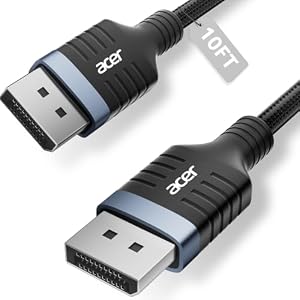
The Acer cable pairs 10 feet with the DisplayPort 1.4 spec, stating 8K at 60Hz, Dynamic HDR and HDCP 2.2. Its distinguishing feature is MST: the listing says it supports MST-ready daisy-chaining, driving multiple monitors from a single connection in Extended and Mirrored modes. Bandwidth is stated at 32.4 Gbps, with backward compatibility stated for DisplayPort 1.3, 1.2, 1.1 and 1.0, the widest stated range of older versions here. The build is stated as a nylon braided jacket with a reinforced aluminum shell. Skip it if your setup needs more than the 1.4 ceiling, because its stated bandwidth is less than half the 80 Gbps of the 2.1 cables.
Pros
- States MST daisy-chaining in Extended and Mirrored modes
- States backward compatibility with DP 1.3, 1.2, 1.1 and 1.0
- 10 feet, the joint-longest stated length here
Cons
- Stated 32.4 Gbps is joint-lowest here, tied with the IVANKY 1.4
- The listing states no conductor gauge and no weight
| Spec | From the listing |
|---|---|
| DisplayPort version | 1.4 |
| Length | 10FT |
| Bandwidth | 32.4 Gbps |
| Jacket | Nylon braided, reinforced aluminum shell |
| Weight | The listing does not state it |
5. IVANKY 80Gbps DisplayPort 2.1 Cable — Best Overall

This IVANKY cable is the 2.1 counterpart to the 1.4 model above: its listing states VESA certification, UHBR20, and support for 16K at 60Hz, 10K at 60Hz, 8K at 240Hz and 4K at 540Hz, with backward compatibility stated as well. Its feature list is the broadest stated here, naming 3D, HDR10, HBR20, HDCP 2.2, DSC 1.2a and FEC together. The build follows the other IVANKY: 30AWG tinned copper with triple shielding, described as slimmer than 28AWG. At 6.6 feet and 0.31 pounds, it is 0.09 pounds heavier than the IVANKY 1.4 cable, the only other listing stating a weight. Its angle is certification plus that feature list at the shorter length.
Pros
- States VESA certification for DisplayPort 2.1 with UHBR20
- States 16K at 60Hz, 8K at 240Hz and 4K at 540Hz
- States HDR10, HDCP 2.2, DSC 1.2a and FEC together
Cons
- 6.6 feet, shorter than the two 10-foot cables
- Heaviest of the two listings that state a weight, at 0.31 pounds
| Spec | From the listing |
|---|---|
| DisplayPort version | 2.1, VESA Certified |
| Length | 6.6 Feet |
| Bandwidth | 80 Gbps (UHBR20) |
| Conductor | 30AWG tinned copper, triple shielding |
| Weight | 0.31 pounds |
Shopping Checklist
Before you order, work through these steps against the listing figures above:
- Measure the run from PC to monitor, including routing, and pick 6.6 feet or 10 feet accordingly.
- Check the DisplayPort version on your graphics card and monitor, and match it to the cable’s stated version.
- Check stated bandwidth and resolution figures against the resolution and refresh rate you run.
- Check the stated conductor gauge, shielding and jacket material.
- Check whether the listing states a latch, certification or MST support, if those matter to you.
- Confirm the return terms for the cable length and version you select.
FAQ
Does a DisplayPort 2.1 cable work with a DisplayPort 1.4 monitor?
Based on the listing details, yes, at the speeds the older device supports. The Silkland listing states this directly, and the IVANKY 2.1 listing states backward compatibility. The 2.1 combinations, such as 16K at 60Hz, wait until both ends support them.
How long a DisplayPort cable do I need for a gaming desk?
Measure the actual run rather than guessing from desk width. Three cables here are stated at 6.6 feet and two at 10 feet, so a tower on the desk usually fits the shorter length, while a floor-standing tower points to 10 feet. Leave slack for routing.
What does the bandwidth figure change in practice?
It sets the ceiling for the resolution and refresh combinations the listing claims. The 1.4 cables state 32.4 Gbps with ceilings such as 8K at 60Hz and 4K at 240Hz, while the 2.1 cables state 80 Gbps with ceilings up to 16K at 60Hz and, on two listings, 4K at 540Hz with DSC.
Final Verdict
For the highest stated figures in a standard desk length, the IVANKY 80Gbps DisplayPort 2.1 cable is the pick: VESA certified, 80 Gbps, HDR10 and DSC 1.2a stated, at 6.6 feet. Choose Silkland when the run needs 10 feet without dropping to 1.4 bandwidth. Choose the Acer or IVANKY 1.4 cable when your hardware is 1.4 and you value MST support or VESA certification at 32.4 Gbps over unused headroom.
Prime covers fast, free delivery on eligible items. See whether a Prime free trial is available for your account.
Check Prime on Amazon →Related Guides
No internal links were supplied for this post, so this section contains no links.
Product and ASIN Reference
| Product | ASIN |
|---|---|
| IVANKY VESA Certified 8K DisplayPort 1.4 Cable | B07VVJZJ2P |
| Highwings 80Gbps DisplayPort 2.1 Cable | B0DMVHHKHL |
| Silkland 80Gbps DisplayPort 2.1 Cable | B0DQ7MFQVC |
| Acer 8K DisplayPort 1.4 Cable | B0FP54LD2C |
| IVANKY 80Gbps DisplayPort 2.1 Cable | B0CBMKRXDX |










Write Your Review
No reviews yet. Be the first to share your experience!