
If you want a complete desktop pc for live streaming, start with the Qehi or the Suevery, the only two complete desktop PCs in this set. The other three listings are not desktop PCs at all: the Loupedeck Live S is a streaming console, and the Samcorn and Uyissykia listings are USB webcams, so they only support a stream alongside a computer you already own.
We compared the listings on processor cores and clock speeds where stated, graphics memory, memory, storage, wireless connection, and physical size. Where a listing does not state a figure, we say so, and where one contradicts itself, we flag the conflict in the same words in the comparison table, the decision guide, and that product’s section.
As an Amazon Associate, we earn from qualifying purchases.
Pick by Your Need
- Best overall: Qehi Gaming PC Desktop. An 8-core processor, 16GB of DDR4 memory, and a 512GB NVMe SSD in one tower.
- Best second tower option: Suevery Gaming PC Desktop. It also states 16GB of memory and a 512GB SSD, in a white tower.
- Best stream control add-on: Loupedeck Live S. A streaming console with native software plugins, not a computer.
- Best webcam with a stated mic range: Samcorn Webcam with Microphone. Audio capture within 17 feet, 1080P at 30FPS.
- Best webcam with a privacy cover: Uyissykia Full HD 1080P Webcam. A sliding privacy cover and dual microphones.
Quick Answer
For a complete desktop pc for live streaming, the Qehi is the clearest pick, with 8 cores, 16 threads, an RTX 3050 with 8GB of video memory, and WiFi 6. The Suevery is the other tower, also stating 16GB of memory, a 512GB SSD, and WiFi 6, but its processor and graphics conflict within its listing. The other three are accessories only.
Comparison Table
| Product | Best for | Key stated figure | Trade-off |
|---|---|---|---|
| Qehi Gaming PC Desktop | A complete tower | 16GB DDR4 memory, 512GB NVMe SSD | Heaviest stated at 18.3 pounds |
| Suevery Gaming PC Desktop | A second complete tower | 16GB DDR4 memory, 512GB NVMe SSD | The listing conflicts on this model: the name states a Ryzen 7 5700X with an RTX 3050 6GB, while the details state a 6-core Ryzen 5 with a Radeon RX 560 4GB. |
| Loupedeck Live S | Stream control console | 5.91 inches long, 0.37 pounds | Not a desktop PC; a console that works with a computer |
| Samcorn Webcam with Microphone | A camera and microphone | 1080P at 30FPS, mic capture within 17 feet | Not a desktop PC; a webcam only |
| Uyissykia Full HD 1080P Webcam | A camera with a privacy cover | 1080P; dimensions not stated | Not a desktop PC; a webcam only, with no spec table stated |
Decision Guide
Start by deciding whether you need the computer itself or only part of the setup. If you need the computer, your choice is between the two towers, both 13.3 inches long and 12.9 inches high: the Qehi is 11.8 inches wide and the Suevery is 10.8 inches wide, so measure your desk space against those figures.
For processor and graphics figures stated without a conflict, choose the Qehi: 8 cores, 16 threads, a 3.6GHz base frequency, a 4.2GHz boost clock, and an RTX 3050 with 8GB of video memory. For the Suevery: The listing conflicts on this model: the name states a Ryzen 7 5700X with an RTX 3050 6GB, while the details state a 6-core Ryzen 5 with a Radeon RX 560 4GB. Judge that model on its consistently stated figures instead: 16GB of DDR4 memory, a 512GB NVMe SSD, WiFi 6, and 2 USB 3.0 ports.
If you already own a computer and need stream control, choose the Loupedeck Live S, a 5.91 inch by 3.35 inch console stating control pages, dials, and plugins. If you need only a camera, the Samcorn states a 90 degree wide angle, 30FPS, and microphone capture within 17 feet, while the Uyissykia states dual microphones and a sliding privacy cover but no dimensions or weight. Check the product page for current details before ordering. The towers state 18.3 pounds and 17.64 pounds, a difference of less than 1 pound, so width matters more than weight here.
1. Qehi Gaming PC Desktop — Best overall

The Qehi is a genuine desktop pc for live streaming, and the most completely described tower here. Its listing states a Ryzen 7 4700LE processor with 8 cores and 16 threads, a 3.6GHz base frequency, and a 4.2GHz boost clock, built on a 7nm process. It also states an RTX 3050 with 8GB of video memory, 16GB of DDR4 memory at 3200MHz, a 512GB NVMe PCIe SSD, WiFi 6, and 6 RGB fans.
Pros
- Stated 8 cores and 16 threads, with base and boost figures given
- Stated 16GB DDR4 3200MHz memory and 512GB NVMe PCIe SSD
- WiFi 6 and 6 RGB cooling fans stated
Cons
- Heaviest stated listing at 18.3 pounds
- Widest tower here at 11.8 inches wide
| Spec | From the listing |
|---|---|
| Processor | Ryzen 7 4700LE, 8 cores, 16 threads, 3.6GHz base, 4.2GHz boost |
| Graphics | RTX 3050, 8GB video memory |
| Memory and storage | 16GB DDR4 3200MHz; 512GB NVMe PCIe SSD |
| Dimensions | 13.3 x 11.8 x 12.9 inches |
| Weight and colour | 18.3 pounds; Black |
2. Suevery Gaming PC Desktop — Best second tower option

The Suevery is the other complete desktop PC here, in a white tower measuring 13.3 inches by 10.8 inches by 12.9 inches, at 17.64 pounds. The listing conflicts on this model: the name states a Ryzen 7 5700X with an RTX 3050 6GB, while the details state a 6-core Ryzen 5 with a Radeon RX 560 4GB. Its consistently stated figures are 16GB of DDR4 memory, a 512GB NVMe SSD, WiFi 6, and 2 USB 3.0 ports, plus an RGB cooling system.
Pros
- Stated 16GB DDR4 memory and 512GB NVMe SSD, matching the Qehi
- WiFi 6 stated for wireless connection
- Narrower tower at 10.8 inches wide
Cons
- Processor and graphics figures conflict within the listing
- The stated port list is cut short in the listing
| Spec | From the listing |
|---|---|
| Memory and storage | 16GB DDR4; 512GB NVMe SSD |
| Wireless | WiFi 6 |
| Dimensions | 13.3 x 10.8 x 12.9 inches |
| Weight and colour | 17.64 pounds; White |
| Processor and graphics | The listing does not state it consistently; see the conflict above |
3. Loupedeck Live S Streaming Console — Best stream control add-on
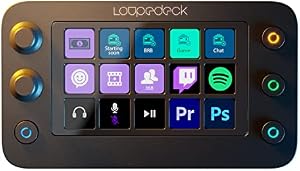
This listing is not a desktop PC: the Loupedeck Live S is a streaming console that controls a stream from a computer you already own. Its listing states native plugins for OBS Studio, Streamlabs on Windows, Twitch, Ecamm, vMix, Spotify, and several editing applications, with ready-made profiles. It states up to 14 pages of controls for touch buttons and dials, a marketplace library of 200+ items, and custom actions that trigger several commands at once. At 5.91 inches by 3.35 inches by 1.18 inches and 0.37 pounds, it states no processor, memory, or storage of its own.
Pros
- Native plugins stated for OBS Studio, Streamlabs, Twitch, Ecamm, and vMix
- Up to 14 pages of controls for touch buttons and dials
- Marketplace library of 200+ items stated
Cons
- Not a desktop PC; it cannot run a stream alone
- No processor, memory, or storage figures stated
| Spec | From the listing |
|---|---|
| Product type | Streaming console for stream control |
| Control pages | Up to 14 pages of touch buttons and dials |
| Dimensions | 5.91 x 3.35 x 1.18 inches |
| Weight and colour | 0.37 pounds; Black |
| Processor, memory, and storage | The listing does not state it |
4. Samcorn Webcam with Microphone — Best webcam with a stated mic range

This listing is not a desktop PC either: it is a USB webcam with a built-in microphone, for a computer you already own. Its listing states Full HD 1080P resolution with H.264 compression over USB 2.0, an image at 30FPS, autofocus, and light correction. It also states a stereo microphone with automatic noise cancelling that captures audio within 17 feet, a 90 degree wide angle, a plug-and-play UVC connection, and a base with 360 degree rotation. Its stated size is 1.97 inches by 3.7 inches by 1.26 inches, at 0.3 pounds.
Pros
- Stated 1080P video at 30FPS with autofocus and light correction
- Stated microphone capture range of 17 feet, the only one stated
- Stated 90 degree wide angle and 360 degree rotating base
Cons
- Not a desktop PC; a camera and microphone only
- Skip it if you need a computer; it adds no processing or storage
| Spec | From the listing |
|---|---|
| Resolution and frame rate | Full HD 1080P at 30FPS, H.264 compression |
| Microphone | Built-in stereo, automatic noise cancelling, capture within 17 feet |
| Field of view | 90 degree wide angle |
| Dimensions and weight | 1.97 x 3.7 x 1.26 inches; 0.3 pounds |
| Connection | USB 2.0, UVC plug and play |
5. Uyissykia Full HD 1080P Webcam — Best webcam with a privacy cover
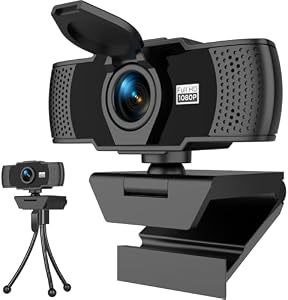
Like the Samcorn, this listing is not a desktop PC: it is a plug-and-play USB computer camera with microphones, for a computer you already own. Its listing states 1080P Full HD resolution, dual microphones with noise cancelling, and auto light correction adjusting brightness and exposure. Its distinguishing feature is a physical sliding privacy cover that blocks the lens when not in use, which the Samcorn listing does not state. Unlike the other four listings, this one provides no spec table, so no dimensions, weight, or frame rate are stated.
Pros
- Stated physical sliding privacy cover that blocks the lens
- Stated dual microphones with noise cancelling
- Stated 1080P resolution and auto light correction
Cons
- Not a desktop PC; a camera and microphones only
- No spec table stated, so dimensions and weight are not given
| Spec | From the listing |
|---|---|
| Resolution | Full HD 1080P |
| Microphones | Dual microphones with noise cancelling |
| Privacy | Physical sliding privacy cover |
| Light correction | Auto light correction for brightness and exposure |
| Dimensions and weight | The listing does not state it |
Shopping Checklist
Use this list before ordering:
- Decide whether you need a complete computer or only a console or camera.
- Measure your desk or shelf space and compare it with the stated dimensions.
- Check the stated memory, storage, and connection figures, and note any figure not stated.
- Where a listing conflicts with itself, base the choice on figures stated consistently.
- Confirm the return terms for the complete computer you choose before ordering it.
FAQ
Do any of these listings besides the two towers count as a desktop PC?
No. Based on the listing details, only the Qehi and the Suevery are complete desktop PC towers. The Loupedeck Live S is a streaming console, and the Samcorn and Uyissykia listings are webcams, so each needs a computer.
Which tower states the clearest processor and graphics figures?
The Qehi states one consistent set: 8 cores, 16 threads, 3.6GHz base and 4.2GHz boost figures, and an RTX 3050 with 8GB of video memory. The Suevery conflicts on both, so its consistent figures are 16GB of memory, a 512GB SSD, and WiFi 6.
What should I add first if I already own a computer for streaming?
Choose by the gap in your setup. For stream control, the Loupedeck states plugins and 14 pages of controls; for a camera, the Samcorn states a 17 foot microphone range and the Uyissykia a sliding privacy cover.
Final Verdict
For a complete desktop pc for live streaming, the Qehi is the strongest choice here, stating a consistent 8-core processor, an 8GB graphics card, 16GB of memory, and a 512GB NVMe SSD in one tower. The Suevery matches it on memory and storage and is 1 inch narrower, but its processor and graphics conflict within its listing, so judge it on consistent figures only. The other three are additions to a computer you already own: a control console and two 1080P webcams.
Prime covers fast, free delivery on eligible items. See whether a Prime free trial is available for your account.
Check Prime on Amazon →Related Guides
No internal links were supplied for this post.
Product and ASIN Reference
| Product | ASIN |
|---|---|
| Qehi Gaming PC Desktop | B0GVSHF8CM |
| Suevery Gaming PC Desktop | B0GD6J23G4 |
| Loupedeck Live S | B0BMLQYZNF |
| Samcorn Webcam with Microphone | B08FXZJSXV |
| Uyissykia Full HD 1080P Webcam | B0GFD6VZ3F |










Write Your Review
No reviews yet. Be the first to share your experience!