
If you want one wide screen for both play and desk work, pick a 49-inch DQHD model for the widest stated workspace, a 45-inch or 34.2-inch OLED model for the fastest stated response time, or a model with picture-in-picture and picture-by-picture if you need two sources on one screen. All five listings here are curved monitors, and they differ mainly in screen size, resolution, panel type, refresh rate, curve radius, and the ports and split-screen features the listings state.
For gaming, the clearest separators are refresh rate, response time, and sync support, while for work they are resolution, screen width, and whether the listing states USB-C or a split-screen mode. We compared the listing details side by side, and note where a listing does not state a figure.
As an Amazon Associate, we earn from qualifying purchases.

Pick by Your Need
- Best overall: INNOCN 49-inch Curved Ultrawide. It pairs a 5120 x 1440 resolution with a stated 240Hz refresh rate and USB-C connectivity.
- Best for wide work views: Samsung 49-inch Odyssey G9. Its 32:9 screen and 1000R curve are stated as equivalent to two side-by-side 16:9 monitors.
- Best for split-screen work: Amzfast 49-inch Curved Monitor. The listing states PIP and PBP support for dividing two signal sources on one screen.
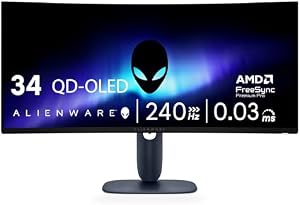
- Best for smaller desks: Alienware 34 Curved Gaming Monitor. At 34.2 inches, it is the smallest screen size stated in this group.
- Best for a steep curve: LG 45-inch Ultragear OLED. The listing states an 800R curve, the smallest curve radius number in this group.
Quick Answer
The INNOCN 49-inch and the Samsung Odyssey G9 suit readers who want a 49-inch, 32:9 screen for wide work layouts and gaming on the same display. The LG 45-inch OLED suits readers who want a 240Hz refresh rate with a 0.03ms response time, while the Alienware 34 suits a smaller desk that still needs a curved ultrawide format.
Comparison Table
| Product | Best for | Key stated figure | Trade-off |
|---|---|---|---|
| INNOCN 49-inch Curved Ultrawide | Gaming and work on one 49-inch screen | 5120 x 1440 resolution at a stated 240Hz | The listing does not state a weight |
| Samsung 49-inch Odyssey G9 | Wide 32:9 views with a tight curve | 1000R curve on a 49-inch screen | Heaviest stated weight in this group, at 34.39 pounds |
| Amzfast 49-inch Curved Monitor | Two sources with PIP and PBP | 5120 x 1440 resolution on a 49-inch screen | Refresh rate is stated as 120Hz, lower than the 240Hz models |
| Alienware 34 Curved Gaming Monitor | A smaller curved ultrawide desk setup | 34.2-inch screen with 3440 x 1440 resolution | Narrower screen and lower resolution than the 49-inch models |
| LG 45-inch Ultragear OLED | Fast response with a steep curve | 800R curve on a 45-inch screen | Resolution is 3440 x 1440, below the DQHD models |
Decision Guide
If you need the widest stated workspace, choose one of the three 49-inch DQHD models, each stated at 5120 x 1440. Between them, the INNOCN listing states 240Hz, the Samsung states 144Hz, and the Amzfast states 120Hz, tied in its listing to a DP 1.4 connection.
If you need two sources on one screen at once, choose the Amzfast, because its listing states PIP and PBP that divide two signal sources into dual 1440p displays. Choose the INNOCN if port count matters more, since its listing states 2 DP 1.4 ports, 1 HDMI 2.1 port, and USB-C.
If you need the fastest stated response time, choose the Alienware 34 or the LG 45-inch, because both state 0.03ms and 240Hz, compared with 1ms stated for the other three. Between them, the choice turns on size and curve: 34.2 inches at 1800R, or 45 inches at 800R. The listings state 1000R for the Samsung and 1500R for the Amzfast. Check the product page for current details before ordering.
If desk space is the limit, compare stated widths: 45.5 inches for the INNOCN, 45.18 inches for the Samsung, 46.69 inches for the Amzfast, 39.1 inches for the LG, and 9.13 inches stated as width for the Alienware, with 31.71 inches stated as its length. The Amzfast is the widest on that stated figure.
1. INNOCN 49-inch Curved Ultrawide Monitor — Best overall
This is the only 49-inch listing here combining a stated 240Hz refresh rate with USB-C carrying 65W power delivery, separating it from the other two 49-inch models on gaming speed and work connectivity. Its listing states a 49-inch VA panel at 5120 x 1440, an 1800R curvature, a 1ms figure, and HDR 400 support, plus the longest stated port list in this group.
Pros
- Stated 5120 x 1440 resolution on a 49-inch, 32:9 screen
- Stated 240Hz refresh rate, matching the highest figure in this group
- USB-C with 65W power delivery stated, plus 2 DP 1.4 ports and 1 HDMI 2.1 port
Cons
- The listing does not state a weight, so it cannot be compared on that figure
- HDR figure is stated as HDR 400, below the DisplayHDR 600 stated for the Samsung
| Spec | From the listing |
|---|---|
| Screen size | 49 Inch |
| Resolution | 5120 x 1440 |
| Refresh rate | 240Hz |
| Curvature | 1800R |
| Color | Black |
| Weight | The listing does not state it |
2. Samsung 49-inch Odyssey G9 G91F — Best for wide work views

The Samsung listing centres on its 1000R curve, tighter than the 1500R and 1800R figures stated for the Amzfast, INNOCN, and Alienware, on a 49-inch screen with a 32:9 format. It states a 144Hz refresh rate, a 1ms response time, DisplayHDR 600, AMD FreeSync support, and variable refresh rate. It also describes the screen as equivalent to two side-by-side 16:9 monitors.
Pros
- Stated 1000R curve on a 49-inch, 32:9 screen
- DisplayHDR 600 stated, above the HDR 400 figure stated for the INNOCN
- Stated 144Hz refresh rate with a 1ms response time
Cons
- Stated weight is 34.39 pounds, the heaviest stated weight in this group
- Refresh rate is stated as 144Hz, below the 240Hz stated for three other models
| Spec | From the listing |
|---|---|
| Screen size | 49 inches |
| Refresh rate | 144Hz |
| Curvature | 1000R |
| Color | Aluminum Silver |
| Weight | 34.39 pounds |
| Width | 45.18 inches |
3. Amzfast 49-inch Curved Monitor — Best for split-screen work

The Amzfast listing is the only one here naming PIP and PBP, describing split-screen support that divides two signal sources into dual 1440p displays, making it the clearest fit for work using two inputs at once. Its stated figures are a 49-inch VA panel at 5120 x 1440, a 1500R curve, a 120Hz refresh rate, a 1ms MPRT figure, a 178-degree viewing angle, 350 nits brightness, and a 3000:1 contrast ratio.
Pros
- PIP and PBP stated, for two signal sources on one screen
- Stated 5120 x 1440 resolution on a 49-inch screen
- Stated 178-degree viewing angle and 350 nits brightness
Cons
- Stated 120Hz refresh rate is the lowest refresh figure in this group
- Stated width is 46.69 inches, the widest stated width in this group
Skip it if you need a refresh rate above 120Hz, because the listing states 120Hz and ties that figure to a DP 1.4 connection.
| Spec | From the listing |
|---|---|
| Screen size | 49 Inch |
| Resolution | 5120 x 1440 |
| Refresh rate | 120Hz |
| Curvature | 1500R |
| Weight | 24.15 pounds |
| Width | 46.69 inches |
4. Alienware 34 Curved Gaming Monitor AW3425DW — Best for smaller desks
At 34.2 inches, this is the smallest screen in the group, and its listing states a QD-OLED panel rather than the VA panels stated for the INNOCN and Amzfast. It states 3440 x 1440 resolution, a 240Hz figure, a 0.03ms response, an 1800R curve, VESA DisplayHDR TrueBlack 400, and 1000 nits peak HDR brightness. Its stated weight of 20.04 pounds is the lightest stated here, and its stated height is 21.84 inches.
Pros
- Stated 0.03ms response time, matching the fastest figure in this group
- QD-OLED panel stated, with 1000 nits peak HDR brightness stated
- Stated weight of 20.04 pounds is the lightest stated weight here
Cons
- Resolution is stated as 3440 x 1440, below the 5120 x 1440 DQHD models
- Screen size is 34.2 inches, the smallest stated size in this group
| Spec | From the listing |
|---|---|
| Screen size | 34.2-inch QD-OLED |
| Resolution | 3440 x 1440 |
| Response time | 0.03ms |
| Curvature | 1800R |
| Color | Black |
| Weight | 20.04 pounds |
5. LG 45-inch Ultragear OLED Monitor — Best for a steep curve

The LG listing states an 800R curve, the smallest curve radius figure here, on a 45-inch OLED panel between the 34.2-inch Alienware and the three 49-inch models in size. It states a 240Hz refresh rate and a 0.03ms response time, matching the Alienware, plus both FreeSync support and NVIDIA G-Sync compatibility, which no other listing states together. It also states up to 1300 nits peak brightness, a 1.5M:1 contrast ratio, and VESA DisplayHDR True Black 400.
Pros
- Stated 800R curve, the smallest curve radius figure in this group
- Stated 240Hz refresh rate with a 0.03ms response time
- Both FreeSync and NVIDIA G-Sync compatibility stated in one listing
Cons
- Resolution is stated as 3440 x 1440, below the 5120 x 1440 DQHD models
- Stated height is 26.1 inches, the tallest stated height in this group
Skip it if you need DQHD resolution for work, because this listing states 3440 x 1440 rather than 5120 x 1440.
| Spec | From the listing |
|---|---|
| Screen size | 45 inches |
| Resolution | 3440 x 1440 |
| Refresh rate | 240Hz |
| Curvature | 800R |
| Weight | 29.76 pounds |
| Width | 39.1 inches |
Shopping Checklist
Use these steps to narrow the five listings to the one that fits your desk and your inputs:
- Measure your desk width and depth first, then compare the result with each listing’s stated width and height figures.
- Check the stated resolution and aspect ratio, and confirm whether you need 5120 x 1440 or whether 3440 x 1440 covers your work layout.
- Check the stated refresh rate, response time, and sync support against the games and the graphics hardware you plan to connect.
- Check the stated ports, including USB-C, DisplayPort, and HDMI counts, against every device you plan to plug in.
- Check the return window on the product page, and compare your two finalists side by side on size, curve, and panel type.
FAQ
Does a 49-inch DQHD monitor replace two separate monitors for work?
Based on the listing details, the Samsung listing describes its 32:9 screen as equivalent to two side-by-side 16:9 monitors, and the three 49-inch models each state 5120 x 1440. Whether that replaces a two-monitor setup depends on your window layout, so compare stated widths with your desk first.
Which stated figures matter most for gaming?
Those figures differ most clearly here, from 120Hz to 240Hz and from 1ms to 0.03ms, and every listing states them. Compare them first, then check curve radius and HDR figures, which also vary.
How do I choose between a VA panel and an OLED panel here?
The INNOCN and Amzfast listings state VA panels at 49 inches, while the Alienware states QD-OLED at 34.2 inches and the LG states OLED at 45 inches. The OLED listings state 0.03ms, while the 49-inch VA listings state 5120 x 1440, so the choice turns on which figure you need more.
Final Verdict
For most readers, the INNOCN 49-inch is the broadest match here, because its listing states 5120 x 1440, 240Hz, and USB-C with 65W power delivery together. Choose the Samsung if the 1000R curve and DisplayHDR 600 matter more than refresh rate, and the Amzfast if PIP and PBP is the feature your work needs. Choose the Alienware 34 for the smallest stated size, or the LG 45-inch for the steepest stated curve.
Prime covers fast, free delivery on eligible items. See whether a Prime free trial is available for your account.
Check Prime on Amazon →Related Guides
No internal links were supplied for this post, so this section lists none.
Product and ASIN Reference
| Product | ASIN |
|---|---|
| INNOCN 49-inch Curved Ultrawide | B0D1VHBPQT |
| Samsung 49-inch Odyssey G9 | B0DWT9XN4D |
| Amzfast 49-inch Curved Monitor | B0FJ8G4K5C |
| Alienware 34 Curved Gaming Monitor | B0F6724X5N |
| LG 45-inch Ultragear OLED | B0FDC38XGQ |










Write Your Review
No reviews yet. Be the first to share your experience!