
If DisplayPort 2.1 is a firm requirement, the ASUS ROG PG27UCDM and the Samsung Odyssey Neo G9 are the two picks here whose listings state it outright, while readers who want a large work screen should look at the ViewSonic, whose listing states only DisplayPort, with no version given. The LG and Lenovo listings supplied here also state no DisplayPort 2.1, so neither should be bought assuming it is present.
We compared the five listings on panel type, resolution, refresh rate, response time, screen size, and connection details. Two confirm DisplayPort 2.1, one states DisplayPort without a version, and two state no DisplayPort version. Stated size ranges from 26.5 inches to 57 inches, so desk fit separates these monitors as much as panel type does.
As an Amazon Associate, we earn from qualifying purchases.
Pick by Your Need
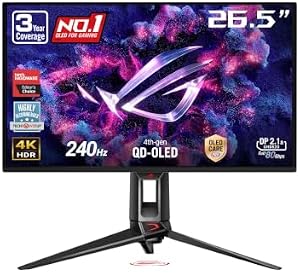
- Best overall: ASUS ROG PG27UCDM. Its listing states DisplayPort 2.1, a 26.5-inch QD-OLED panel, and 240Hz.
- Best for wide gaming: Samsung Odyssey Neo G9. Its listing states DisplayPort 2.1 and a 57-inch dual UHD curved screen.
- Best for multitasking: ViewSonic VX4381U-4K. Its 43-inch screen, PIP and PBP, and 65W USB-C suit multi-source work.
- Best for dual refresh modes: LG UltraGear 27G850A-B. It states 240Hz at 4K UHD and 480Hz in Full HD.
- Best for lightest stated weight: Lenovo Legion Pro 27UD-10. At 13.89 pounds, it is the lightest stated of the five.
Quick Answer
For a confirmed DisplayPort 2.1 connection in a single-screen size, choose the ASUS ROG PG27UCDM, whose listing states it alongside a 240Hz QD-OLED panel. For the widest stated screen and a confirmed DisplayPort 2.1 input, choose the Samsung Odyssey Neo G9. The ViewSonic, LG, and Lenovo models are worth comparing on panel and size, but their listings do not confirm DisplayPort 2.1.
Comparison Table
| Product | Best for | Key stated figure | Trade-off |
|---|---|---|---|
| ASUS ROG PG27UCDM | DisplayPort 2.1 in a 26.5-inch OLED | 26.5-inch 3840 x 2160 QD-OLED at 240Hz | Smallest stated screen here, tied with the Lenovo |
| Samsung Odyssey Neo G9 | Wide curved gaming, DisplayPort 2.1 stated | 57-inch dual UHD, 1000R curved | Heaviest stated at 41.9 pounds, widest at 52.3 inches |
| ViewSonic VX4381U-4K | Large-screen multitasking | 43-inch 3840 x 2160 screen | DisplayPort stated with no version, so 2.1 is not confirmed |
| LG UltraGear 27G850A-B | Switching 4K and Full HD refresh modes | 27-inch 3840 x 2160 IPS at 240Hz | No DisplayPort version stated, so 2.1 is not confirmed |
| Lenovo Legion Pro 27UD-10 | A lighter 26.5-inch OLED option | 26.5-inch 3840 x 2160 QD-OLED at 240Hz | No DisplayPort 2.1 stated, so it is not confirmed |
Decision Guide
Start with the connection, where these listings divide most clearly. If you need DisplayPort 2.1 confirmed in the listing, choose between the ASUS ROG PG27UCDM and the Samsung Odyssey Neo G9, the only two that state it. If you need a single 26.5-inch screen, choose the ASUS, with its QD-OLED panel, 240Hz, and 0.03ms response time. If you need a screen as wide as two UHD monitors, choose the Samsung, accepting a stated width of 52.3 inches and weight of 41.9 pounds.
If you need a large canvas for several sources, choose the ViewSonic VX4381U-4K, whose listing states PIP and PBP, a 43-inch 3840 x 2160 screen, and USB-C with up to 65W power. It states DisplayPort and HDMI 2.1 but no DisplayPort version, so it does not confirm the keyword connection. Its stated width is 38.48 inches and its stated weight is 37.5 pounds.
If you need to switch between detail and refresh rate, choose the LG UltraGear 27G850A-B, whose listing states Dual Mode with 4K UHD at 240Hz or Full HD at 480Hz and a 1ms GtG response time, at 27 inches and 20.72 pounds. Its listing states no DisplayPort version, so it does not meet a confirmed DisplayPort 2.1 requirement.
If the lowest stated weight matters, choose the Lenovo Legion Pro 27UD-10, which states a 26.5-inch QD-OLED panel, 240Hz, a 0.03ms GtG response time, and 13.89 pounds. Its listing names HDMI 2.1 and states no DisplayPort 2.1, so it suits a reader who values panel and weight over the confirmed connection. Check the product page for current details before ordering.
1. ASUS ROG PG27UCDM QD-OLED Monitor — Best overall
This is the clearest full match to the keyword here: its listing states DisplayPort 2.1, a 26.5-inch 4K panel at 3840 x 2160, 240Hz, and a 0.03ms response time. Its angle against the other four is burn-in management, since the listing states OLED Care Pro with a Neo Proximity Sensor that switches to a black screen when the user is away, plus a custom heatsink. It also states 4th-gen QD-OLED and OLED Anti-Flicker 2.0. Its stated footprint is 24.0 inches wide, 8.6 inches in length, at 16.8 pounds.
Pros
- Listing states DisplayPort 2.1, matching the keyword directly
- 26.5-inch QD-OLED at 3840 x 2160, 240Hz, 0.03ms response time
- OLED Care Pro and Neo Proximity Sensor stated for burn-in protection
Cons
- Smallest stated screen here at 26.5 inches, tied with the Lenovo
- No USB-C power figure is stated, unlike the ViewSonic’s 65W
| Spec | From the listing |
|---|---|
| Panel and size | 26.5-inch QD-OLED, 3840 x 2160 |
| Refresh and response | 240Hz, 0.03ms |
| Length | 8.6 inches |
| Width | 24.0 inches |
| Weight | 16.8 pounds |
2. Samsung Odyssey Neo G9 Curved Monitor — Best for wide gaming
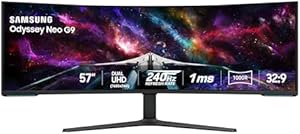
The Samsung is the other listing here that states DisplayPort 2.1, applied to a very different screen: a 57-inch dual UHD curved monitor described as wide as 2 UHD monitors. It states a 1000R curve, a Quantum Mini-LED panel, 240Hz, and a 1ms GTG response time. The stated figures show the cost of that width: 52.3 inches in width, 19.7 inches in length, and 41.9 pounds, the heaviest stated in this group.
Pros
- DisplayPort 2.1 input stated, with 240Hz and 1ms GTG
- 57-inch dual UHD screen described as wide as 2 UHD monitors
- Quantum Mini-LED panel with stated 1000R curve
Cons
- Widest and heaviest stated here at 52.3 inches and 41.9 pounds
- Dual UHD format is wider than a single 4K screen
| Spec | From the listing |
|---|---|
| Panel and size | 57-inch Quantum Mini-LED, dual UHD |
| Refresh and response | 240Hz, 1ms GTG |
| Length | 19.7 inches |
| Width | 52.3 inches |
| Weight | 41.9 pounds |
3. ViewSonic VX4381U-4K Monitor — Best for multitasking

Plainly stated, this monitor does not confirm the keyword connection: its listing states DisplayPort and HDMI 2.1 but no DisplayPort version, so DisplayPort 2.1 is not confirmed. What it states is a 43-inch 4K UHD screen at 3840 x 2160, HDR10 support, and USB-C supporting display, data, and up to 65W power. Its angle is multi-source work, with PIP and PBP stated for multiple compatible sources. Its stated width is 38.48 inches and its stated weight is 37.5 pounds.
Pros
- 43-inch screen at 3840 x 2160, the largest single 4K canvas here
- USB-C stated with display, data, and up to 65W power
- PIP and PBP stated for multiple compatible sources on one screen
Cons
- Listing states no DisplayPort version, so DisplayPort 2.1 is not confirmed
- No refresh rate or response time is stated in the listing
| Spec | From the listing |
|---|---|
| Panel and size | 43-inch, 3840 x 2160 |
| USB-C power | Up to 65W |
| Length | 13.6 inches |
| Width | 38.48 inches |
| Weight | 37.5 pounds |
4. LG UltraGear 27G850A-B IPS Monitor — Best for dual refresh modes

Plainly stated, the listing details supplied state no DisplayPort version at all, so DisplayPort 2.1 is not confirmed here either. Its angle is Dual Mode: the listing states 4K UHD at 3840 x 2160 and 240Hz, or Full HD at 480Hz, on a 27-inch Nano IPS Black panel with a 1ms GtG response time. It also states HDR 600, G-Sync compatibility, and FreeSync support. Its stated dimensions are 24.2 inches wide, 9.81 inches in length, and 22.91 inches in height, at 20.72 pounds.
Pros
- Dual Mode stated: 4K UHD 240Hz, Full HD 480Hz
- 27-inch Nano IPS Black at 3840 x 2160, 1ms GtG
- HDR 600 stated
Cons
- Listing supplied states no DisplayPort version, so DisplayPort 2.1 is not confirmed
- Heavier than both 26.5-inch models at 20.72 pounds stated
| Spec | From the listing |
|---|---|
| Panel and size | 27-inch Nano IPS Black, 3840 x 2160 |
| Refresh and response | 240Hz at 4K UHD, 480Hz in Full HD, 1ms GtG |
| Length | 9.81 inches |
| Width | 24.2 inches |
| Weight | 20.72 pounds |
5. Lenovo Legion Pro 27UD-10 OLED Monitor — Best for lightest stated weight

Plainly stated, this listing also does not confirm the keyword connection: it names HDMI 2.1 and states no DisplayPort 2.1 in the details supplied. What it states is a 26.5-inch QD-OLED panel at 3840 x 2160, 240Hz, a 0.03ms GtG response time, and True Black 400 HDR technology. Against the ASUS, which shares its stated size, resolution, refresh rate, and response time, it separates itself on weight: 13.89 pounds, the lightest stated. Its stated dimensions are 24.13 inches in length, 10.16 inches in width, and 19.88 inches in height, as given.
Pros
- 26.5-inch QD-OLED at 3840 x 2160, 240Hz, 0.03ms GtG
- Lightest stated weight here at 13.89 pounds
- True Black 400 HDR technology stated
Cons
- Listing supplied states no DisplayPort 2.1, so that connection is not confirmed
- No burn-in protection feature is stated, unlike the ASUS OLED Care Pro
| Spec | From the listing |
|---|---|
| Panel and size | 26.5-inch QD-OLED, 3840 x 2160 |
| Refresh and response | 240Hz, 0.03ms GtG |
| Length | 24.13 inches |
| Width | 10.16 inches |
| Weight | 13.89 pounds |
Shopping Checklist
Before choosing a finalist, work through these steps:
- Measure your desk, then compare its width and depth with each finalist’s stated figures.
- Check the stated connection details and confirm whether a DisplayPort version is named.
- Compare stated panel type, resolution, refresh rate, and response time side by side.
- Check stated weight against what your desk or mount is rated to hold.
- Check the return window on the product page.
FAQ
How can I tell which of these listings actually confirm DisplayPort 2.1?
Read the connection details in the listing itself rather than relying on the category or search phrase. Of these five, only the ASUS and the Samsung state DisplayPort 2.1 outright. The ViewSonic states DisplayPort with no version, and the LG and Lenovo listings state no DisplayPort 2.1, so those three are not confirmed.
Does a larger stated screen size always mean a better fit for work?
No, because the stated figures describe different shapes as well as sizes. The ViewSonic states a single 43-inch screen at 3840 x 2160 with PIP and PBP, while the Samsung states a 57-inch dual UHD screen described as wide as 2 UHD monitors. Compare stated width, resolution format, and multi-picture features together against the sources you plan to show at once.
What should I check if I switch between 4K detail and higher refresh rates?
Look for a stated dual-mode figure rather than assuming a monitor can trade resolution for refresh rate. Among these five, the LG listing states that trade explicitly, with 4K UHD at 240Hz or Full HD at 480Hz and a 1ms GtG response time. The other listings state a single refresh figure, so compare the mode you will use most.
Final Verdict
If confirmed DisplayPort 2.1 is the deciding factor, the choice narrows to two: the ASUS ROG PG27UCDM for a 26.5-inch QD-OLED screen, or the Samsung Odyssey Neo G9 for a 57-inch dual UHD curved screen. The ViewSonic offers the largest single 4K canvas, the LG a stated dual refresh mode, and the Lenovo the lightest stated weight with a QD-OLED panel. None of their listings supplied here confirms DisplayPort 2.1, so match the confirmed connection first, then stated size and weight to your desk.
Prime covers fast, free delivery on eligible items. See whether a Prime free trial is available for your account.
Check Prime on Amazon →Related Guides
No internal links were supplied for this post.
Product and ASIN Reference
| Product | ASIN |
|---|---|
| ASUS ROG PG27UCDM | B0DM6SHQTN |
| Samsung Odyssey Neo G9 | B0CDQM55C9 |
| ViewSonic VX4381U-4K | B0H337VCP4 |
| LG UltraGear 27G850A-B | B0DSTPTMNS |
| Lenovo Legion Pro 27UD-10 | B0FHL3KC13 |










Write Your Review
No reviews yet. Be the first to share your experience!