
If you need four drive bays for a home media library, choose the Yxk Zero1 Pro or the Asustor Drivestor 4 Gen 2, because they are the only two listings here with 4 bays; if you can work with 2 bays instead, consider the UGREEN, BUFFALO, and TERRAMASTER listings for their different processor, memory, and included-drive details. That split matters from the first paragraph, because three of the five supplied products do not match the core type in the keyword.
We compared the five listings on bay count first, then on stated capacity, RAID, processor, memory, and network ports. Each mismatch is also stated in its own section and in the comparison below.
As an Amazon Associate, we earn from qualifying purchases.

Pick by Your Need
- Best overall: Yxk Zero1 Pro. It combines 4 bays, an Intel N100 processor, and dual 2.5GbE ports in one listing.
- Best for RAID choice: Asustor Drivestor 4 Gen 2. Its listing states five RAID configurations across 4 bays.
- Best for file services: TERRAMASTER F2-212. Its listing names SMB, NFS, SFTP/FTP, AFP, iSCSI, and WebDAV.
- Best compact width: BUFFALO LinkStation 720. It is a 2-bay model listed at 3.6 inches wide, the narrowest stated width here.
- Best for M.2 slots: UGREEN NAS DXP2800. It is a 2-bay model whose listing states two M.2 NVMe slots alongside the drive bays.
Quick Answer
Choose the Yxk Zero1 Pro for 4 bays with 8GB of DDR4 RAM and two 2.5GbE ports, or the Asustor Drivestor 4 Gen 2 for 4 bays with the wider stated RAID list and Btrfs snapshots. Choose the UGREEN only if 2 bays plus two M.2 slots meet your needs.
Comparison Table
| Product | Best for | One key stated figure | One trade-off |
|---|---|---|---|
| Yxk Zero1 Pro | 4-bay media storage with dual networking | Up to 144TB from 4 x 32TB HDDs | Heaviest stated weight here at 7.84 pounds |
| Asustor Drivestor 4 Gen 2 | 4-bay storage with more RAID options | RAID 0, 1, 5, 6, and 10 stated | Listing states 1GB of memory, less than the Yxk and UGREEN listings |
| UGREEN NAS DXP2800 | 2-bay use with M.2 expansion | Up to 80TB from 2 HDD bays and 2 M.2 slots | Mismatch: this is a 2-bay NAS, not a 4-bay NAS |
| BUFFALO LinkStation 720 | Starting with drives already included | 4TB stated as 2 x 2TB drives | Mismatch: this is a 2-bay NAS, not a 4-bay NAS, and no weight is stated |
| TERRAMASTER F2-212 | 2-bay file services across platforms | 1.7GHz quad-core CPU with 1GB RAM | Mismatch: this is a 2-bay NAS, not a 4-bay NAS, and the listing states the RAM is not upgradeable |
Decision Guide
Start with bay count, because it cannot be changed by a setting. If you need 4 bays, your choice is between the Yxk Zero1 Pro at 9.2 inches long, 7.9 inches wide, and 6.3 inches high, and the Asustor Drivestor 4 Gen 2 at 6.5 inches long, 8.58 inches wide, and 6.46 inches high. Measure the space first, since the Yxk listing is longer while the Asustor listing is wider.
If you need the highest stated capacity, choose the Yxk, whose listing states up to 144TB using four 32TB HDDs. If you need more RAID configurations, choose the Asustor, whose listing states RAID 0, 1, 5, 6, and 10, compared with RAID 0, 1, or 5 on the Yxk. If you need Btrfs snapshots, the Asustor listing states that feature, while the Yxk listing states no equivalent.
If you need two network ports, choose the Yxk, whose listing states two 2.5GbE ports with link aggregation for compatible equipment. The Asustor and UGREEN listings each state 2.5GbE networking, but the UGREEN is a 2-bay model, so that choice means giving up two bays.
If you need drives included, choose the BUFFALO LinkStation 720, whose listing states 4TB as two 2TB drives. The Yxk and TERRAMASTER listings are described as diskless, so they state no included drive capacity. If you need M.2 NVMe slots, choose the UGREEN, whose listing states dual M.2 slots and up to 80TB, accepting 2 bays rather than 4.
If you need the widest stated list of file services, look at the TERRAMASTER F2-212, whose listing names SMB, NFS, SFTP/FTP, AFP, iSCSI, and WebDAV. Its listing also states 1GB of RAM that is not upgradeable, so check that limit before choosing it over a 4-bay model.
Check the product page for current details before ordering.
1. Yxk Zero1 Pro 4-Bay NAS — Best overall

This is a true 4-bay NAS, combining bay count, processor, and networking in one listing. The listing states an Intel N100 x86 processor, 8GB of DDR4 RAM, four SATA 3.0 bays, and up to 144TB using 4 x 32TB HDDs, plus a 4K HDMI connection. Compared with the Asustor, it states more memory and a second 2.5GbE port, while the Asustor states more RAID configurations.
Pros
- Four SATA 3.0 bays with RAID 0, 1, or 5 stated in the listing
- Two 2.5GbE ports stated, with link aggregation for compatible equipment
- Mobile app guided setup steps stated for first-time users and families
Cons
- Heaviest stated weight in this set at 7.84 pounds
- Listing states no Btrfs snapshot feature
| Spec | From the listing |
|---|---|
| Bays and capacity | 4 bays, up to 144TB from 4 x 32TB HDDs |
| Processor and memory | Intel N100, 8GB DDR4 RAM |
| Network | Two 2.5GbE ports |
| Dimensions | 9.2 x 7.9 x 6.3 inches |
| Weight | 7.84 pounds |
| Color | Black |
2. Asustor Drivestor 4 Gen 2 AS1204T — Best for RAID choice
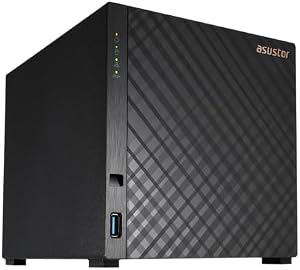
This is also a true 4-bay NAS, with an angle of protection and configuration choice rather than memory or port count. The listing states a Realtek RTD1619B 1.7GHz quad-core processor, 1GB of memory, 2.5-Gigabit Ethernet, and support for 4 hard drives. It also states Btrfs snapshots for restoring data to a previous point in time, and names 4K Plex media server use.
Pros
- Five RAID configurations stated: 0, 1, 5, 6, and 10
- Btrfs snapshots stated for restoring data to an earlier point
- 2.5-Gigabit Ethernet stated, above traditional Gigabit in the listing wording
Cons
- Listing states 1GB of memory, the joint lowest figure here
- Listing states no HDMI output
| Spec | From the listing |
|---|---|
| Bays and RAID | 4 bays, RAID 0, 1, 5, 6, 10 |
| Processor and memory | Realtek RTD1619B 1.7GHz quad-core, 1GB |
| Network | 2.5-Gigabit Ethernet |
| Dimensions | 6.5 x 8.58 x 6.46 inches |
| Weight | 3.53 pounds |
| Color | Black |
3. UGREEN NAS DXP2800 2-Bay — Best for M.2 slots
Plainly stated, this is a 2-bay NAS, not a 4-bay NAS, so it does not match the core type in the keyword. Its angle is a different layout: the listing states an Intel N100 quad-core CPU, 8GB of DDR5 RAM, 2.5GbE networking, and dual M.2 NVMe slots, with up to 80TB using two HDD bays and two M.2 slots. It also states Docker, virtual machine use, and AI photo management. Skip it if you need 4 drive bays.
Pros
- Two M.2 NVMe slots stated alongside the two HDD bays
- 8GB of DDR5 RAM stated, matching the highest memory figure here
- Docker and virtual machine use stated in the listing
Cons
- Only 2 bays, so it does not meet a 4-bay requirement
- Listing states no RAID configuration list
| Spec | From the listing |
|---|---|
| Bays and capacity | 2 HDD bays plus 2 M.2 slots, up to 80TB |
| Processor and memory | Intel N100 quad-core, 8GB DDR5 RAM |
| Network | 2.5GbE |
| Dimensions | 9.33 x 4.29 x 6.97 inches |
| Weight | 2.58 pounds |
| Color | Grey |
4. BUFFALO LinkStation 720 4TB — Best for included drives
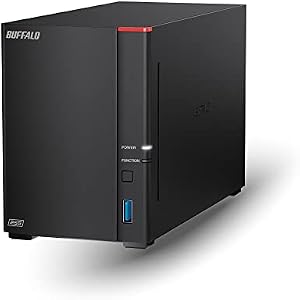
Plainly stated, this is a 2-bay NAS, not a 4-bay NAS, so it does not match the core type in the keyword. Its angle is that drives are included: the listing states 4TB as 2 x 2TB, while the Yxk and TERRAMASTER listings are described as diskless. The listing also states Windows and MacOS 26 compatibility, a closed system, and SSL encryption for file transfers.
Pros
- Drives included, stated as 4TB from two 2TB drives
- Windows and MacOS 26 compatibility stated in the listing
- SSL encryption for file transfers stated in the listing
Cons
- Only 2 bays, so it does not meet a 4-bay requirement
- No processor, memory, or network speed figure is stated in the listing details provided
| Spec | From the listing |
|---|---|
| Bays and capacity | 2 bays, 4TB as 2 x 2TB drives included |
| Processor | The listing does not state it |
| Network speed | The listing does not state it |
| Dimensions | 8.1 x 3.6 x 5.0 inches |
| Weight | The listing does not state it |
| Color | Black |
5. TERRAMASTER F2-212 2-Bay NAS — Best for file services

Plainly stated, this is a 2-bay NAS, not a 4-bay NAS, so it does not match the core type in the keyword. Its angle is the stated range of file services and backup options under the TOS 7 operating system named in the listing. The listing states an ARM v8 quad-core 1.7GHz CPU, 1GB of DDR4 RAM that is not upgradeable, and 4K video hardware decoding, at 8.74 inches long, 4.69 inches wide, and 6.06 inches high. Skip it if you need 4 drive bays.
Pros
- Six file services named: SMB, NFS, SFTP/FTP, AFP, iSCSI, and WebDAV
- 4K video hardware decoding capability stated in the listing
- Multiple permission management for users, groups, and folders stated
Cons
- Only 2 bays, so it does not meet a 4-bay requirement
- Listing states the 1GB RAM is not upgradeable
| Spec | From the listing |
|---|---|
| Bays | 2 bays, diskless |
| Processor and memory | ARM v8 quad-core 1.7GHz, 1GB DDR4 RAM, not upgradeable |
| Operating system | TOS 7 |
| Dimensions | 8.74 x 4.69 x 6.06 inches |
| Weight | 4.6 pounds |
| Color | 2-Bay, Quad-Core, F2-212 |
Shopping Checklist
- Measure the space first and compare it with each listing’s stated length, width, and height in inches.
- Confirm the bay count in writing: 4 bays on the Yxk and Asustor listings, 2 bays on the other three.
- Check the stated capacity, RAID list, and whether drives are included or the unit is diskless.
- Check the stated processor and memory figure.
- Check the stated network port count and speed, and the return window.
- Compare the finalists side by side on dimensions and weight where a weight is stated.
FAQ
How many of these listings are actually 4-bay models?
Two listings are 4-bay models: the Yxk Zero1 Pro and the Asustor Drivestor 4 Gen 2. The other three each state 2 bays, so treat them as alternatives only if 2 bays meet your needs.
Does a 2-bay model with M.2 slots equal a 4-bay model?
No, based on the listing details. The UGREEN listing states two HDD bays and two M.2 NVMe slots for up to 80TB, which is a different layout from four HDD bays.
What should I check first, capacity or RAID?
Check bay count first, then capacity, then RAID. The Yxk listing states up to 144TB and RAID 0, 1, or 5, while the Asustor listing states RAID 0, 1, 5, 6, and 10 across its 4 bays, so the fit depends on whether capacity or the longer RAID list matters more.
Final Verdict
For a true 4-bay home media setup, choose the Yxk Zero1 Pro for its stated 144TB capacity, 8GB of memory, and two 2.5GbE ports, or the Asustor Drivestor 4 Gen 2 for its five stated RAID configurations and Btrfs snapshots. The other three listings are 2-bay products and should be chosen only on that basis, with the BUFFALO standing out for drives included and the UGREEN for its two M.2 slots.
Prime covers fast, free delivery on eligible items. See whether a Prime free trial is available for your account.
Check Prime on Amazon →Related Guides
No internal links were supplied for this post, so this section lists none.
Product and ASIN Reference
| Product | ASIN |
|---|---|
| Yxk Zero1 Pro 4-Bay NAS | B0GF6JCQ4P |
| Asustor Drivestor 4 Gen 2 AS1204T | B0FTFVRQQ6 |
| UGREEN NAS DXP2800 | B0D22HBFK1 |
| BUFFALO LinkStation 720 4TB | B091DWPH4T |
| TERRAMASTER F2-212 | B0CCS5VFQF |










Write Your Review
No reviews yet. Be the first to share your experience!