
Pick the Z-Edge or the ZZA for the fastest stated refresh rate at 300Hz, the SANSUI for the widest stated color figures at 240Hz, the Sceptre if built-in speakers matter, and the ASUS TUF for its motion-blur features at 180Hz. All five listings describe a 27 inch curved gaming monitor, so the separation comes from refresh rate, curvature, color coverage, connection limits and weight, not screen size.
We compared the five listings on the figures each one states: two reach 300Hz, one reaches 240Hz and two reach 180Hz, and four use a 1500R curve while one uses a gentler 1800R curve. Where a listing leaves a fact out, this guide says so.
As an Amazon Associate, we earn from qualifying purchases.
Pick by Your Need
- Best overall: Z-Edge 27 inch Curved Gaming Monitor. It pairs the joint-fastest stated 300Hz rate with two DisplayPort connections supporting that full rate.
- Best for high-refresh play: ZZA 27 Inch Curved Computer Monitor. It also states 300Hz, on a VA panel with an 1800R curve.
- Best for color figures: SANSUI 27 Inch Curved 240Hz Gaming Monitor. Its listing states the widest color gamut figures of the five, with a 4000:1 contrast ratio.
- Best with speakers: Sceptre Curved 27-inch Prime Gaming Monitor. It is the only listing that states built-in speakers.
- Best for motion features: ASUS TUF Gaming VG27VQ3B. Its listing names ELMB Sync and Shadow Boost with a 1ms GTG response time.
Quick Answer
For most buyers, the Z-Edge is the starting point: it combines 300Hz, a 1500R curve and two DisplayPort connections rated for the full rate. Choose the SANSUI if stated color coverage matters more than the last step of refresh rate, and the Sceptre if you want stated built-in speakers.
Comparison Table
| Product | Best for | Key stated figure | Trade-off |
|---|---|---|---|
| Z-Edge 27 inch Curved Gaming Monitor | Full-rate DisplayPort play | 300Hz refresh rate | HDMI stated to support a maximum of 240Hz |
| Sceptre Curved 27-inch Prime Gaming Monitor | Built-in audio | 180Hz refresh rate | No weight stated |
| ZZA 27 Inch Curved Computer Monitor | 300Hz on a gentler curve | 1800R curvature | Port counts not stated |
| SANSUI 27 Inch Curved 240Hz Gaming Monitor | Stated color coverage | 240Hz refresh rate | No built-in speakers stated |
| ASUS TUF Gaming VG27VQ3B | Motion-blur features | 180Hz refresh rate | Conflict in the ASUS listing: the size field reads 14.4 x 24 x 3.1 inches, while the length, width and height fields read 21.0, 38.0 and 49.0 inches. |
Decision Guide
If you need the highest stated refresh rate, choose the Z-Edge or the ZZA: both state 300Hz, while the other three state 240Hz or 180Hz. The Z-Edge listing states two DisplayPort ports that each support up to 300Hz, while the ZZA listing names HDMI without stating a port count or per-port limit. Check the product page for current details before ordering.
If you need a specific curve, four listings state 1500R and only the ZZA states 1800R. A smaller radius number describes a tighter curve, so choose a 1500R model for the tighter wrap, or the ZZA for the gentler curve.
If color figures lead your choice, the SANSUI listing states the widest gamut figures, with a 4000:1 contrast ratio and 300 nits of brightness. The Z-Edge states a 3000:1 contrast ratio, the Sceptre and ASUS each state one gamut figure, and the ZZA states none.
If weight or mounting matters, the SANSUI is the lightest stated at 7.26 pounds and the ASUS the heaviest at 13.9 pounds; the Sceptre listing states no weight. Only the SANSUI states a VESA size, at 100 x 100mm. For sound, the Sceptre is the only listing stating built-in speakers, while the SANSUI names an audio jack and no built-in speakers.
Finally, one listing needs care on dimensions. Conflict in the ASUS listing: the size field reads 14.4 x 24 x 3.1 inches, while the length, width and height fields read 21.0, 38.0 and 49.0 inches. Because those fields disagree, do not plan desk space around any single ASUS dimension figure; the other four listings each state one consistent set, widths 14.0 to 24.4 inches, heights 17.6 to 20.0 inches.
1. Z-Edge 27 inch Curved Gaming Monitor — Best overall

The Z-Edge separates itself on connection detail: it shares 300Hz with the ZZA, but it is the only 300Hz listing that states which ports reach that rate. Its listing states two DisplayPort ports supporting up to 300Hz, dual HDMI ports supporting a maximum of 240Hz, a 1500R curve, an MPRT response time of 1ms and a 3000:1 contrast ratio on a 1080P panel. The stated footprint is 24.2 inches wide and 17.6 inches high, at 9.9 pounds.
Pros
- 300Hz stated refresh rate, tied for the highest here
- Two DisplayPort ports each stated to support 300Hz
- 3000:1 stated contrast ratio and 1ms MPRT response time
Cons
- HDMI stated to support a maximum of 240Hz, below the DisplayPort rate
- No built-in speakers are stated in the listing
| Spec | From the listing |
|---|---|
| Refresh rate | 300Hz |
| Response time | MPRT 1ms |
| Curvature | 1500R |
| Contrast ratio | 3000:1 |
| Weight | 9.9 pounds |
| Connections | Two DisplayPort ports, dual HDMI ports |
2. Sceptre Curved 27-inch Prime Gaming Monitor — Best with speakers

The Sceptre takes a different angle: its listing is the only one stating built-in speakers, and it names a Blue-Light Shift feature described as reducing blue light emissions. Its stated figures sit below the leaders, with a refresh rate overclocked to 180Hz, a 1ms BR response figure, a 1500R curve and a stated size of 27 inches. Connectivity is stated in full, with two HDMI ports and two DisplayPort connections providing up to 180Hz; the stated footprint is 24.4 inches wide and 17.9 inches high.
Pros
- Built-in speakers stated, the only listing that states them
- Two HDMI ports and two DisplayPort connections
- Blue-Light Shift feature named
Cons
- 180Hz stated refresh rate, tied for the lowest here
- The listing states no weight and no resolution figure
| Spec | From the listing |
|---|---|
| Refresh rate | 180Hz |
| Response time | 1ms BR |
| Curvature | 1500R |
| Color gamut | 100% sRGB |
| Speakers | Built-in speakers |
| Weight | The listing does not state it |
3. ZZA 27 Inch Curved Computer Monitor — Best for a gentler curve

The ZZA matches the Z-Edge on the headline figure, stating 300Hz and FHD 1080p, but differs on panel and curve: its listing states a VA panel and an 1800R curvature, the gentlest stated here, where the other four state 1500R. It is also the only listing stated in white rather than black, and it names HDR10 and AMD FreeSync. Its stated weight is 8.0 pounds, the second lightest stated, at a stated height of 20.0 inches. Skip it if you need a stated port count, because its listing names HDMI without stating how many ports it has.
Pros
- 300Hz stated refresh rate, tied for the highest here
- 1800R curvature stated, distinct from the other four at 1500R
- HDR10 and AMD FreeSync named
Cons
- Port counts and per-port limits are not stated
- White is the only color stated; the other listings state black
| Spec | From the listing |
|---|---|
| Refresh rate | 300Hz |
| Panel type | VA panel |
| Curvature | 1800R |
| Resolution | FHD 1080p |
| HDR | HDR10 |
| Weight | 8.0 pounds |
4. SANSUI 27 Inch Curved 240Hz Gaming Monitor — Best for color figures

The SANSUI sits between the refresh groups, stating 240Hz where two listings state 300Hz and two state 180Hz; its angle is stated color and setup detail. Its listing states a 1500R curve, an MPRT response time of 1ms, a 4000:1 contrast ratio, 300 nits of brightness and HDR, plus Black Level adjustment and a Crosshair feature. It is the only listing stating a VESA size, at 100 x 100mm, and a tilt range of -5 to 15 degrees, and at 7.26 pounds it is the lightest stated weight here, with a footprint of 24.13 inches by 17.84 inches.
Pros
- Widest stated color gamut figures of the five listings
- VESA 100 x 100mm and a -5 to 15 degree tilt range stated
- Lightest stated weight here at 7.26 pounds
Cons
- The listing states no built-in speakers, naming an audio jack instead
- 240Hz stated refresh rate, below the 300Hz of two listings here
| Spec | From the listing |
|---|---|
| Refresh rate | 240Hz |
| Curvature | 1500R |
| Contrast ratio | 4000:1 |
| Brightness | 300 nits |
| Color gamut | 130% sRGB, DCI-P3 95% |
| VESA size | 100 x 100mm |
5. ASUS TUF Gaming VG27VQ3B — Best for motion features
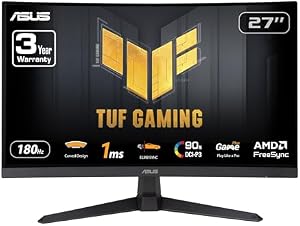
The ASUS takes the motion-feature angle: its listing names ELMB Sync, described as reducing ghosting and motion blur, alongside a 1ms GTG response time, FreeSync for variable refresh rate, and Shadow Boost, described as enhancing detail in dark areas. Its stated figures are a 27 inch Full HD panel at 1920 x 1080, a 1500R curve and a 180Hz refresh rate, tied with the Sceptre for the lowest here. At 13.9 pounds it is the heaviest stated weight here. Conflict in the ASUS listing: the size field reads 14.4 x 24 x 3.1 inches, while the length, width and height fields read 21.0, 38.0 and 49.0 inches. Skip it if you need one settled set of dimensions, because those fields do not agree.
Pros
- ELMB Sync and Shadow Boost both named
- 1ms GTG response time stated
- Resolution stated at 1920 x 1080
Cons
- 180Hz stated refresh rate, tied for the lowest here
- Heaviest stated weight here at 13.9 pounds
| Spec | From the listing |
|---|---|
| Resolution | 1920 x 1080 |
| Refresh rate | 180Hz |
| Curvature | 1500R |
| Response time | 1ms GTG |
| Color gamut | 90% DCI-P3 |
| Motion feature | ELMB Sync |
Shopping Checklist
Work through the stated figures, not the headline rate alone.
- Measure your desk, then compare each finalist’s stated width and height.
- Check the stated refresh rate against your connection, since one listing caps HDMI below DisplayPort.
- Check stated curvature, panel type and color figures, noting gaps.
- Check the stated weight and VESA size before planning a mount.
- Check the return window on the product page, then compare finalists side by side.
FAQ
Does a higher stated refresh rate change which connection I should use?
It can. The Z-Edge listing states that its DisplayPort ports support up to 300Hz while its HDMI ports support a maximum of 240Hz, so reaching its top rate depends on the port you choose. The Sceptre states up to 180Hz across both connection types, and the ZZA states no per-port limits.
How do the 1500R and 1800R curves differ in these listings?
Four listings state 1500R and one, the ZZA, states 1800R. The smaller radius number describes the tighter curve, so the 1500R models carry the tighter stated wrap and the ZZA the gentler one. No listing states a viewing distance, so compare the radius figures themselves.
What should I check if a listing leaves a figure out?
Treat the gap as part of the comparison. The Sceptre states no weight, the ZZA states no port count, and only the SANSUI states a VESA size, so a plan depending on those figures rests on stated ground for some models only.
Final Verdict
On the stated figures, the Z-Edge is the most complete package here, pairing 300Hz with two DisplayPort connections rated for that full rate and a stated 3000:1 contrast ratio. The ZZA matches its refresh rate on a gentler 1800R VA panel, while the SANSUI trades a step of rate for the widest stated color figures and the only stated VESA size. The Sceptre is the choice when stated built-in speakers matter most, and the ASUS suits buyers who want ELMB Sync and Shadow Boost. Compare stated weights, port limits and gaps first.
Prime covers fast, free delivery on eligible items. See whether a Prime free trial is available for your account.
Check Prime on Amazon →Related Guides
No internal links were supplied for this post, so this section has no links.
Product and ASIN Reference
| Product | ASIN |
|---|---|
| Z-Edge 27 inch Curved Gaming Monitor | B0DXKZZF9B |
| Sceptre Curved 27-inch Prime Gaming Monitor | B0H5FJXKRG |
| ZZA 27 Inch Curved Computer Monitor | B0H831FVTH |
| SANSUI 27 Inch Curved 240Hz Gaming Monitor | B0F2T7QWQN |
| ASUS TUF Gaming VG27VQ3B | B0CV2H4179 |










Write Your Review
No reviews yet. Be the first to share your experience!