
Pick a true stick-and-throttle pair first: the Logitech G X56 and Turtle Beach VelocityOne pair a stick with a separate throttle unit, the two Thrustmaster T-Flight models detach for flexible placement, and the Thrustmaster TCA Sidestick Airbus Edition is a single sidestick with a built-in throttle axis, not a separate throttle. Four give you two units for separate hands, while one concentrates everything into a single 0.48-pound stick.
Platform narrows the field quickly. The Hotas One and VelocityOne cover Xbox as well as PC, while the other three are listed for PC. Counts spread widely, from 5 axes and 12 buttons on the Hotas X to 15 axes and 73 inputs on the VelocityOne.
As an Amazon Associate, we earn from qualifying purchases.



Pick by Your Need
- Best overall: Logitech G X56 H.O.T.A.S. It pairs twin throttles and a 4-spring stick system with more than 189 programmable controls.
- Best for simpler PC setups: Thrustmaster T-Flight Hotas X. It covers the core layout with 12 buttons and 5 axes.
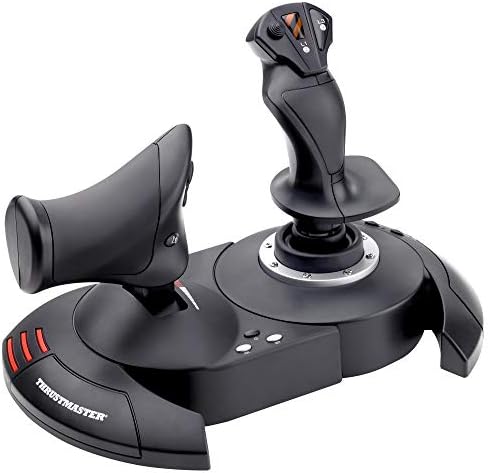
- Best for Xbox and PC: Thrustmaster T-Flight Hotas One. Listed for Xbox Series X|S and PC, with 14 buttons and a detachable throttle.
- Best for Airbus-style flying: Thrustmaster TCA Sidestick Airbus Edition. A 1:1 scale A320 replica with built-in throttle axis and thrust reverser.
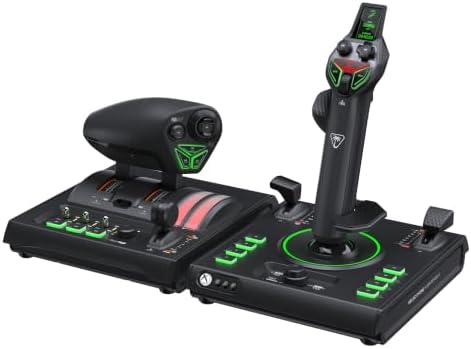
- Best for the most axes: Turtle Beach VelocityOne H.O.T.A.S. It lists 15 axes and 73 inputs, plus a full-color display.
Quick Answer
For most PC pilots, the Logitech G X56 is the most complete package here, with twin throttles and more than 189 programmable controls. Xbox players should look at the T-Flight Hotas One or the VelocityOne, the only two listed for console as well as PC. Choose the TCA Sidestick only if a single Airbus-style stick with a built-in throttle axis fits your flying.
Comparison Table
| Product | Best for | Key spec from the listing | Trade-off | Buy |
|---|---|---|---|---|
| Logitech G X56 H.O.T.A.S | Twin-throttle PC setups | 189+ programmable controls, 4 springs, 2 m cable | Heaviest here at 5.07 pounds, PC only | View on Amazon |
| Thrustmaster T-Flight Hotas X | Simpler PC layouts | 12 buttons, 5 axes, detachable throttle | Fewest buttons and axes here | View on Amazon |
| Thrustmaster T-Flight Hotas One | Xbox and PC | 14 buttons, detachable throttle, dual rudder | Listed size 20.47 x 11.42 x 22.24 inches, far larger than others | View on Amazon |
| Thrustmaster TCA Sidestick Airbus Edition | Airbus-style PC flying | 17 action buttons, 12 remappable, 4 head modules | No separate throttle; built-in axis only | View on Amazon |
| Turtle Beach VelocityOne H.O.T.A.S | Maximum axes and inputs | 15 axes, 73 inputs, dual throttle | No cable length given, unlike the X56 at 2 m | View on Amazon |
Decision Guide
Start with platform. On Xbox Series X|S, only the Hotas One and VelocityOne are listed, and the VelocityOne also lists Xbox One. On PC, all five remain in play, and the X56 states a requirement covering Windows 11, 10, 8.1, and 7 with 2 USB 2.0 ports, so check for two free ports first.
Next, decide how the throttle should work. Twin throttles appear on the X56, with friction adjuster and throttle lock, and on the VelocityOne, with swappable dual detents. The two T-Flight models use a single detachable throttle, joined or split. The TCA Sidestick differs: its throttle is one axis in the stick base, with a thrust reverser, giving up the separate left-hand lever the other four provide.
Then count controls. The VelocityOne lists 15 axes against 5 on the Hotas X, and 73 inputs against 12 buttons on the Hotas X, 14 on the Hotas One, and 17 on the TCA Sidestick. The X56 tops the group with more than 189 programmable controls. More inputs help in function-heavy simulators, but mean more setup time.
Finally, weigh size. The X56 is heaviest at 5.07 pounds, then the Hotas X at 4.32, the Hotas One at 3.62, and the VelocityOne at 3.09; the TCA Sidestick is an outlier at 0.48 pounds. Footprints are closer, except the Hotas One at a listed 20.47 x 11.42 x 22.24 inches, so check the product page if that footprint matters.
1. Logitech G X56 H.O.T.A.S — Best Overall
The X56 is the only model here combining twin throttles with more than 189 programmable controls, and its stick adds a mini analog stick alongside pitch, roll, and yaw. Its aileron and elevator axis is 16-bit with hall-effect sensors, and adjustable stick force comes from a 4-spring system none of the other four offer. At 5.07 pounds, it is the heaviest here, and it needs 2 USB ports with a 2 m cable.
| Spec | From the listing |
|---|---|
| Color | Black |
| Length | 7.28 inches |
| Width | 8.86 inches |
| Height | 10.43 inches |
| Weight | 5.07 pounds |
The trade-off is capacity against ports and weight. Skip it if you fly on Xbox, since no console support is listed.
2. Thrustmaster T-Flight Hotas X — Best Simple PC Option
The Hotas X keeps the count small, with 12 programmable buttons and 5 axes against 14 buttons on the Hotas One and 73 inputs on the VelocityOne. Its throttle detaches, a feature it shares only with the Hotas One, and dual rudder control works through handle rotation or a progressive tilting lever. It weighs 4.32 pounds and measures 10.43 x 10.0 x 9.47 inches, wider than the X56 at 8.86 inches wide, despite having far fewer controls.
| Spec | From the listing |
|---|---|
| Color | Black |
| Length | 10.43 inches |
| Width | 10.0 inches |
| Height | 9.47 inches |
| Weight | 4.32 pounds |
The trade-off is simplicity against headroom: 12 buttons and 5 axes cover a basic layout, but function-heavy simulators will run out of controls sooner than on the other four.
3. Thrustmaster T-Flight Hotas One — Best for Xbox and PC
The Hotas One is 1 of only 2 models here listed for Xbox Series X|S as well as PC, with official licensing. It offers 14 programmable buttons, 2 more than the Hotas X, plus a trigger, hat switch, and dual rudder control, and its throttle detaches for desk or lap placement. It weighs 3.62 pounds, but its listed dimensions of 20.47 x 11.42 x 22.24 inches are much larger than every other model here, so confirm that footprint.
| Spec | From the listing |
|---|---|
| Color | Black |
| Length | 20.47 inches |
| Width | 11.42 inches |
| Height | 22.24 inches |
| Weight | 3.62 pounds |
The trade-off is cross-platform reach against stated size. Skip it if your setup is PC only and space is tight, because the Hotas X covers a similar layout in smaller dimensions.
4. Thrustmaster TCA Sidestick Airbus Edition — Best for Airbus-Style Flying
An honest flag: the TCA Sidestick is stick-only, with a built-in throttle axis, not a stick paired with a separate throttle. It offers a 1:1 scale A320 sidestick replica, 17 action buttons with braille-style identification, 12 remappable buttons, and 4 swappable head modules. Its contactless magnetic sensor is described as drift-free, its twist handle handles rudder control, and at 0.48 pounds it weighs a fraction of the 3.09 to 5.07 pounds the two-unit models list.
| Spec | From the listing |
|---|---|
| Color | Black |
| Length | 8.86 inches |
| Width | 8.46 inches |
| Height | 10.43 inches |
| Weight | 0.48 pounds |
The trade-off is authenticity against throttle hardware: Airbus flyers gain the replica layout and reverser, but anyone wanting a physical left-hand lever should choose another model.
5. Turtle Beach VelocityOne H.O.T.A.S — Best for the Most Axes
The VelocityOne lists 15 Hall-Effect axes, three times the 5 axes of the Hotas X, alongside 73 programmable inputs. Its Flightstick II uses 16-bit Hall-Effect sensors, matching the X56 figure, and its dual throttle uses swappable detents with adjustable resistance and stick tension. A full-color display shows real-time flight data, a feature none of the other four list. It weighs 3.09 pounds in a 7.48 x 8.19 x 9.92 inch frame and covers Xbox Series X|S, Xbox One, and PC.
| Spec | From the listing |
|---|---|
| Color | Black |
| Length | 7.48 inches |
| Width | 8.19 inches |
| Height | 9.92 inches |
| Weight | 3.09 pounds |
The trade-off is axes and display against mapping volume: it leads on axes, but the X56 offers far more controls if raw input count matters more.
Buying Checklist
- Confirm platform: Xbox Series X|S appears only for the Hotas One and VelocityOne, which also lists Xbox One.
- Count USB ports, since the X56 states a requirement for 2 USB 2.0 ports.
- Measure your desk against listed dimensions, especially the Hotas One at 20.47 x 11.42 x 22.24 inches.
- Decide between twin throttles, a detachable throttle, and a built-in axis before comparing counts.
- Check rudder pedal plans, since only the Hotas One names compatibility with a separate pedal set.
- Compare 2 or 3 finalists on axes and inputs, then check the return window on the product page.
FAQ
Does every option here include a separate throttle?
No. Four pair a stick with a separate throttle unit, and the two T-Flight models let it detach. The TCA Sidestick Airbus Edition is the exception: a single stick with a built-in throttle axis and thrust reverser, so there is no second unit.
Which of these work on Xbox as well as PC?
The Hotas One is listed for Xbox Series X|S and PC, and the VelocityOne for Xbox Series X|S, Xbox One, and PC. The other three are listed for PC only, so console players should start with those two.
How many controls should you look for?
It depends on how much you map to hardware. Counts range from 12 buttons and 5 axes on the Hotas X to 73 inputs and 15 axes on the VelocityOne, with the X56 listing 189+ controls. Start from your simulator’s most-used functions, then pick a model whose count covers them.
Final Verdict
We compared these five on platform, throttle design, axes, and controls, and the X56 stands out for PC pilots wanting twin throttles and the largest mapping capacity. The VelocityOne is stronger when axes, a display, and Xbox support matter more, while the Hotas One covers console and PC in a detachable layout. The Hotas X suits a simpler desk, and the TCA Sidestick serves Airbus-style flying well, if you accept a built-in throttle.
Prime covers fast, free delivery on eligible items. See whether a Prime free trial is available for your account.
Check Prime on Amazon →Related Guides
- Best Rudder Pedals for Flight Simulator Setups
- Best Joystick for Flight Simulator on PC
- Best Gaming Desk Accessories for a Sim Cockpit
- Best USB Controllers for PC Gaming
Product and ASIN Reference
| Product | ASIN | Buy |
|---|---|---|
| Logitech G X56 H.O.T.A.S Throttle and Joystick Flight Simulator – Black | B079P6SSHP | View on Amazon |
| Thrustmaster T-Flight Hotas X USB Flight Sim Stick & Throttle – PC | B001CXYMFS | View on Amazon |
| Thrustmaster T-Flight Hotas One Flight Stick & Throttle – XBOX & PC | B07643TW2V | View on Amazon |
| Thrustmaster TCA Sidestick Airbus Edition Flight Sim Joystick – PC | B0873QXDQT | View on Amazon |
| Turtle Beach VelocityOne H.O.T.A.S. Flight Sim Controls XBOX, PC | B0H8PZH1P3 | View on Amazon |







Write Your Review
No reviews yet. Be the first to share your experience!