
Pick the Samsung or KOORUI for a 32 inch 4K panel, the INNOCN for 4K in a smaller 27 inch frame, the Redragon for 27 inch QHD, and the LG for a 34 inch curved ultrawide. All five listings state 240Hz, a 0.03ms response time, and an OLED panel, so the choice comes down to size, resolution, dimensions, weight, sync support, and ports.
We compared the five listings on those stated points. Two models are 32 inch 4K designs, two are 27 inch designs at different resolutions, and one is a 34 inch WQHD ultrawide with a stated 800R curve.
As an Amazon Associate, we earn from qualifying purchases.
Pick by Your Need
- Best overall: Samsung Odyssey QD-OLED G8. It pairs a 32 inch 4K panel with 240Hz and the lightest weight of the three listings that state one.
- Best for 4K connectivity: KOORUI 32 inch 4K OLED. Its listing names HDMI 2.1, DisplayPort 1.4, USB Type-C, and USB-A/B ports.
- Best compact 4K: INNOCN GA27W1Q. It states 4K resolution on a 27 inch panel that is 24.06 inches wide.
- Best for QHD: Redragon GM27. It is the only 27 inch QHD model here, at 2560×1440, with 240Hz stated.
- Best ultrawide: LG UltraGear 34GX900A-B. Its listing states a 34 inch 21:9 curved WQHD OLED panel.
Quick Answer
For most buyers, the Samsung Odyssey QD-OLED G8 and the KOORUI 32 inch model are the main 4K picks, both at 32 inches and 240Hz. Choose the INNOCN GA27W1Q for 4K on a narrower 27 inch frame, and the LG UltraGear for a 34 inch curved ultrawide layout.
Comparison Table
| Product | Best for | Key stated figure | Trade-off |
|---|---|---|---|
| Samsung Odyssey QD-OLED G8 | 32 inch 4K gaming | 32 inch size, 28.33 inches wide | No USB Type-C port is stated |
| KOORUI 32 inch 4K OLED | 4K with USB Type-C | 32 inch size, 25.65 pounds stated weight | Heaviest stated weight of the five |
| INNOCN GA27W1Q | Compact 4K | 27 inch size, 24.06 inches wide | No weight is stated in the listing |
| Redragon GM27 | 27 inch QHD | 2560×1440 resolution, 27 inch size | Lower stated resolution than the three 4K models |
| LG UltraGear 34GX900A-B | Curved ultrawide | 34 inch size, 800R curve stated | Widest stated footprint at 30.9 inches wide |
Decision Guide
If you need 4K on the largest square-format screen here, choose one of the two 32 inch models. The Samsung measures 28.33 inches wide and 10.37 inches long, at 18.51 pounds stated. The KOORUI measures 28.3 inches wide and 8.89 inches long, at 25.65 pounds stated. That weight gap is their clearest practical difference, so check it against what your desk or mount is listed to hold.
If you need 4K in less desk width, choose the INNOCN GA27W1Q. Its stated width is 24.06 inches, 4.27 inches narrower than the Samsung, and its stated height is 13.9 inches. No weight is stated for the INNOCN.
If you need a 27 inch screen but do not need 4K, choose the Redragon GM27. Its listing states QHD at 2560×1440 rather than 3840×2160, and it names tilt adjustment only, while the KOORUI listing names tilt, swivel, pivot, and height adjustment.
If you need a wider field in a single panel, choose the LG UltraGear. The listing states a 21:9 aspect ratio, a 34 inch size, and an 800R curve, with overall dimensions of 30.9 inches wide, 22.9 inches high, and 11.5 inches long. That 11.5 inch length is the largest stated length of the five.
If sync support decides it, the Samsung and LG listings name FreeSync and G-Sync compatibility, the INNOCN listing names G-SYNC compatibility and VRR, the KOORUI listing names Adaptive Sync, and the Redragon listing names FreeSync. Match the stated sync type to the graphics card you plan to connect.
Check the product page for current details before ordering.
1. Samsung Odyssey QD-OLED G8 — Best overall

This 32 inch Samsung pairs 4K resolution with a 240Hz refresh rate and a 0.03ms GtG response time, and its listing also states DisplayHDR True Black 400 and Glare Free technology. Compared with the KOORUI at the same 32 inch size, the Samsung has the lower stated weight, 18.51 pounds against 25.65 pounds, and a longer stated length, 10.37 inches against 8.89 inches. Its stated overall size is 28.33 inches wide and 23.01 inches high, so it needs a similar desk width to the KOORUI while weighing less on paper.
Pros
- 32 inch 4K QD-OLED panel stated with 240Hz and 0.03ms GtG
- Lightest stated weight of the three listings that state a weight, at 18.51 pounds
- FreeSync and G-Sync compatibility both named in the listing
Cons
- No USB Type-C port is stated in the listing
- Silver is the only colour stated, unlike the black options from KOORUI, Redragon, and LG
| Spec | From the listing |
|---|---|
| Colour | Silver |
| Size | 32 inch |
| Length | 10.37 inches |
| Width | 28.33 inches |
| Height | 23.01 inches |
| Weight | 18.51 pounds |
2. KOORUI 32 inch 4K OLED — Best for 4K connectivity

The KOORUI matches the Samsung on headline figures: a 32 inch 4K UHD panel, 240Hz, and 0.03ms stated. Its listing separates it on connections and stand movement: dual HDMI 2.1, DisplayPort 1.4, Type-C, and USB-A/B ports are named, and tilt from -5 to 20 degrees, swivel from -20 to 20 degrees, pivot of plus or minus 90 degrees, and height adjustment of 110mm are stated, with VESA 100x100mm compatibility. Its dimensions are 28.3 inches wide, 23.3 inches high, and 8.89 inches long, at 25.65 pounds, the heaviest stated weight here. Skip it if that weight exceeds what your desk or mount is listed to hold.
Pros
- Dual HDMI 2.1, DisplayPort 1.4, Type-C, and USB-A/B ports named
- Tilt, swivel, pivot, and 110mm height adjustment all stated
- HDR True Black 400 and a 1500000:1 contrast ratio stated
Cons
- Heaviest stated weight of the five, at 25.65 pounds
- Only Adaptive Sync is named, with no G-Sync compatibility stated
| Spec | From the listing |
|---|---|
| Colour | Black |
| Size | 32 inch |
| Length | 8.89 inches |
| Width | 28.3 inches |
| Height | 23.3 inches |
| Weight | 25.65 pounds |
3. INNOCN GA27W1Q — Best compact 4K

The INNOCN is the smaller 4K option, stating a 27 inch panel at 3840 x 2160, 240Hz, and 0.03ms. Its listing states a contrast ratio of 1,500,000:1 and 1.07B colours at 10 bit, and it names 2 DisplayPort, 2 HDMI, and 1 3.5mm audio jack, plus support for connecting USB C devices. Its dimensions are 24.06 inches wide, 13.9 inches high, and 2.0 inches long, the shortest stated length and narrowest width of the five. No weight is stated.
Pros
- 4K at 3840 x 2160 on a narrower 27 inch, 24.06 inch wide frame
- 2 DisplayPort and 2 HDMI connections stated
- G-SYNC compatibility and VRR both named in the listing
Cons
- No weight is stated in the listing
- Shortest stated height of the five, at 13.9 inches, with no stand adjustment range stated
| Spec | From the listing |
|---|---|
| Colour | White |
| Size | 27 inch |
| Length | 2.0 inches |
| Width | 24.06 inches |
| Height | 13.9 inches |
| Weight | The listing does not state it |
4. Redragon GM27 OLED — Best for QHD

The Redragon takes a different route from the three 4K models, stating a 27 inch OLED panel at QHD 2560×1440 with a 240Hz refresh rate and a 0.03ms GTG response time. Its listing states a contrast ratio of 15000:1, a figure that differs in scale from the 1,500,000:1 ratios stated for the KOORUI and INNOCN listings, so the numbers should be read as each listing states them rather than merged. The listing names FreeSync, HDR10, and tilt adjustment, and it gives dimensions of 30.7 inches wide, 18.9 inches high, and 7.08 inches long. That stated width is wider than the stated widths of the two 32 inch models, so check it against your desk, and no weight is stated in the listing.
Pros
- 27 inch QHD at 2560×1440 with 240Hz and 0.03ms GTG stated
- FreeSync and HDR10 both named in the listing
- Tilt adjustment stated in the listing
Cons
- Lower stated resolution than the 4K models, at 2560×1440
- No weight is stated, and its stated width of 30.7 inches is the second widest here
| Spec | From the listing |
|---|---|
| Colour | Black |
| Size | 27 inch |
| Length | 7.08 inches |
| Width | 30.7 inches |
| Height | 18.9 inches |
| Weight | The listing does not state it |
5. LG UltraGear 34GX900A-B — Best ultrawide
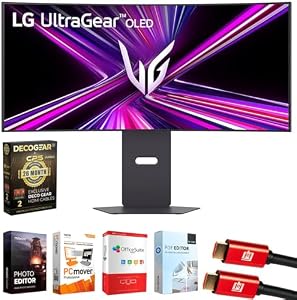
The LG is the only ultrawide and the only curved model in this group, stating a 34 inch WQHD OLED panel with a 21:9 aspect ratio, an 800R curve, a 240Hz refresh rate, and a 0.03ms GtG response time. Its listing names FreeSync and G-SYNC compatibility, DisplayHDR, and a bundle that includes 2 HDMI cables and extended protection stated as 26 months in addition to the included manufacturer protection. Its stated dimensions are 30.9 inches wide, 22.9 inches high, and 11.5 inches long, with a stated weight of 22.9 pounds, and the 30.9 inch width and 11.5 inch length are both the largest stated figures of their kind in this group, so this model asks for the most desk space on paper. Skip it if your measured desk width is under 30.9 inches.
Pros
- Only 34 inch, 21:9 curved model here, with an 800R curve stated
- FreeSync and NVIDIA G-SYNC compatibility both named
- 2 HDMI cables stated as included in the bundle
Cons
- Largest stated width at 30.9 inches and largest stated length at 11.5 inches
- WQHD resolution stated rather than the 4K stated for three other models
| Spec | From the listing |
|---|---|
| Colour | Black |
| Size | 34 inch |
| Length | 11.5 inches |
| Width | 30.9 inches |
| Height | 22.9 inches |
| Weight | 22.9 pounds |
Shopping Checklist
Use this list before choosing:
- Measure your desk width and depth against the stated width and length for each finalist.
- Check the stated resolution, 3840×2160 or 2560×1440 or WQHD, against the output your computer or console is listed to support.
- Check the stated stand adjustments and VESA size, where a listing gives one, against your mounting plan.
- Check the stated ports against the cables and devices you need to connect.
- Check the return window on the product page before ordering.
- Compare the finalists side by side on size, weight, and sync support using only the figures each listing states.
FAQ
Is 240Hz stated for all five monitors here?
Yes. Based on the listing details, each listing states 240Hz and a 0.03ms response time. The differences are size, resolution, dimensions, weight where stated, sync support, and ports.
Should I choose 4K or QHD from these listings?
Choose 4K if the stated 3840×2160 resolution matters, which the Samsung, KOORUI, and INNOCN listings offer. Choose QHD if 2560×1440 or WQHD is sufficient, as the Redragon and LG listings state, noting the LG adds a 34 inch 21:9 curved format.
What should I measure before ordering one of these monitors?
Measure desk width and depth first, then compare them with the stated width and length for your finalist, which range from 24.06 inches to 30.9 inches wide here. Also check the stated weight where one is given: the three that state one range from 18.51 pounds to 25.65 pounds.
Final Verdict
All five listings state an OLED panel, 240Hz, and 0.03ms, so the decision rests on format and stated measurements. The Samsung and KOORUI suit buyers who want 32 inch 4K, the Samsung stating the lower weight and the KOORUI the wider port and stand list. The INNOCN suits a narrower desk that still needs 4K, the Redragon suits 27 inch QHD, and the LG suits a curved 34 inch ultrawide layout.
Prime covers fast, free delivery on eligible items. See whether a Prime free trial is available for your account.
Check Prime on Amazon →Related Guides
No internal links were supplied for this post, so this section contains no links.
Product and ASIN Reference
| Product | ASIN |
|---|---|
| Samsung Odyssey QD-OLED G8 | B0DY2YQ439 |
| KOORUI 32 inch 4K OLED | B0F8MXBB4S |
| INNOCN GA27W1Q | B0FJ2G1T68 |
| Redragon GM27 | B0DSKGJ2C3 |
| LG UltraGear 34GX900A-B | B0FR2NWHPH |










Write Your Review
No reviews yet. Be the first to share your experience!