
If you want the sharpest image in this group, choose one of the four 4K QD-OLED models; if you want a 27 inch 240Hz monitor at QHD resolution instead, choose the LG UltraGear OLED. All five listings state 240Hz and a 0.03ms response time, so the real differences are resolution, panel technology, stated color figures, connectivity, physical size, and burn-in protection.
We compared only the listing details supplied for these five monitors. Four use QD-OLED panels at 4K, three stating 3840 x 2160, while the LG uses OLED at QHD 1440p. Two listings describe a 26.5-inch panel in a 27-inch class product, and one states no weight, so the sections below note missing figures rather than filling them in.
As an Amazon Associate, we earn from qualifying purchases.
Pick by Your Need
- Best overall: ASUS ROG PG27UCDM. It pairs 4K QD-OLED with DisplayPort 2.1 and a proximity sensor for burn-in protection.
- Best for color work: MSI MAG 272UP QD-OLED X24. Its listing states 1.07 billion colors and Delta E ≤2 accuracy.
- Best for QHD gaming: LG 27GS95QE UltraGear OLED. It is the only QHD 1440p model here, at 240Hz with 0.03ms.
- Best for a bright room: Samsung Odyssey OLED LS27FG810SNXZA. Its listing states a Glare Free feature for daylight rooms.
- Best for multiple devices: INNOCN GA27W1Q. Its listing states 2 DisplayPort, 2 HDMI, and a 3.5mm audio jack.
Quick Answer
For most buyers, the ASUS ROG PG27UCDM and the MSI MAG 272UP QD-OLED X24 are the main picks, because both state 4K, 240Hz, and 0.03ms on a QD-OLED panel. Choose the LG 27GS95QE if you want QHD 1440p rather than 4K, and the INNOCN GA27W1Q if the stated port count matters most.
Comparison Table
| Product | Best for | Key stated figure | Trade-off |
|---|---|---|---|
| ASUS ROG PG27UCDM | 4K QD-OLED with DisplayPort 2.1 | 26.5-inch panel, 3840 x 2160 | Panel is stated as 26.5 inches, not a full 27 inches |
| MSI MAG 272UP QD-OLED X24 | Stated color accuracy | 26.5-inch panel, 3840 x 2160 | Heaviest stated weight in this group at 22.6 pounds |
| LG 27GS95QE | QHD gaming | 27 inches, QHD 1440p | Lower stated resolution than the four 4K models |
| Samsung Odyssey OLED LS27FG810SNXZA | Use in daylight | 27 inches, 4K | Listing states DisplayHDR 400, without the True Black wording used by others |
| INNOCN GA27W1Q | Connecting several devices | 27 inches, 3840 x 2160 | No weight is stated in the listing |
Decision Guide
Start with resolution. If you need 3840 x 2160, choose the ASUS, MSI, or INNOCN, since each states that figure, while the Samsung states 4K without giving that pixel figure. If you need QHD 1440p, choose the LG, the only listing that states it. All five state 240Hz and 0.03ms, so those figures do not separate the group.
Next, check panel size and desk fit. The ASUS and MSI listings state a 26.5-inch panel, while the other three state 27 inches. Widths run from 23.8 inches on the LG to 24.1 inches on the Samsung, heights from 13.9 inches on the INNOCN to 22.6 inches on the LG, and depths from 2.0 inches to 10.4 inches.
For weight, the Samsung is the lightest stated at 15.2 pounds, then the LG at 16.2 pounds and the ASUS at 16.8 pounds, with the MSI the heaviest stated at 22.6 pounds; the INNOCN states no weight. The MSI also states a 4-way adjustable stand with VESA 100mm.
For color, the MSI and INNOCN listings state 1.07 billion colors and a DCI-P3 figure, and the LG, MSI, and INNOCN listings state a 1,500,000:1 contrast ratio. The INNOCN gives the most complete stated port count, while the ASUS names DisplayPort 2.1 without a full count. Check the product page for current details before ordering.
1. ASUS ROG PG27UCDM — Best overall
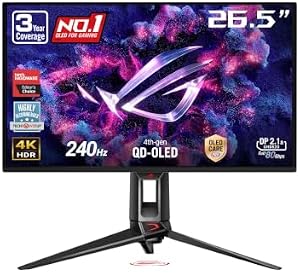
This ASUS model stands apart for the combination its listing states: a 26.5-inch 4K QD-OLED panel at 3840 x 2160, a 240Hz refresh rate, a 0.03ms response time, and DisplayPort 2.1. The listing also describes 4th-gen QD-OLED technology, a custom heatsink, and OLED Anti-Flicker 2.0. Against the other four, it is the only listing that names a proximity sensor that switches to a black screen when the user is away.
Pros
- 4K QD-OLED panel stated at 3840 x 2160 with 240Hz and 0.03ms
- DisplayPort 2.1 named in the listing
- OLED Care Pro with Neo Proximity Sensor stated for burn-in protection
Cons
- Panel is stated as 26.5 inches, not a full 27 inches
- No contrast ratio is stated in the supplied listing facts
| Spec | From the listing |
|---|---|
| Panel size | 26.5 inches |
| Resolution | 3840 x 2160 |
| Refresh rate / response time | 240Hz / 0.03ms |
| Dimensions | 8.6 x 24.0 x 21.6 inches |
| Weight | 16.8 pounds |
| Color | BLACK |
2. MSI MAG 272UP QD-OLED X24 — Best for color work

The MSI listing gives the most detailed color figures here: a 26.5-inch UHD QD-OLED panel at 3840 x 2160, 10-bit color with 1.07 billion colors, a stated DCI-P3 figure, and Delta E ≤2 accuracy. It also states 240Hz, a 0.03ms response time, a VESA ClearMR 13000 rating, and DisplayHDR True Black 400 with a 1,500,000:1 contrast ratio. At 22.6 pounds it is the heaviest stated monitor here, and the only listing that states a 4-way adjustable stand with VESA 100mm.
Pros
- 10-bit color stated with 1.07 billion colors and Delta E ≤2
- DisplayHDR True Black 400 and 1,500,000:1 contrast ratio stated
- 4-way adjustable stand with VESA 100mm stated in the listing
Cons
- Heaviest stated weight in this group at 22.6 pounds
- Panel is stated as 26.5 inches, not a full 27 inches
| Spec | From the listing |
|---|---|
| Panel size | 26.5 inches |
| Resolution | 3840 x 2160 |
| Refresh rate / response time | 240Hz / 0.03ms (GtG) |
| Color | 1.07 billion colors (10-bit), 99% DCI-P3 |
| Dimensions | 9.5 x 24.0 x 20.9 inches |
| Weight | 22.6 pounds |
3. LG 27GS95QE UltraGear OLED — Best for QHD gaming

This LG model is the outlier on resolution: its listing states a 27-inch OLED panel at QHD 1440p, while three other listings state 3840 x 2160 and the Samsung states 4K. It still states a 240Hz refresh rate and a 0.03ms response time, plus DisplayHDR True Black 400 and a 1,500,000:1 contrast ratio. Its stated footprint is the tallest here at 22.6 inches in height, with a width of 23.8 inches, a depth of 10.2 inches, and a weight of 16.2 pounds. Skip it if you need a stated 4K resolution, because this listing states QHD instead.
Pros
- Only QHD 1440p listing in this group, for buyers who want that resolution
- 240Hz and 0.03ms stated on an OLED panel
- DisplayHDR True Black 400 and 1,500,000:1 contrast ratio stated
Cons
- Resolution is stated as QHD 1440p, lower than the 4K listings
- Tallest stated height in this group at 22.6 inches
| Spec | From the listing |
|---|---|
| Panel size | 27 inches |
| Resolution | QHD 1440p |
| Refresh rate / response time | 240Hz / 0.03ms (GtG) |
| Contrast ratio | 1,500,000:1 |
| Dimensions | 10.2 x 23.8 x 22.6 inches |
| Weight | 16.2 pounds |
4. Samsung Odyssey OLED LS27FG810SNXZA — Best for a bright room

The Samsung listing leads with two points the others do not state in the same way: a Glare Free feature for rooms where daylight is entering, and a bundle with a protection extension alongside a stated manufacturer warranty period. The panel is stated as a 27-inch QD-OLED at 4K, with 240Hz, a 0.03ms response time, and VESA DisplayHDR 400. At 15.2 pounds it is the lightest stated monitor here, with dimensions of 10.4 x 24.1 x 21.8 inches, in Silver.
Pros
- Glare Free feature stated for use when daylight is entering the room
- Lightest stated weight in this group at 15.2 pounds
- Dynamic Cooling System with Thermal Modulation System stated in the listing
Cons
- Listing states DisplayHDR 400, without the True Black wording used by the LG and MSI listings
- Deepest stated depth in this group at 10.4 inches
| Spec | From the listing |
|---|---|
| Panel size | 27 inches |
| Resolution | 4K |
| Refresh rate / response time | 240Hz / 0.03ms |
| Color | Silver |
| Dimensions | 10.4 x 24.1 x 21.8 inches |
| Weight | 15.2 pounds |
5. INNOCN GA27W1Q — Best for multiple devices

The INNOCN listing states the clearest connectivity count here: 2 DisplayPort inputs, 2 HDMI inputs, and 1 3.5mm audio jack, plus HDMI 2.1 and VRR support. Its panel is stated as a 27-inch 4K UHD QD-OLED at 3840 x 2160, with a 240Hz refresh rate, a 0.03ms response time, a stated DCI-P3 figure, a 1,500,000:1 contrast ratio, and 1.07 billion colors at 10 bit. Its stated dimensions are 2.0 inches in depth, 24.06 inches in width, and 13.9 inches in height, in White, and the listing states no weight. Skip it if a stated weight matters for your setup, because no weight figure is given.
Pros
- Stated port count of 2 DisplayPort, 2 HDMI, and 1 audio jack
- 4K QD-OLED stated at 3840 x 2160 with 240Hz and 0.03ms
- MAC-VIEW modes stated for adjusting Mac visuals through the on-screen display
Cons
- No weight is stated in the listing
- No named burn-in care system is stated in the supplied listing facts
| Spec | From the listing |
|---|---|
| Panel size | 27 inches |
| Resolution | 3840 x 2160 |
| Refresh rate / response time | 240Hz / 0.03ms |
| Color gamut / contrast | 99% DCI-P3 / 1,500,000:1 |
| Dimensions | 2.0 x 24.06 x 13.9 inches |
| Weight | The listing does not state it |
Shopping Checklist
Work through these steps against the listing figures above:
- Measure your desk, then compare it with each finalist’s stated width, depth, and height figures.
- Confirm the resolution you need, 3840 x 2160 or QHD 1440p, and check that the listing states it.
- Check the stated panel size wording, 26.5 inches or 27 inches, not just the product class name.
- Check the stated weight where one is given, and note where no weight is stated.
- Check the stated ports and sync support against the devices you plan to connect.
- Check the return window on the product page, and compare your finalists side by side.
FAQ
Is a 27 inch 240Hz monitor always a 27-inch panel?
No. The LG, Samsung, and INNOCN listings state 27 inches, while the ASUS and MSI listings state a 26.5-inch panel in a 27-inch class product. Read the panel size figure as written, and compare it with the stated overall width and height before you decide.
Should I choose 4K or QHD at this size and refresh rate?
Choose based on the resolution figure the listing states. Four listings here state 4K, three giving 3840 x 2160 as the pixel figure, while the LG listing states QHD 1440p. All five state 240Hz and 0.03ms, so resolution is the stated difference to weigh, not refresh rate.
What should I check about burn-in protection before buying an OLED monitor?
Check whether the listing names a protection system and what it states that system does. The ASUS listing describes a sensor that switches to a black screen when the user is away, the MSI listing describes OLED Care 2.0, and the Samsung listing describes a cooling system that adjusts brightness. Where no named system is stated, treat that detail as unstated rather than assuming it is included.
Final Verdict
We compared five 27 inch 240Hz monitors: four state 4K QD-OLED panels and one, the LG, states QHD OLED. Pick the ASUS ROG PG27UCDM for DisplayPort 2.1 and its stated proximity sensor, the MSI MAG 272UP QD-OLED X24 for its stated color figures and adjustable stand, or the INNOCN GA27W1Q for its stated port count. Pick the Samsung Odyssey OLED for its stated Glare Free feature and lightest stated weight, keeping the missing INNOCN weight in view as you compare them.
Prime covers fast, free delivery on eligible items. See whether a Prime free trial is available for your account.
Check Prime on Amazon →Related Guides
No internal links were supplied for this post, so this section lists none.
Product and ASIN Reference
| Product | ASIN |
|---|---|
| ASUS ROG PG27UCDM | B0DM6SHQTN |
| MSI MAG 272UP QD-OLED X24 | B0FTZVBX84 |
| LG 27GS95QE | B0CSGWXVBN |
| Samsung Odyssey OLED LS27FG810SNXZA | B0FG3HMG9V |
| INNOCN GA27W1Q | B0FJ2G1T68 |










Write Your Review
No reviews yet. Be the first to share your experience!