
Pick the GAZOGJ arm first if you want the widest adjustment range in this set, since it swivels from -90 to +90 degrees, rotates a full 360 degrees, and tilts from -55 to +55 degrees. It also carries the highest stated load limit here at 9 kg, and it mounts either a laptop from 12 to 17 inches on its tray or a monitor from 17 to 32 inches without the tray. For a two-screen desk, the JOMRTS dual arm is the only mount in this group that holds a monitor and a laptop at the same time.
This set is uneven in a useful way, so it pays to read the numbers before choosing. Two of the five listings are the same DL-MD30LP stand sold under two different brands, and both give almost no figures beyond a 400 mm height adjustment. One listing is a clamp-on shelf rather than an arm mount at all, which suits a different job. The sections below lay out what each listing actually states, where the figures conflict, and which desk each one fits.
As an Amazon Associate, we earn from qualifying purchases.

Pick by Your Need
- Best overall: GAZOGJ Dual Laptop and Monitor Arm. It covers laptops from 12 to 17 inches and monitors from 17 to 32 inches with a stated load limit of 9 kg.
- Best simple clamp stand: UBEERNVX DL-MD30LP Clamp Stand. It adjusts to 400 mm in height and fits laptops from 10 to 15 inches.
- Best dual-screen setup: JOMRTS Dual Monitor and Laptop Mount. It holds a monitor up to 17.6 lbs and a laptop up to 9.9 lbs on one clamp base.
- Best extra desk space: Generic 29.5-Inch Clamp-On Desk Shelf. Its 75 x 25 cm shelf clamps to the desk edge and supports up to 10 kg.
- Best same-stand alternative: TUNNRLFF DL-MD30LP Clamp Stand. It is the same DL-MD30LP stand under a second brand, so compare both listings before you pick one.
Quick Answer
Choose the GAZOGJ arm for the widest range of motion and the highest stated load limit, and choose the JOMRTS dual arm if you want a monitor and a laptop on one mount. The two DL-MD30LP stands are the same product under two brands, and the Generic shelf adds surface space rather than holding a screen at eye level.
Comparison Table
| Product | Best for | Key figures from the listing | Trade-off |
|---|---|---|---|
| GAZOGJ Dual Laptop and Monitor Arm | Widest adjustment range | 9 kg load limit; 18.3-inch max extension; 23.6-inch max height | Extension figures conflict between inches and millimetres |
| UBEERNVX DL-MD30LP Clamp Stand | Simple clamp stand | 400 mm height adjustment; 10-15 inch laptop; 10-27 inch monitor | Almost no figures given beyond height and size ranges |
| JOMRTS Dual Monitor and Laptop Mount | Monitor plus laptop on one mount | Monitor 17-32 inch up to 17.6 lbs; laptop 10-15.6 inch up to 9.9 lbs | Laptop side tops out at 15.6 inches |
| Generic 29.5-Inch Clamp-On Desk Shelf | Extra desk surface | 75 x 25 cm shelf; supports up to 10 kg | A shelf, not an arm mount, so it does not raise a screen |
| TUNNRLFF DL-MD30LP Clamp Stand | Same stand, second brand | 400 mm height adjustment; 10-15 inch laptop; 10-27 inch monitor | Identical to the UBEERNVX listing, with the same gaps |
Decision Guide
Start with what sits on the stand. If your laptop measures 16 or 17 inches across, the GAZOGJ arm is the only mount here that states support for a laptop that large, with a tray for laptops from 12 to 17 inches and a stated load limit of 9 kg. If your laptop is 15.6 inches or smaller, the JOMRTS dual arm also fits it, with a stated laptop load limit of 9.9 lbs, and the two DL-MD30LP stands cover laptops from 10 to 15 inches. Measure your laptop first, then match the number to the range the listing states, because none of these listings give a clamp opening measurement you can check against your desk edge.
Next, decide whether a monitor joins the setup. The JOMRTS mount is the only product here built to hold a monitor and a laptop together, with a monitor side rated for screens from 17 to 32 inches up to 17.6 lbs and VESA holes of 75 x 75 mm or 100 x 100 mm. The GAZOGJ arm holds one screen at a time: a laptop on its tray, or a monitor from 17 to 32 inches without the tray, on the same VESA patterns. The two DL-MD30LP stands also list a monitor range of 10 to 27 inches, but they give no load limit and no VESA figure, so a heavier monitor is a guess rather than a match.
Then weigh how much movement matters. The GAZOGJ arm gives the most adjustment in this set: swivel from -90 to +90 degrees, a full 360-degree rotation, tilt from -55 to +55 degrees, a maximum extension of 18.3 inches, and a maximum height of 23.6 inches from the desk. One caution applies here: the listing pairs that 18.3-inch extension figure with 560 mm in parentheses, and 560 mm converts to about 22 inches, so the two figures do not agree, and you should check the product page before relying on either number. The JOMRTS arm uses a mechanical spring with four axes that rotate on their own, and it switches between horizontal and vertical screen orientation across a full 360 degrees. The DL-MD30LP stands rotate, but the listings give no angles, no tilt range, and no extension figure.
Finally, consider the shelf for a different problem. The Generic clamp-on shelf does not lift a screen, tilt, or swivel; it adds a 75 x 25 cm surface at the back of the desk and supports up to 10 kg, which suits a monitor base, a printer, or office supplies. If your desk feels crowded rather than too low, the shelf is the better fit. If your neck and posture are the problem, pick an arm that raises the screen, since the shelf keeps everything at desk height.
1. GAZOGJ Dual Laptop and Monitor Arm — Best overall
This is the most adjustable mount in the set, and it is also the only one that offers two ways to fix it to the desk: a clamp base or a grommet base, with a stated maximum weight of 9 kg, given as 19.8 lbs in the listing. It lifts a laptop from 12 to 17 inches on its tray, or a monitor from 17 to 32 inches without the tray, on VESA patterns of 75 x 75 mm or 100 x 100 mm. Its arm swivels from -90 to +90 degrees, rotates a full 360 degrees, and tilts from -55 to +55 degrees, with a maximum extension of 18.3 inches and a maximum height of 23.6 inches from the desk to the centre of the mount. The trade-off sits in the extension figures: the listing pairs 18.3 inches with 560 mm, and 560 mm converts to about 22 inches, so the two numbers conflict and you should check the product page before planning your reach.
Pros
- Highest stated load limit in this set at 9 kg, given as 19.8 lbs.
- Widest adjustment range: swivel -90 to +90 degrees, rotate 360 degrees, tilt -55 to +55 degrees.
- Two mounting options, clamp base or grommet base, plus a tray for laptops from 12 to 17 inches.
Cons
- Extension figures conflict, since 18.3 inches and 560 mm do not match.
- Holds one screen at a time, so a monitor and a laptop cannot sit on it together.
| Spec | From the listing |
|---|---|
| Mounting options | Clamp base or grommet base |
| Laptop size range | 12-17 inches with tray |
| Monitor size range | 17-32 inches without tray |
| VESA pattern | 75 x 75 mm or 100 x 100 mm |
| Maximum load | 9 kg (19.8 lbs) |
| Colour | The listing does not state it |
2. UBEERNVX DL-MD30LP Clamp Stand — Best simple clamp stand
This stand keeps its listing short: it is the DL-MD30LP, a metal stand with a long arm clamp, height adjustment up to 400 mm, a laptop range of 10 to 15 inches, and a monitor range of 10 to 27 inches. The 400 mm height figure is the only adjustment number the listing gives, and the rotating design is stated without any angle, tilt range, or extension measurement. Its size range is narrower than the GAZOGJ arm on both sides, since it tops out at a 15-inch laptop and a 27-inch monitor, and its listing gives no load limit at all. Skip it if you need a stated weight limit or a stated reach figure, because this listing provides neither, and you would be guessing about both.
Pros
- Height adjusts up to 400 mm, the only adjustment number the listing states.
- Metal build with a long arm clamp for desk-edge mounting.
- Covers both a 10-15 inch laptop and a 10-27 inch monitor in one listing.
Cons
- No load limit is given in the listing.
- No tilt, swivel, or extension figures are given.
| Spec | From the listing |
|---|---|
| Height adjustment | 400 mm |
| Laptop size range | 10-15 inches |
| Monitor size range | 10-27 inches |
| Colour | One Color |
| Size | One Size |
| Maximum load | The listing does not state it |
3. JOMRTS Dual Monitor and Laptop Mount — Best dual-screen setup

This is the only mount in the set that holds a monitor and a laptop on the same base, and it states a separate limit for each side: monitors from 17 to 32 inches up to 17.6 lbs, and laptops from 10 to 15.6 inches up to 9.9 lbs. Each screen uses a VESA rear mounting hole of 75 x 75 mm or 100 x 100 mm, and the mount fixes to the desk with a clamp, while its mechanical spring damping lets the arms hover freely, the four axes rotate on their own to find a viewing angle, and the screen switches between horizontal and vertical orientation across a full 360 degrees. The listing says the monitor installs in 3 seconds with a latch, the arm inserts and screws in place, and one person can complete the install. The trade-off is the laptop ceiling: a 17-inch laptop is too large for this mount, since its laptop side tops out at 15.6 inches and 9.9 lbs.
Pros
- Only mount here that holds a monitor and a laptop at the same time.
- Monitor side rated to 17.6 lbs for screens from 17 to 32 inches.
- Mechanical spring with four independently rotating axes and 360-degree screen orientation.
Cons
- Laptop side tops out at 15.6 inches and 9.9 lbs, so larger laptops do not fit.
- No maximum height or extension figure is given in the listing.
| Spec | From the listing |
|---|---|
| Monitor size range | 17-32 inches |
| Monitor load limit | 17.6 lbs |
| Laptop size range | 10-15.6 inches |
| Laptop load limit | 9.9 lbs |
| VESA pattern | 75 x 75 mm or 100 x 100 mm |
| Colour | The listing does not state it |
4. Generic 29.5-Inch Clamp-On Desk Shelf — Best extra desk space
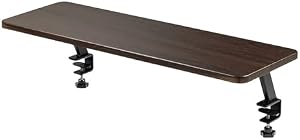
This product is a clamp-on shelf, not an arm mount, so it solves a different problem from the other four products here: it adds surface rather than raising a screen. The shelf measures 75 x 25 cm, which the listing gives as a 29.5-inch shelf, and it clamps to the edge of the desk with hand tightening and supports up to 10 kg. The clamp can face away from the shelf to free extra space, and the listing gives a 13.2 cm figure tied to the organizer section of the unit, while its stated load limit of 10 kg is the highest in this set, slightly above the 9 kg limit of the GAZOGJ arm. Skip it if you want a screen raised to eye level, because this shelf has no arm, no tilt, and no swivel, and everything placed on it stays at the height of the shelf itself.
Pros
- Highest stated load limit in this set at 10 kg.
- 75 x 25 cm surface adds room for a monitor base, printer, or supplies.
- Clamp tightens by hand and can face away from the shelf for extra space.
Cons
- A shelf, not an arm mount, so it does not raise or angle a screen.
- No tilt, swivel, or height adjustment is given in the listing.
| Spec | From the listing |
|---|---|
| Shelf size | 75 x 25 cm |
| Maximum load | 10 kg |
| Organizer figure | 13.2 cm |
| Colour | Brown |
| Mounting | Clamp with hand tightening |
| Material | The listing does not state it |
5. TUNNRLFF DL-MD30LP Clamp Stand — Best same-stand alternative

This listing is the same DL-MD30LP stand as the UBEERNVX product above, sold under the TUNNRLFF brand, and the two listings match line for line. It gives the same 400 mm height adjustment, the same laptop range of 10 to 15 inches, the same monitor range of 10 to 27 inches, and the same long arm clamp in metal, with the same colour and size values of One Color and One Size. Nothing in the listing separates it from its twin: no extra figure, no different range, and no load limit in either listing. The trade-off is the same as its twin, since the listing gives no weight limit, no tilt or swivel angle, and no extension figure, so a heavier laptop or a precise reach requirement cannot be checked against any stated number, and you should compare the two listings side by side before choosing, because the product is the same and only the brand name on the listing changes.
Pros
- Height adjusts up to 400 mm, matching the UBEERNVX listing exactly.
- Metal build with a long arm clamp for desk-edge mounting.
- Covers both a 10-15 inch laptop and a 10-27 inch monitor in one listing.
Cons
- Identical to the UBEERNVX listing, so it adds no new figures or features.
- No load limit is given in the listing.
| Spec | From the listing |
|---|---|
| Height adjustment | 400 mm |
| Laptop size range | 10-15 inches |
| Monitor size range | 10-27 inches |
| Colour | One Color |
| Size | One Size |
| Maximum load | The listing does not state it |
Buying Checklist
- Measure your laptop across the screen and weigh it, then match both numbers to the size range and load limit the listing states.
- Measure the thickness of your desk edge and confirm the clamp fits it, since none of these listings give a clamp opening measurement.
- Check the VESA pattern on the back of your monitor, 75 x 75 mm or 100 x 100 mm, before choosing a mount that holds a monitor.
- Compare the stated reach and height figures with your desk depth and your seated eye level, and check the product page where the GAZOGJ extension figures conflict.
- If you are choosing between the two DL-MD30LP listings, compare them side by side, since they describe the same stand under two brands.
- Check the return window on the product page before ordering, in case the clamp or the fit does not suit your desk.
FAQ
Can a clamp stand hold a 17-inch laptop?
Yes, but only one mount here states support for it: the GAZOGJ arm takes laptops from 12 to 17 inches on its tray with a stated load limit of 9 kg. The JOMRTS mount tops out at a 15.6-inch laptop up to 9.9 lbs, and both DL-MD30LP stands cover laptops from 10 to 15 inches only.
What should I check before clamping a stand to my desk?
Measure the thickness of your desk edge and the depth of the surface, then confirm the clamp style suits it, since none of these listings state a clamp opening measurement. Also weigh your laptop and check the stated load limit, because the two DL-MD30LP listings give no load limit at all.
Are the two DL-MD30LP stands the same product?
Yes, they are the same stand under two brands: both listings give the model number DL-MD30LP, a 400 mm height adjustment, a 10-15 inch laptop range, and a 10-27 inch monitor range. Compare the two listings before you pick one, since the product details match and only the brand name differs.
Final Verdict
The GAZOGJ arm is the strongest pick in this set, with the highest stated load limit at 9 kg, the widest adjustment range, and two mounting options. The JOMRTS dual arm is the pick for a monitor and a laptop together, as long as the laptop is 15.6 inches or smaller. The two DL-MD30LP stands are the same product under two brands and suit a simple setup, while the Generic shelf is the right choice when the desk needs more surface rather than a raised screen.
Prime covers fast, free delivery on eligible items. See whether a Prime free trial is available for your account.
Check Prime on Amazon →Related Guides
- Best Laptop Stand with Cooling Fans
- Best Laptop Riser with Storage Drawer
- Best Laptop Standing Desk Portable
- Best Laptop Holder for Lap


Write Your Review
No reviews yet. Be the first to share your experience!