
If you want a screen that drops from the ceiling for movie night and rolls away when you finish, pick the 120-inch motorized Kayle for push-button use, the 100-inch VIVOHOME for a manual pull-down at a mid size, or the 80-inch ZENY for a smaller room. Each screen here mounts to a wall or a ceiling and retracts when not in use, so your wall stays clear between viewings.
Sizes run from 80 inches to 120 inches, all in 16:9, with manual pull-down models and one motorized model. The choice comes down to size, viewing angle, gain, and how you want the screen to move, so measure your ceiling space and your seating distance before you pick one.
As an Amazon Associate, we earn from qualifying purchases.


Pick by Your Need
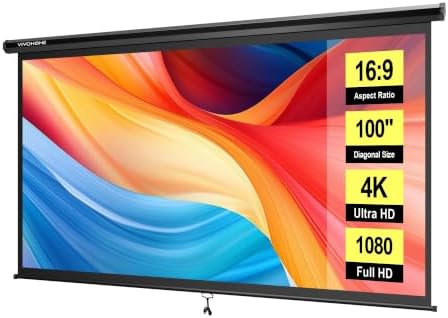
- Best overall: Kayle 120-Inch Motorized Screen. It retracts with a wireless remote and covers a 120-inch 16:9 area.
- Best manual 100-inch: VIVOHOME 100-Inch Pull-Down Screen in Black. It holds any height with a self-locking mechanism and spans 87 by 49 inches of viewing area.
- Best for smaller rooms: ZENY 80-Inch Manual Screen. Its 80-inch diagonal fits bedrooms and compact living rooms.
- Best wide viewing angle: MageScreen 120-Inch Manual Screen. It lists a 175-degree viewing angle with 1.2 gain.
- Best white casing: VIVOHOME 100-Inch Pull-Down Screen in White. It matches the black model in size and adds a white casing.
Quick Answer
Start with the Kayle 120-inch motorized screen if you want remote control, or the VIVOHOME 100-inch manual screen if a pull-down suits your room. The MageScreen 120-inch manual model adds the widest viewing angle among the manual screens at 175 degrees, while the ZENY 80-inch model fits the smallest rooms.
Comparison Table
| Product | Best for | Key data from the listing | Trade-off | Buy |
|---|---|---|---|---|
| VIVOHOME 100-Inch Black | Manual mid-size screen | 100 in, 87 x 49 in viewing area, 160 degrees, 13.0 lb | Manual pull-down only | View on Amazon |
| ZENY 80-Inch | Smaller rooms | 80 in, 16:9, three-layer PVC, 18.0 lb | Smallest screen; heaviest stated weight here | View on Amazon |
| MageScreen 120-Inch | Wide viewing angle | 120 in, 1.2 gain, 175 degrees, auto-lock | Weight not stated | View on Amazon |
| Kayle 120-Inch Motorized | Push-button use | 120 in, 1.2 gain, 180 degrees, RF remote | Weight not stated | View on Amazon |
| VIVOHOME 100-Inch White | White casing | 100 in, 87 x 49 in, 160 degrees, 13.0 lb | Manual pull-down only | View on Amazon |
Decision Guide
Size comes first. The ZENY at 80 inches suits a bedroom or a compact living room, the two VIVOHOME models at 100 inches suit a mid-size living room, and the MageScreen and Kayle at 120 inches suit a larger room with a longer throw. Check the overall width as well as the diagonal: the VIVOHOME models measure 92.09 inches wide overall, the ZENY measures 90.3 inches wide, the MageScreen measures 107.7 inches wide, and the Kayle measures 116.53 inches wide.
If you want the screen to move without pulling a cord, choose the Kayle, the only motorized model here, with a wireless RF remote and a detachable 3-way wall switch. If a manual pull-down suits you, the VIVOHOME models use a self-locking mechanism that holds the screen at any height, and the MageScreen uses a multi-position auto-lock with a lanyard tug to retract.
Viewing angle separates the three larger models. The VIVOHOME models list 160 degrees, the MageScreen lists 175 degrees, and the Kayle lists 180 degrees, so the Kayle covers the widest seating spread. Gain is 1.2 on both the MageScreen and the Kayle; neither the VIVOHOME models nor the ZENY list a gain figure. Weight also matters for a ceiling mount: the VIVOHOME models weigh 13.0 pounds each, the ZENY weighs 18.0 pounds, and the MageScreen and Kayle give no weight figure in the listing.
1. VIVOHOME 100-Inch Pull-Down Screen in Black — Best manual 100-inch pick
This screen gives a 100-inch diagonal display area of 87 by 49 inches in 16:9, with an overall size of 92 by 57.5 inches, and the listing places the best viewing distance at 9.2 feet. Its manual retractable design uses a self-locking mechanism that holds the screen at any height, and it mounts to a wall or a ceiling with a roll-up design for storage. The matte white surface supports 3D, 1080P, 4K, 8K, and Full HD images with a 160-degree viewing angle.
| Spec | From the listing |
|---|---|
| Size | 100 inch diagonal, 16:9 |
| Viewing area | 87 x 49 inches |
| Overall size | 92 x 57.5 inches |
| Viewing angle | 160 degrees |
| Weight | 13.0 pounds |
| Colour | Black |
2. ZENY 80-Inch Manual Pull-Down Screen — Best for smaller rooms
This screen gives an 80-inch diagonal in 16:9 for bedrooms, apartments, and compact home theaters, where a 100-inch or 120-inch screen would crowd the wall. Its three-layer PVC polyester surface is matte white with a black backing that helps reduce light penetration, and black borders frame the picture. The manual retractable design needs no power connection, and it mounts to a wall or a ceiling, then retracts to keep the room neat.
| Spec | From the listing |
|---|---|
| Size | 80 inch, 16:9 |
| Surface | Three-layer PVC polyester, matte white |
| Mount | Wall or ceiling |
| Overall width | 90.3 inches |
| Overall height | 60.2 inches |
| Weight | 18.0 pounds |
3. MageScreen 120-Inch Manual Projector Screen — Best wide-angle manual screen
This screen gives a 120-inch diagonal in 16:9 with matte white vinyl at 1.2 gain and a 175-degree viewing angle, the widest angle among the manual models here. Its black-backed fabric helps prevent light penetration, and four-sided black masking borders frame the picture. The pull-down mechanism uses a multi-position auto-lock, and a gentle tug on the lanyard retracts it into the metal housing, with heavy-duty brackets for wall or ceiling mounting.
| Spec | From the listing |
|---|---|
| Size | 120 inch, 16:9 |
| Gain | 1.2 |
| Viewing angle | 175 degrees |
| Surface | Matte white vinyl, black-backed |
| Mount | Wall or ceiling |
| Weight | The listing does not state it |
4. Kayle 120-Inch Motorized Projector Screen — Best motorized screen
This screen is the only motorized model in this set, with a synchronous motor, wireless RF remotes, and a detachable 3-way wall switch, so it lowers and retracts without a pull cord. It gives a 120-inch diagonal in 16:9 with a 180-degree viewing angle and 1.2 gain on a three-layer black-backed surface, and it is ready for 4K Ultra HD and Active 3D projection. It arrives fully assembled in a metal casing with an installation kit for wall or ceiling mounting.
| Spec | From the listing |
|---|---|
| Size | 120 inch, 16:9 |
| Gain | 1.2 |
| Viewing angle | 180 degrees |
| Motor | Synchronous motor, RF remote, 3-way wall switch |
| Casing | Metal |
| Weight | The listing does not state it |
5. VIVOHOME 100-Inch Pull-Down Screen in White — Best white-casing 100-inch screen
This screen matches the black VIVOHOME model in size, with a 100-inch diagonal display area of 87 by 49 inches in 16:9 and an overall size of 92 by 57.5 inches, and the listing places the best viewing distance at 9.2 feet. Its manual retractable design uses the same self-locking mechanism that holds the screen at any height, and it mounts to a wall or a ceiling. The matte white surface supports 3D, 1080P, 4K, 8K, and Full HD images with a 160-degree viewing angle, and its white finish matches light-coloured ceilings.
| Spec | From the listing |
|---|---|
| Size | 100 inch diagonal, 16:9 |
| Viewing area | 87 x 49 inches |
| Overall size | 92 x 57.5 inches |
| Viewing angle | 160 degrees |
| Weight | 13.0 pounds |
| Colour | White |
Buying Checklist
- Measure the ceiling or wall width first and check the stated overall width of the screen
- Check the stated diagonal size and viewing area against your seating distance
- Check the stated viewing angle and gain for seats off to the side
- Check whether the screen is manual or motorized, and whether it needs a power outlet
- Compare 2 to 3 finalists side by side and check the return window on the product page
FAQ
What size retractable ceiling projector screen fits my room?
Measure the wall or ceiling width first, then check the stated overall width, not just the diagonal. The VIVOHOME models measure 92.09 inches wide overall, the ZENY measures 90.3 inches wide, the MageScreen measures 107.7 inches wide, and the Kayle measures 116.53 inches wide, so a 120-inch diagonal needs far more width than a 100-inch one.
Should I pick a manual or a motorized screen?
Pick a manual screen if you want a simple pull-down with no power connection, such as the VIVOHOME models with a self-locking mechanism or the MageScreen with its auto-lock. Pick the motorized Kayle if you want the screen to lower and retract with a wireless remote or a wall switch, and check that a power outlet sits near the mount.
What do viewing angle and gain mean for a projector screen?
Viewing angle states how far off to the side the picture stays visible, and the screens here list 160 degrees, 175 degrees, and 180 degrees. Gain states how much light the surface returns toward the viewer, and the MageScreen and Kayle both list 1.2 gain, while the VIVOHOME models and the ZENY list no gain figure.
Final Verdict
For most rooms, the Kayle 120-inch motorized screen is the simplest choice, since it lowers and retracts with a remote, while the VIVOHOME 100-inch manual screens suit a mid-size room with a straightforward pull-down. The MageScreen 120-inch manual model suits a wider seating spread at 175 degrees, and the ZENY 80-inch model suits the smallest rooms. Measure your width first, then match the diagonal, the viewing angle, and the manual or motorized mechanism to your room.
Prime covers fast, free delivery on eligible items. See whether a Prime free trial is available for your account.
Check Prime on Amazon →Related Guides
Readers comparing screens can also look for buying guides on home theater projectors, projector mounts, and fixed-frame projector screens here. A guide on room layout and seating distance helps place a retractable screen, and a guide on projector brightness helps match a projector to a matte white surface.
Product and ASIN Reference
| Product | ASIN | Buy |
|---|---|---|
| VIVOHOME 100 Inch 16:9 Pull Down Projector Screen, Black | B08MJPBMW5 | View on Amazon |
| ZENY 80 Inch 16:9 Projector Screen, Manual Pull Down Projection Screen | B0D3HW3VVH | View on Amazon |
| MageScreen 120″ 16:9 Manual Projector Screen Pull Down | B0GYYRF6QT | View on Amazon |
| Kayle 120 Inch Motorized Projector Screen w/Wireless Remote, White, 16:9 | B0D62TYK6V | View on Amazon |
| VIVOHOME 100 Inch 16:9 Pull Down Projector Screen, White | B07ZCJY4SY | View on Amazon |






Write Your Review
No reviews yet. Be the first to share your experience!