
Shoppers who want two screens should start with the Kado 27-inch curved, 27-inch flat and 24-inch curved sets, while shoppers who already own two screens should look first at the HUANUO FlowLift stand. Four listings are two-monitor sets, and one is a stand with no screen at all.
That split matters because the four monitor sets share the same stated resolution and refresh rate, leaving size, curve and colour gamut to separate them. The sections below keep the stand apart from the screens and flag identical and unfinished figures.
As an Amazon Associate, we earn from qualifying purchases.



Pick by Your Need
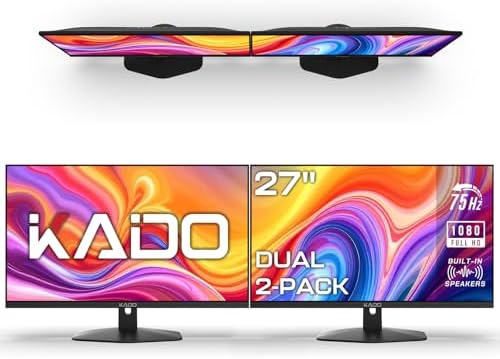
- Best 27-inch curved dual set: Kado 2-Pack Dual 27″ Curved Monitor. It states two 27-inch curved screens, 1920 x 1080, 75Hz, 1500R curve, 98% sRGB colour gamut.
- Best dual monitor stand: HUANUO FlowLift Dual Monitor Stand. It states a mount for two 13 to 32 inch screens, VESA 75×75/100×100 mounting and a dual C-clamp base.
- Best 24-inch curved dual set: Kado Dual Monitor 2-Pack 24″ Curved Monitor. It states two 24-inch curved screens, 1920 x 1080, 75Hz, 1500R curve, 98% sRGB colour gamut.
- Best flat dual set: Kado 2-Pack Dual 27″ Flat Monitor. It states two 27-inch flat screens, 1920 x 1080, 75Hz, 99% sRGB, the highest stated here.
- Best alternative 27-inch curved dual set: Kado Dual Monitor 2-Pack 27″ Curved Monitor. It states the same figures as the first pick: two 27-inch curved screens, 1920 x 1080, 75Hz, 1500R curve, 98% sRGB.
Quick Answer
The Kado 2-Pack Dual 27″ Curved Monitor leads with two 27-inch curved screens, 1920 x 1080, 75Hz, 1500R curve and 98% sRGB. The 24-inch curved set suits smaller desks, the flat set suits buyers who prefer a flat panel, and the HUANUO stand suits buyers who own two screens already.
Comparison Table
| Product | Best for | Key stated figure | Trade-off | Buy |
|---|---|---|---|---|
| Kado 2-Pack Dual 27″ Curved Monitor | A 27-inch curved set | Two 27-inch curved screens, 1920 x 1080, 75Hz | No numeric response time stated | View on Amazon |
| HUANUO FlowLift Dual Monitor Stand | Holding screens you own | Mount for two 13 to 32 inch screens | No complete weight or desk thickness limit stated | View on Amazon |
| Kado Dual Monitor 2-Pack 24″ Curved Monitor | A smaller curved set | Two 24-inch curved screens, 1920 x 1080, 75Hz | No numeric response time stated | View on Amazon |
| Kado 2-Pack Dual 27″ Flat Monitor | A flat set | Two 27-inch flat screens, 1920 x 1080, 75Hz, 99% sRGB | No curve and no numeric response time stated | View on Amazon |
| Kado Dual Monitor 2-Pack 27″ Curved Monitor | Alternative 27-inch curved set | Two 27-inch curved screens, 1920 x 1080, 75Hz | Same figures as the first pick; no stated difference | View on Amazon |
How We Choose
We compared only figures stated in the listings, ranking the five picks by the attributes that decide a dual-screen set: size, curve, resolution, refresh rate, colour gamut and, for the stand, screen-size range, VESA mounting and desk fit. Where a figure was stated two ways, or identically by two listings, we flagged it as not settled, and where a listing stated no figure, we treated that as a limit, not as a zero.
- We compared only stated figures: size, curve, resolution, refresh rate and colour gamut.
- We ranked the monitor sets by size, then curve, then colour gamut.
- We ranked the stand by screen-size range, VESA mounting and desk conditions.
- We flagged any figure stated two ways, or identically by two listings, as not settled.
- We treated a missing figure as a limit, not a zero, and used no unstated claim.
Decision Guide
If you need two new screens rather than a mount, choose one of the four Kado sets by size: the 27-inch sets each state two 27-inch screens, while the 24-inch set states two 24-inch screens. All four state the same resolution, 1920 x 1080, and the same refresh rate, 75Hz, so neither separates them, and the choice turns on curve and colour gamut. If you already own two screens, choose the HUANUO stand, the only pick that states a mount, with a stated 13 to 32 inch range and VESA 75×75/100×100 mounting.
If you want a curved panel, choose one of the three curved Kado sets, each stating a 1500R curve, and note that the curved sets state 98% sRGB while the flat set states 99% sRGB, the highest stated here. If you want a flat panel, choose the Kado 27-inch flat set, the only flat one here. All four listings describe fast response times and reduced ghosting and blurring, but none states a numeric response time figure, so no response time comparison is possible from the listings alone.
If you are choosing between the two 27-inch curved Kado sets, note this: the two listings state identical figures throughout, so no stated difference between them is settled. For the HUANUO stand, note this as well: the listing states the screen weight range only in part, beginning at 4 with no upper figure stated, and the desk thickness range only in part, beginning at 0.59 inches with no upper figure stated, so neither limit is settled. The stand listing also states that only wooden desks are recommended; plastic or glass desks cannot be used.
1. Kado 2-Pack Dual 27″ Curved Monitor — Best 27-inch curved dual set
This set states two 27-inch curved monitors at 1920 x 1080 and 75Hz, with a 1500R curve and a 98% sRGB colour gamut, in a dual setup described as seamless with reduced peripheral distortion. The listing states the curved design reduces eye strain and neck fatigue, and fast response times reduce ghosting and blurring. It states HDMI and VESA wall mounting, and gives dimensions of 24.46 x 14.56 x 2.83 inches at 11.0 pounds. Skip it if you want a flat panel, since this set states a curved panel only.
| Spec | From the listing |
|---|---|
| Screens | Two 27-inch curved monitors |
| Resolution and refresh rate | 1920 x 1080, 75Hz |
| Curve | 1500R curved design |
| Colour gamut | 98% sRGB |
| Weight | 11.0 pounds |
2. HUANUO FlowLift Dual Monitor Stand — Best dual monitor stand
This stand states a fully adjustable dual monitor mount for two screens from 13 to 32 inches, with full-motion adjustment, portrait rotation, VESA 75×75/100×100 mounting and a dual C-clamp base. The listing states each screen must meet three conditions at the same time, starting with the 13 to 32 inch range and a weight range beginning at 4 with no upper figure stated. The desk must also meet three conditions, starting with wooden desks only and a thickness range from 0.59 inches with no upper figure stated. It states no screen, so skip it if you need new screens, not a mount.
| Spec | From the listing |
|---|---|
| Screen size range | 13 to 32 inches, two screens |
| Mounting | VESA 75×75 and 100×100 |
| Desk material | Wooden desks only; plastic or glass desks cannot be used |
| Desk thickness | From 0.59 inches; no upper figure stated |
| Dimensions | 16.06 x 12.0 x 6.85 inches |
3. Kado Dual Monitor 2-Pack 24″ Curved Monitor — Best 24-inch curved dual set
This set states two 24-inch curved monitors at 1920 x 1080 and 75Hz, with a 1500R curve and a 98% sRGB colour gamut, in a dual setup described as seamless with reduced peripheral distortion. The listing states the curved design reduces eye strain and neck fatigue, and fast response times reduce ghosting and blurring. It states HDMI and VESA wall mounting, and gives dimensions of 21.17 x 12.65 x 2.21 inches at 11.64 pounds, the smallest screen set here and the heaviest stated set by weight. Skip it if you want larger screens, since this set states 24-inch screens only.
| Spec | From the listing |
|---|---|
| Screens | Two 24-inch curved monitors |
| Resolution and refresh rate | 1920 x 1080, 75Hz |
| Curve | 1500R curved design |
| Colour gamut | 98% sRGB |
| Weight | 11.64 pounds |
4. Kado 2-Pack Dual 27″ Flat Monitor — Best flat dual set
This set states two 27-inch flat monitors at 1920 x 1080 and 75Hz, with a 99% sRGB colour gamut, the highest stated here, and a 75Hz refresh rate described as seamless. The listing states flat monitors in a dual setup give a seamless viewing experience with reduced peripheral distortion, and fast response times reduce ghosting and blurring. It states HDMI and VESA wall mounting, and gives dimensions of 24.37 x 14.51 x 2.74 inches at 9.37 pounds, the lightest monitor set here. Skip it if you want a curved panel, since this set states a flat screen only.
| Spec | From the listing |
|---|---|
| Screens | Two 27-inch flat monitors |
| Resolution and refresh rate | 1920 x 1080, 75Hz |
| Curve | None stated; flat screen |
| Colour gamut | 99% sRGB |
| Weight | 9.37 pounds |
5. Kado Dual Monitor 2-Pack 27″ Curved Monitor — Best alternative 27-inch curved dual set
This set states two 27-inch curved monitors at 1920 x 1080 and 75Hz, with a 1500R curve and a 98% sRGB colour gamut, in a dual setup described as seamless with reduced peripheral distortion. The listing states the curved design reduces eye strain and neck fatigue, and fast response times reduce ghosting and blurring. It states HDMI and VESA wall mounting, and gives dimensions of 24.46 x 14.56 x 2.83 inches at 11.0 pounds. Those figures match the first pick exactly, so the listings state no difference between the two sets.
| Spec | From the listing |
|---|---|
| Screens | Two 27-inch curved monitors |
| Resolution and refresh rate | 1920 x 1080, 75Hz |
| Curve | 1500R curved design |
| Colour gamut | 98% sRGB |
| Weight | 11.0 pounds |
Shopping Checklist
Check the product page for current details before ordering. Then work through these steps:
- Confirm the listing is a two-monitor set or a stand, matching what you need to buy.
- Check the stated screen size and whether the panel is curved at 1500R or flat.
- Compare the stated resolution and refresh rate, 1920 x 1080 and 75Hz across the four monitor sets.
- Check the stated colour gamut: 98% sRGB for the curved sets, 99% sRGB for the flat set.
- For the stand, check the stated screen-size range, VESA mounting, desk material and thickness.
- Check the return window on the product page.
FAQ
Do all five picks include monitors?
No. Four of the five are two-monitor sets from Kado, each stating two screens at 1920 x 1080 and 75Hz, while the HUANUO FlowLift is a dual monitor stand only. The stand states a mount for two 13 to 32 inch screens with VESA 75×75 and 100×100 mounting, and it states no screen, no resolution and no refresh rate.
What is the difference between the two 27-inch curved Kado sets?
No difference is stated. Both sets state two 27-inch curved screens, 1920 x 1080, 75Hz, a 1500R curve, a 98% sRGB colour gamut, dimensions of 24.46 x 14.56 x 2.83 inches and a weight of 11.0 pounds. Since the listings state identical figures throughout, the choice between the two cannot be settled from the stated figures alone.
Which set states the highest colour gamut?
The Kado 2-Pack Dual 27″ Flat Monitor states a 99% sRGB colour gamut, the highest stated here. The three curved Kado sets each state 98% sRGB, while the HUANUO stand states no colour gamut at all, since it is a mount rather than a monitor. All four sets state the same resolution and refresh rate.
Final Verdict
For a gaming monitor dual setup buyer who wants two new screens, the Kado 2-Pack Dual 27″ Curved Monitor leads with two 27-inch curved screens, 1920 x 1080, 75Hz, a 1500R curve and 98% sRGB colour gamut. The 24-inch curved set suits smaller desks, the flat set suits buyers who prefer a flat panel with the highest stated colour gamut, and the HUANUO stand suits buyers who own two screens already, provided its stated desk and screen conditions are met.
Prime covers fast, free delivery on eligible items. See whether a Prime free trial is available for your account.
Check Prime on Amazon →Types of Gaming Monitors
Gaming monitors are grouped mainly by refresh rate and by panel type. High-refresh panels (144Hz+) show smoother motion if the GPU can render fast enough to use it. Curved and OLED panels change immersion and contrast differently than a flat IPS or VA panel at the same refresh rate.
Resolution and refresh rate both draw more GPU performance to use fully, so pairing a very high-refresh 4K gaming monitor with a modest graphics card often means the monitor's top refresh rate goes unused in demanding titles.
Frequently Asked Questions
Is a curved gaming monitor better than a flat one?
It depends on preference and desk distance -- curved panels can add immersion at wide aspect ratios, but a flat panel is often preferred for precise, grid-aligned work alongside gaming.
Does panel type (IPS vs OLED) matter beyond picture quality?
Yes -- OLED generally has faster pixel response but some risk of static-image burn-in, while IPS has no burn-in risk but slightly slower response, which matters for competitive, fast-paced games.
Related Guides
- Best Gaming Monitor Arm
- Best Gaming Monitor Eye Care
- Best Gaming Monitor G-Sync
- Best Gaming PC for 1440p Esports
Product and ASIN Reference
| Product | ASIN | Buy |
|---|---|---|
| Kado 2-Pack Dual 27″ Curved Monitor | B0D9M2LQGJ | View on Amazon |
| HUANUO FlowLift Dual Monitor Stand | B07T5SY43L | View on Amazon |
| Kado Dual Monitor 2-Pack 24″ Curved Monitor | B0D86WMWWF | View on Amazon |
| Kado 2-Pack Dual 27″ Flat Monitor | B0FXLJNMRL | View on Amazon |
| Kado Dual Monitor 2-Pack 27″ Curved Monitor | B0D86WHWMM | View on Amazon |





Write Your Review
No reviews yet. Be the first to share your experience!