
Shoppers who want the graphics card named in the keyword should look first at the Lenovo Legion Pro and the Razer Blade 16, the only two listings here that state an RTX 4090, while shoppers open to a different stated card should also look at the GIGABYTE AORUS Master 16 with an RTX 5090, the MSI Stealth 16 AI+ with an RTX 5070 Ti and the ASUS ROG Strix G16 with an RTX 5060. All five state a 16-inch display, but memory ranges from 16GB to 64GB and storage from 1TB to 2TB.
That split matters more than the shared screen size, because the graphics card, processor and memory together decide what each machine is stated to do. Where a listing states a figure in more than one way, that figure is flagged as not settled.
As an Amazon Associate, we earn from qualifying purchases.


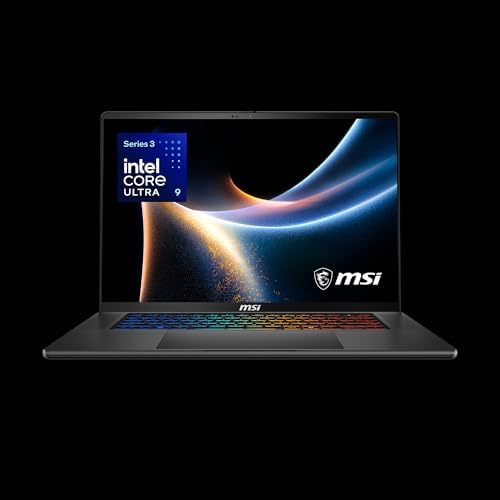


Pick by Your Need
- Best overall: Lenovo Legion Pro. It pairs an RTX 4090 with 64GB DDR5 RAM, a 2TB SSD and a WQXGA 240Hz display.
- Best RTX 4090 OLED option: Razer Blade 16. It pairs an RTX 4090 with an OLED QHD+ 240Hz display, 32GB RAM and a 2TB SSD.
- Best stated graphics card: GIGABYTE AORUS Master 16. It states an RTX 5090 Laptop GPU, a Ryzen 9 9955HX3D and a 240Hz WQXGA display.
- Best lightest stated weight: MSI Stealth 16 AI+. At 4.39 pounds it is the lightest here, with an RTX 5070 Ti and 32GB DDR5.
- Best 16GB DDR5 option: ASUS ROG Strix G16. It states an RTX 5060, an Intel Core i7 Processor 14650HX and 16GB DDR5.
Quick Answer
The Lenovo Legion Pro is the most complete specification here, with an RTX 4090, an Intel Core i9-14900HX, 64GB DDR5 RAM, a 2TB SSD and a 16-inch WQXGA display at 240Hz with 500 nits. The Razer Blade 16 is the other RTX 4090 listing.
Comparison Table
| Product | Best for | Key stated figure | Trade-off | Buy |
|---|---|---|---|---|
| ASUS ROG Strix G16 | 16GB DDR5 machine with stated RTX graphics | 16-inch FHD+ display, 165Hz | The listing states no Wi-Fi version and no battery capacity | View on Amazon |
| GIGABYTE AORUS Master 16 | Highest stated graphics card here | RTX 5090 Laptop GPU, up to 175W Max TGP | The listing states no memory amount | View on Amazon |
| MSI Stealth 16 AI+ | Lightest stated weight, OLED display | 16-inch QHD+ OLED display, 240Hz | The listing states no battery capacity and no processor clock speed | View on Amazon |
| Razer Blade 16 | RTX 4090 machine with OLED display | 16-inch OLED QHD+ display, 240Hz | The listing states no Wi-Fi version and no battery capacity | View on Amazon |
| Lenovo Legion Pro | Most complete stated specification | 64GB DDR5 RAM, 2TB SSD | Heaviest of the two RTX 4090 listings, at 5.78 pounds | View on Amazon |
How We Choose
We compared only figures stated in the listings, and we ranked the five laptops by the stated graphics card, processor, display, memory and storage, and weight. We flagged any figure stated two ways as not settled, we treated a missing stated figure as a limit, and we did not use any unstated claim to fill a gap.
- We compared only figures stated in the listings.
- We ranked by graphics card first, because only two listings state the named card.
- We ranked next by processor, display, memory and storage.
- We flagged any figure stated two ways as not settled, and treated a missing figure as a limit.
- We did not use any unstated claim, or treat a missing figure as evidence of absence.
Decision Guide
If you need the graphics card named in the keyword, choose the Lenovo Legion Pro with an RTX 4090 and 16GB GDDR6, or the Razer Blade 16 with an RTX 4090. The Lenovo states the larger memory figure, at 64GB DDR5 against the Razer at 32GB RAM, while both state a 2TB SSD and a 240Hz display. If you are open to a different card, the GIGABYTE states an RTX 5090 at up to 175W Max TGP, the MSI states an RTX 5070 Ti with 16GB GDDR7 VRAM, and the ASUS states an RTX 5060 with DLSS 4. The GIGABYTE listing states no memory amount.
For the sharpest stated display, compare the listings that state a 240Hz panel: the GIGABYTE and Lenovo at WQXGA, 2560 x 1600, and the Razer and MSI at QHD+ OLED. The Lenovo is the only one that states a brightness figure, at 500 nits, and the only one that states 100% DCI-P3, while the Razer states a 0.2 ms response time and DisplayHDR 500 certification. The ASUS states the lowest refresh rate here, at 165Hz on a 16-inch FHD+ display.
For the lowest stated weight, choose the MSI at 4.39 pounds, followed by the GIGABYTE at 5.07 pounds, the Razer at 5.4 pounds, the Lenovo at 5.78 pounds and the ASUS at 5.84 pounds. For processor core count, the Lenovo and Razer both state an Intel Core i9-14900HX with 24 cores and 5.8 GHz, while the GIGABYTE states a Ryzen 9 9955HX3D with 16 cores, 32 threads and up to 5.4GHz. For stated ports, only the Lenovo listing states them, with 4 x USB-A, 1 x Thunderbolt 4, 1 x Ethernet, 1 x HDMI and 1 x USB-C.
1. ASUS ROG Strix G16 — Best 16GB DDR5 option
This 16-inch laptop states an Intel Core i7 Processor 14650HX, an NVIDIA GeForce RTX 5060 Laptop GPU with DLSS 4 and Max-Q, 16GB of DDR5-5600MHz memory and 1TB of PCIe Gen 4 SSD storage, on a 16-inch FHD+ display at 165Hz with an ACR film. It states Windows 11 Home and ROG Intelligent Cooling with an end-to-end vapor chamber and tri-fan technology. At 5.84 pounds it is the heaviest listing here, and the listing states no Wi-Fi version and no battery capacity; skip it if a stated RTX 4090 is a requirement.
| Spec | From the listing |
|---|---|
| Processor | Intel Core i7 Processor 14650HX |
| Graphics | NVIDIA GeForce RTX 5060 Laptop GPU |
| Memory and storage | 16GB DDR5-5600MHz, 1TB PCIe Gen 4 SSD |
| Display | 16-inch FHD+, 165Hz, ACR film |
| Weight | 5.84 pounds |
2. GIGABYTE AORUS Master 16 — Best stated graphics card
This 16-inch laptop states an AMD Ryzen 9 9955HX3D processor with 128MB cache, up to 5.4GHz, 16 cores and 32 threads, and an NVIDIA GeForce RTX 5090 Laptop GPU at up to 175W Max TGP. It states a 240Hz display at 2560 x 1600 WQXGA, Windows 11 Home, and GiMATE, described as a smart AI mate. At 5.07 pounds it is the second lightest listing of the five, and the listing states no memory amount, no Wi-Fi version and no battery capacity; skip it if a stated memory figure is needed.
| Spec | From the listing |
|---|---|
| Processor | AMD Ryzen 9 9955HX3D, up to 5.4GHz, 16 cores, 32 threads |
| Graphics | NVIDIA GeForce RTX 5090 Laptop GPU, up to 175W Max TGP |
| Display | 240Hz, 2560 x 1600 WQXGA |
| Storage | 2TB SSD |
| Weight | 5.07 pounds |
3. MSI Stealth 16 AI+ — Best lightest stated weight
This 16-inch laptop states an Intel Core Ultra 9 386H processor, an NVIDIA GeForce RTX 5070 Ti with 16GB GDDR7 VRAM, 32GB DDR5 memory and a 1TB NVMe SSD, on a 16-inch QHD+ OLED display at 240Hz. It states Windows 11 Home and Wi-Fi 7, the only listing here that states a Wi-Fi version, with DLSS 4. At 4.39 pounds it is the lightest listing of the five, and the listing states no battery capacity and no processor clock speed; skip it if a stated RTX 4090 is a requirement.
| Spec | From the listing |
|---|---|
| Processor | Intel Core Ultra 9 386H |
| Graphics | NVIDIA GeForce RTX 5070 Ti, 16GB GDDR7 VRAM |
| Memory and storage | 32GB DDR5, 1TB NVMe SSD |
| Display | 16-inch QHD+ OLED, 240Hz |
| Weight | 4.39 pounds |
4. Razer Blade 16 — Best RTX 4090 OLED option
This 16-inch laptop states an Intel Core i9-14900HX processor with 24 cores and a 5.8 GHz maximum clock speed, an NVIDIA GeForce RTX 4090, 32GB RAM and a 2TB SSD, on a 16-inch OLED QHD+ display at 240Hz with a 0.2 ms response time. The listing states a vapor chamber cooling system with a single-piece vapor chamber, 0.5 mm exhaust fins and NASBIS sheets that cool keyboard temperatures. At 5.4 pounds it sits between the GIGABYTE and Lenovo on weight, and the listing states no Wi-Fi version or battery capacity.
| Spec | From the listing |
|---|---|
| Processor | Intel Core i9-14900HX, 24 cores, 5.8 GHz |
| Graphics | NVIDIA GeForce RTX 4090 |
| Display | 16-inch OLED QHD+, 240Hz, 0.2 ms |
| Memory and storage | 32GB RAM, 2TB SSD |
| Weight | 5.4 pounds |
5. Lenovo Legion Pro — Best overall
This 16-inch laptop states an Intel Core i9-14900HX processor with 24 cores and a turbo frequency of up to 5.8 GHz, an NVIDIA GeForce RTX 4090 with 16GB GDDR6, 64GB DDR5 RAM and a 2TB PCIe NVMe M.2 SSD, on a 16-inch WQXGA display at 2560 x 1600, 240Hz and 500 nits. It states 4 x USB-A, 1 x Thunderbolt 4, 1 x Ethernet, 1 x HDMI and 1 x USB-C, plus an RGB backlit keyboard. At 5.78 pounds it is the second heaviest listing here, and the listing states no Wi-Fi version or battery capacity.
| Spec | From the listing |
|---|---|
| Processor | Intel Core i9-14900HX, 24 cores, up to 5.8 GHz |
| Graphics | NVIDIA GeForce RTX 4090, 16GB GDDR6 |
| Memory and storage | 64GB DDR5 RAM, 2TB PCIe NVMe M.2 SSD |
| Display | 16-inch WQXGA, 2560 x 1600, 240Hz, 500 nits |
| Weight | 5.78 pounds |
Shopping Checklist
Check the product page for current details before ordering. Then work through these steps:
- Confirm the configuration states the graphics card you need.
- Compare stated processor model, core count and maximum clock speed.
- Compare stated display size, resolution, panel type and refresh rate, and note any stated brightness.
- Check stated memory and storage type and amount.
- Check stated weight against your bag or desk space, and check stated ports and keyboard features.
- Check the return window on the product page.
FAQ
Does every laptop here state an RTX 4090?
No. Only two listings state an RTX 4090: the Razer Blade 16 and the Lenovo Legion Pro, with the Lenovo also stating 16GB GDDR6. The other three state a different graphics card: the GIGABYTE states an RTX 5090, the MSI states an RTX 5070 Ti with 16GB GDDR7 VRAM, and the ASUS states an RTX 5060.
Which laptop states the most memory and the largest storage?
The Lenovo Legion Pro states the most memory, at 64GB DDR5 RAM, followed by the Razer Blade 16 and the MSI Stealth 16 AI+ at 32GB each, and the ASUS ROG Strix G16 at 16GB DDR5. The GIGABYTE states no memory amount. For storage, the GIGABYTE, Razer and Lenovo each state a 2TB SSD, while the ASUS and MSI each state a 1TB SSD.
Which display should I choose among these five?
Four listings state a 240Hz display, while the ASUS ROG Strix G16 states 165Hz. Among the 240Hz group, the GIGABYTE and Lenovo state WQXGA at 2560 x 1600, while the Razer and MSI state QHD+ OLED. The Lenovo is the only listing that states a brightness figure, at 500 nits, with 100% DCI-P3, and the Razer states a 0.2 ms response time and DisplayHDR 500 certification.
Final Verdict
For a gaming laptop rtx 4090 buyer who wants the strongest stated specification, the Lenovo Legion Pro leads with an RTX 4090, an Intel Core i9-14900HX, 64GB DDR5 RAM, a 2TB SSD and a WQXGA display at 240Hz and 500 nits. The Razer Blade 16 is the other RTX 4090 listing, with an OLED QHD+ display at the same refresh rate, while the other three suit buyers open to a different stated graphics card.
Prime covers fast, free delivery on eligible items. See whether a Prime free trial is available for your account.
Check Prime on Amazon →Types of Gaming Laptops
Gaming laptops are grouped mainly by GPU tier and by extra switching hardware. MUX-switch models can route the display directly to the discrete GPU, skipping the integrated GPU for a small performance gain in games, at some cost to battery life when active. Standard models rely on dynamic switching between integrated and discrete graphics.
RAM amount matters for multitasking alongside gaming (streaming software, browser tabs, Discord) more than for the games themselves, since most current titles are more sensitive to GPU and CPU performance than to RAM beyond a reasonable baseline.
Frequently Asked Questions
What does a MUX switch do in a gaming laptop?
It lets the display connect directly to the discrete GPU instead of routing through the integrated GPU, which can reduce overhead and slightly improve frame rates in games, usually at some battery-life cost when enabled.
Does more RAM improve gaming performance directly?
Beyond a reasonable baseline, extra RAM mainly helps with multitasking around the game (streaming, browser tabs, chat apps) rather than meaningfully raising frame rates in the game itself.
Related Guides
- Best Gaming Laptop RTX 4070
- Best Gaming Laptop With RTX 4070
- Best Gaming Laptop With 5070Ti
- Best Gaming Laptop Ryzen 7
Product and ASIN Reference
| Product | ASIN | Buy |
|---|---|---|
| ASUS ROG Strix G16 | B0DZZWMB2L | View on Amazon |
| GIGABYTE AORUS Master 16 | B0H4NKX21Q | View on Amazon |
| MSI Stealth 16 AI+ | B0GVPSK8M7 | View on Amazon |
| Razer Blade 16 | B0CPP726HK | View on Amazon |
| Lenovo Legion Pro | B0D2PHSHFP | View on Amazon |







Write Your Review
No reviews yet. Be the first to share your experience!