
The Aula L99 is the easiest pick here if the screen is the whole point: it is the only listing of the five that states a screen size, 3.98 inches, pairing it with a 96 percent layout, tri-mode connection and full-key hot-swapping. The other four trade that clarity for something else — a detachable screen, open-source firmware, a metal knob or a full-size frame.
Read the stated figures with care. The EPOMAKER X Aula F75 MAX spec table lists its dimensions in a scrambled order, height given as 12.87 inches, so its size figures cannot be trusted until the product page settles them. Several headline figures rest on product names alone — two 75 percent layouts, the full-size label, the 8000mAh battery — and the Womier DUO87 listing never states how the keyboard connects. Each gap is flagged below.
As an Amazon Associate, we earn from qualifying purchases.
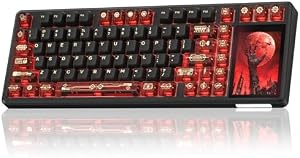

Pick by Your Need
- Best for a stated screen size: Aula L99. The only screen here with a stated inch figure, 3.98 inches.
- Best for deep remapping: Womier DUO87. QMK/VIA firmware supports remapped keys, macros and layered lighting.
- Best for fast wireless play: EPOMAKER X Aula F75 MAX. States 1000Hz polling in USB and 2.4G modes.
- Best for at-a-glance status: SOLAKAKA A99 Pro. Its LCD shows date, time, battery level, system and connection mode.
- Best for a full-size layout: AULA F108 PRO. The full-size frame (product name) adds a number pad the 75 percent boards leave out.
Quick Answer
All five listings are mechanical keyboards with a screen, so all five match the keyword; they differ in how much each proves. The Aula L99 states the most about its display — a 3.98-inch touch screen showing time, battery, system and connection — on a 96 percent frame. The Womier DUO87 is the only one with a detachable screen and QMK/VIA firmware, but states no connection type. The F75 MAX states 80 programmable keys and 1000Hz polling, yet its dimensions conflict. The SOLAKAKA A99 Pro leans on LCD readouts and a metal knob (product name); the AULA F108 PRO is the full-size option (product name) and the only listing stating a weight, 2.65 pounds.
Comparison Table
| Keyboard | Layout | Screen | Connectivity | Knob |
|---|---|---|---|---|
| Aula L99 | 96 percent | 3.98-inch touch screen | USB-C, 2.4GHz, BT5.1 | not stated |
| EPOMAKER X Aula F75 MAX | 75 percent (product name) | TFT screen | Bluetooth, 2.4GHz, USB-C | Yes (product name) |
| Womier DUO87 | 75 percent (product name) | Detachable touch screen | not stated | not stated |
| SOLAKAKA A99 Pro | not stated | LCD display | BT5.0, 2.4GHz, USB-C | Metal (product name) |
| AULA F108 PRO | Full size (product name) | TFT color display | BT5.0, 2.4GHz, USB-C | Yes |
Decision Guide
Start with the screen. Touch input is stated for only two of the five: the Aula L99’s 3.98-inch smart touch screen and the Womier DUO87’s detachable touch screen. The SOLAKAKA A99 Pro’s LCD and the AULA F108 PRO’s TFT color display are described as readout and interface surfaces, but neither states touch input; the F75 MAX states only a customizable TFT screen.
Layout is the second split. The L99 states a 96 percent layout in its facts. The F75 MAX and DUO87 layouts rest on their product names alone, flagged in the table, and the F108 PRO’s full-size label is likewise name-only. The SOLAKAKA listing states no layout, leaving its footprint to the product page. Treat the F75 MAX dimensions as unsettled: length 5.62 inches, width 1.69 inches and height 12.87 inches cannot all describe one keyboard, so no size claim here rests on them.
Connectivity is stated for four boards and missing for one. The L99, F75 MAX, SOLAKAKA and F108 PRO each state tri-mode connection (USB-C, 2.4GHz, Bluetooth); the L99 states pairing for up to three Bluetooth devices, the F108 PRO up to five saved devices. The DUO87 listing never states a connection type, so confirm it on the product page first. For customization, the DUO87’s QMK/VIA is the deepest stated route; the L99 offers driver-based macros.
1. Aula L99 Touch Screen Keyboard — Best for a Stated Screen Size
The Aula L99 builds its pitch around a 3.98-inch smart touch screen on a 96 percent layout, showing time, battery level, system and connection. Tri-mode connection covers USB-C wired, 2.4GHz wireless and BT5.1 for up to three Bluetooth devices, and the AULA driver supports macro programming on all keys. Full-key hot-swapping accepts 3-pin and 5-pin switches, and pre-lubricated Caramel Latte switches sit under PBT keycaps with RGB backlighting.
Pros
- Only listing here stating a screen size, 3.98 inches
- Driver supports macro programming for all keys
- Bluetooth pairing for up to three devices
Cons
- The Womier DUO87’s screen detaches for separate placement; the L99 screen stays fixed in the frame
- The AULA F108 PRO states an 8000mAh battery (product name); the L99 describes a large-capacity battery with no figure
| Spec | From the listing |
|---|---|
| Layout | 96 percent |
| Screen | 3.98-inch smart touch screen |
| Connectivity | USB-C wired, 2.4GHz, BT5.1 (up to 3 Bluetooth devices) |
| Switches | Pre-lubricated Caramel Latte |
2. EPOMAKER X Aula F75 MAX — Best for Stated 1000Hz Polling
The F75 MAX pairs a customizable TFT screen with a knob (product name) in a 75 percent layout (product name), on a gasket structure. Its facts lead with play: anti-ghosting in every mode and a stated 1000Hz polling rate in USB and 2.4G modes. It carries 80 programmable keys, factory-lubed linear switches, a 2cm-low front height and a two-stage adjustable kickstand.
Pros
- Only listing here stating a polling rate, 1000Hz
- States 80 programmable keys
- Two-stage kickstand; 2cm-low front height
Cons
- Its spec table lists height at 12.87 inches against a 5.62-inch length — a conflict to settle on the product page before trusting its dimensions
- The Aula L99 states a 3.98-inch screen; this listing gives no screen size to set beside it
| Spec | From the listing |
|---|---|
| Layout | 75 percent (product name) |
| Screen | TFT screen; size: The listing does not state it |
| Programmable keys | 80 |
| Polling rate | 1000Hz in USB and 2.4G modes |
| Dimensions | Length 5.62 in, width 1.69 in, height 12.87 in (labels conflict) |
3. Womier DUO87 Detachable Screen Keyboard — Best for QMK/VIA Customization

The DUO87 takes the screen off the board: its oversized smart touch screen is detachable, docking for touch controls on a 75 percent layout (product name). It is the only listing here with open-source QMK/VIA firmware, for key remapping, macros and layered RGB lighting. The build uses a gasket mount with five-layer filling, POM pre-lubricated switches and PBT keycaps on a hot-swappable 3-pin and 5-pin base.
Pros
- Only detachable screen here
- QMK/VIA firmware, the deepest remapping route here
- Gasket mount with five-layer filling structure
Cons
- Rival listings state tri-mode wireless connections; this listing’s facts never state a connection type, so confirm it on the product page
- The Aula L99 states its screen at 3.98 inches; this screen is called oversized with no inch figure behind it
| Spec | From the listing |
|---|---|
| Layout | 75 percent (product name) |
| Screen | Detachable oversized smart touch screen |
| Firmware | QMK/VIA |
| Connectivity | The listing does not state it |
| Switches | POM pre-lubricated |
4. SOLAKAKA A99 Pro LCD Keyboard — Best for LCD Status Readouts

The A99 Pro treats its LCD as a dashboard: it shows date, time, battery level, connected system and connection mode, and a metal knob (product name) handles adjustments. Tri-mode connectivity spans BT5.0, 2.4GHz and USB-C wired modes. Its gasket structure combines five cushioning layers with a single-key slotted PCB and noise-dampening cotton, and the full hot-swappable base accepts 3-pin and 5-pin switches.
Pros
- Widest stated readout list: date, time, battery, system, connection mode
- Gasket stack with noise-dampening cotton pads
- Keycap puller included
Cons
- The Aula L99 and Womier DUO87 state touch screens; this LCD’s listing describes readouts without stating touch input
- The AULA F108 PRO states dimensions and a weight; this listing states neither, so desk fit rests on the product page
| Spec | From the listing |
|---|---|
| Screen | LCD display |
| Connectivity | BT5.0, 2.4GHz, USB-C wired |
| Knob | Metal (product name) |
| Structure | Gasket, five layers of cushioning pads, single-key slotted PCB |
| Switch type | The listing does not state it |
5. AULA F108 PRO Full-Size Keyboard — Best for a Full-Size Layout

The F108 PRO is the big board of the set: a full-size layout (product name) with a built-in TFT color display, a multi-function knob and an 8000mAh battery (product name). Tri-mode connection covers BT5.0, 2.4GHz and USB-C wired, saving up to five devices. The hot-swappable base takes 3-pin and 5-pin switches, pre-lubricated switches (product name) sit under side-printed PBT keycaps, and a five-layer filling structure rounds out the build.
Pros
- Only listing stating a weight, 2.65 pounds
- Saves up to five devices across tri-mode connections
- Extended integrated silicone pad in the five-layer stack
Cons
- The Aula L99 states a touch screen; this listing’s interactive interface comes with no stated touch input
- At 17.52 inches long it takes the most desk width of the five, where the 75 percent boards stay compact
| Spec | From the listing |
|---|---|
| Layout | Full size (product name) |
| Screen | TFT color display |
| Battery | 8000mAh (product name) |
| Connectivity | BT5.0, 2.4GHz, USB-C (up to five devices) |
| Dimensions | 17.52 x 5.55 x 1.65 inches |
| Weight | 2.65 pounds |
Shopping Checklist
- Measure your desk space first and note the footprint you can give up
- Check stated dimensions and layout on the product page, especially where figures conflict
- Check whether touch input is stated, rather than assuming every display responds to taps
- Check stated connection modes and switch compatibility for each finalist
- Compare two or three finalists side by side, and check the return window on the product page
- Do not buy a layout size you did not measure
FAQ
What should I check first when choosing a mechanical keyboard with a screen?
Start with what the screen is stated to do. Some listings state touch input and readouts such as time and battery level; others describe a display without stating touch. Then compare stated layout, connection modes and switch support, treating any figure that appears only in a product name as unconfirmed until the product page confirms it.
Does a keyboard screen need touch input to be useful?
Not necessarily. A readout screen still shows battery, connection mode and system status at a glance — the SOLAKAKA A99 Pro LCD’s stated job. Touch input adds direct control, as on the Aula L99 and the detachable DUO87 screen, so choose by whether you want to tap the display or read it.
How do I choose between a 75 percent, 96 percent and full-size layout?
Match the layout to the keys you use daily. A 75 percent board is the most compact but drops the number pad; a 96 percent layout keeps more keys in a tighter frame; full size keeps everything at the cost of the most desk width. Where a listing states no layout, as the SOLAKAKA listing does, settle it on the product page.
Final Verdict
For most buyers, the Aula L99 is the soundest pick: it states its screen size, layout and connection figures outright, with driver-based macros and full hot-swapping. Choose the Womier DUO87 for a detachable screen and QMK/VIA remapping, after confirming its unstated connection type on the product page. The F75 MAX suits players who want stated 1000Hz polling, once its conflicting dimensions are settled on the product page. The SOLAKAKA A99 Pro is the readout-focused option; the F108 PRO suits buyers who want a full-size frame and a stated weight.
Prime covers fast, free delivery on eligible items. See whether a Prime free trial is available for your account.
Check Prime on Amazon →Product and ASIN Reference
| Product | ASIN | Grade |
|---|---|---|
| Aula L99 | B0H1GHWYNB | MATCH |
| EPOMAKER X Aula F75 MAX | B0DPWX3WTL | MATCH |
| Womier DUO87 | B0H3P2857F | MATCH |
| SOLAKAKA A99 Pro | B0FZSYY892 | MATCH |
| AULA F108 PRO | B0F2MNWCB6 | MATCH |










Write Your Review
No reviews yet. Be the first to share your experience!