
If you need an activity light you can check at a glance, choose one of the SSK or ORICO drives whose listings state an LED light, and if you need fingerprint unlocking instead, choose the NEWQ drive, whose listing states no LED indicator. We compared all five drives on stated capacity, speed, dimensions, cables and security tools.
The largest stated capacity is 4 TB and the smallest is 128 GB. Three listings state an LED light, and two state no LED indicator, as noted below.
As an Amazon Associate, we earn from qualifying purchases.



Pick by Your Need
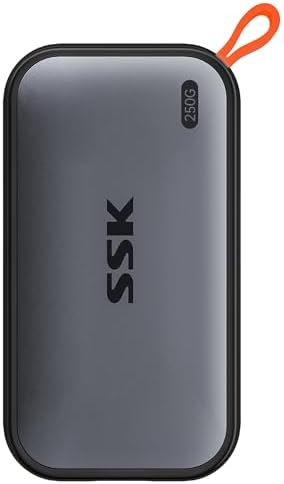
- Best overall: SSK Portable SSD 250GB. It states an LED light, read up to 1050MB/s and both cables.
- Best for security: NEWQ 512GB Touch Portable SSD. It states fingerprint unlocking, but no LED indicator.
- Best for 2 in 1 cable: ORICO 256GB Portable SSD. It states an LED light and a 2 in 1 USB C and USB A cable.
- Best for large libraries: SSK 4TB Portable SSD. It states 4 TB and speed up to 2000MB/s, but no LED indicator.
- Best compact: SSK 128GB Portable SSD. Its stated footprint is 2.5 inches by 1.3 inches, the smallest stated footprint of the five, and it states an LED light.
Quick Answer
For a stated LED indicator with balanced capacity and speed, the SSK 250GB drive is the central pick, stating read up to 1050MB/s and write up to 1000MB/s. For a smaller load with a stated LED light, choose the SSK 128GB or the ORICO 256GB. The NEWQ 512GB and SSK 4TB drives suit security or capacity first, because their listings state no LED indicator.
Comparison Table
| Product | Best for | One key stated figure | One trade-off | Buy |
|---|---|---|---|---|
| NEWQ 512GB Touch Portable SSD | Fingerprint and password unlocking | 512GB capacity | The listing states no LED indicator. The listing gives two different speed units for this drive: up to 400MB/s in its name and up to 400 Mbps in its description. | View on Amazon |
| SSK Portable SSD 250GB | Stated LED activity light with both cables | Read up to 1050MB/s | 250GB holds less than the 512GB and 4 TB drives in this group | View on Amazon |
| ORICO 256GB Portable SSD | Stated LED light with a 2 in 1 cable | 256GB capacity | The listing gives two different weights for this drive: 0.9 lb in its description and 0.2 pounds in its spec table. | View on Amazon |
| SSK 128GB Portable SSD | Smallest stated footprint with a stated LED light | 128 GB stated size | 128 GB is the smallest stated capacity of the five listings | View on Amazon |
| SSK 4TB Portable SSD | Largest stated capacity and highest stated speed | 4 TB stated size | The listing states no LED indicator, and full speed requires a USB 3.2 Gen2x2 port as stated | View on Amazon |
Decision Guide
If you need a stated LED indicator first, narrow the list to the SSK 250GB, the ORICO 256GB and the SSK 128GB. Among those three, the SSK 250GB states the highest read figure, up to 1050MB/s, and the highest write figure, up to 1000MB/s.
If you need fingerprint unlocking, choose the NEWQ 512GB drive, the only listing here that states it. The listing gives two different speed units for this drive: up to 400MB/s in its name and up to 400 Mbps in its description.
If you need the most stated storage, choose the SSK 4TB drive, which states 4 TB and speed up to 2000MB/s, dependent on a USB 3.2 Gen2x2 connection as stated.
If you need a small footprint, the SSK 128GB states 2.5 inches by 1.3 inches, the smallest stated footprint of the five, while the ORICO states 2.44 inches by 2.72 inches, the largest stated footprint of the five. The listing gives two different weights for this drive: 0.9 lb in its description and 0.2 pounds in its spec table. Choose the SSK 128GB on footprint, and do not choose the ORICO on its conflicted weight. Check the product page for current details before ordering.
If you need both USB-C and USB-A connections, check each listing’s cable wording: three SSK drives and the ORICO state a way to connect to both, while the NEWQ states USB-C only.
1. NEWQ 512GB Touch Portable SSD — Best for fingerprint security
This drive centres on fingerprint and password encryption, and the listing states no LED indicator. It states 512GB capacity and compatibility with iPhone 15, 16 and 17 models as listed, plus Samsung, Google and other USB-C phones, tablets and PCs. Its stated dimensions are 3.94 inches by 1.18 inches by 0.72 inches, and its stated weight is 0.12 pounds. The listing gives two different speed units for this drive: up to 400MB/s in its name and up to 400 Mbps in its description. Skip it if a stated LED indicator is a requirement.
| Spec | From the listing |
|---|---|
| Colour | Silver |
| Length | 3.94 inches |
| Width | 1.18 inches |
| Height | 0.72 inches |
| Weight | 0.12 pounds |
2. SSK Portable SSD 250GB — Best overall
This drive is the central LED pick: its listing states an LED light, a 250 GB stated size, read speed up to 1050MB/s and write speed up to 1000MB/s over a 10Gbps connection. Its stated dimensions are 2.7 inches by 1.48 inches by 0.5 inches, and its stated weight is 0.08 pounds, the lightest stated weight among listings that state a weight without a conflict. The listing states that a 250GB drive often appears as around 232GB on Windows, while MacOS can show the full 250 GB.
| Spec | From the listing |
|---|---|
| Colour | Grey |
| Size | 250 GB |
| Length | 2.7 inches |
| Width | 1.48 inches |
| Height | 0.5 inches |
| Weight | 0.08 pounds |
3. ORICO 256GB Portable SSD — Best for 2 in 1 cable with LED light
This drive states an LED light in its name, a 256GB stated size and transfer speed up to 460MB/s, below the SSK 250GB and SSK 128GB on stated speed. Its stated dimensions are 2.44 inches by 0.5 inches by 2.72 inches. The listing gives two different weights for this drive: 0.9 lb in its description and 0.2 pounds in its spec table. Because the weight is conflicted, the spec table below omits that row. The listing states a 2 in 1 USB C and USB A cable, so choose it on that cable rather than on speed or footprint.
| Spec | From the listing |
|---|---|
| Colour | Black |
| Size | 256GB |
| Length | 2.44 inches |
| Width | 0.5 inches |
| Height | 2.72 inches |
4. SSK 128GB Portable SSD — Best compact
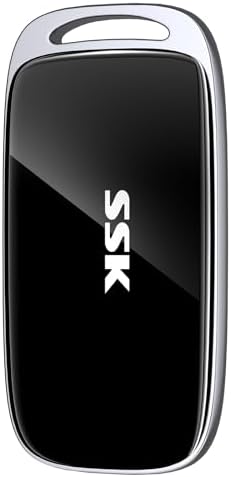
This drive states the smallest capacity in the group, 128 GB, with speed up to 550MB/s on a stated 6Gbps connection and an LED light that indicates instant activity. Its stated dimensions are 2.5 inches by 1.3 inches by 0.4 inches, the lowest stated height of the five and the smallest stated footprint of the five, and the listing states no weight. It states that displayed capacity often appears as around 116GB on Windows, while MacOS typically shows the full 128GB. It also states S.M.A.R.T. monitoring, TRIM, a USB-C cable and a USB-A adapter.
| Spec | From the listing |
|---|---|
| Colour | Space Gray |
| Size | 128 GB |
| Length | 2.5 inches |
| Width | 1.3 inches |
| Height | 0.4 inches |
| Weight | The listing does not state it |
5. SSK 4TB Portable SSD — Best for large libraries
This drive states the largest capacity in the group, 4 TB, and the highest stated speed, up to 2000MB/s on a stated 20Gbps USB 3.2 Gen2x2 connection. Its stated dimensions are 2.93 inches by 1.46 inches by 0.42 inches, and the listing states no weight. The listing states no LED indicator, so it does not match the LED feature in the keyword. It states a 20Gbps USB-C cable, a 10Gbps USB-A cable, S.M.A.R.T. diagnostics and adaptive TRIM. Skip it if a stated LED indicator is a requirement.
| Spec | From the listing |
|---|---|
| Colour | Black |
| Size | 4 TB |
| Length | 2.93 inches |
| Width | 1.46 inches |
| Height | 0.42 inches |
| Weight | The listing does not state it |
Shopping Checklist
Use this list to narrow the five listings to one drive:
- Measure your space first and compare it with each stated length, width and height.
- Check stated capacity against your file load, and note any stated displayed-capacity notes.
- Check whether the listing states an LED indicator; no LED stated means no match for that feature.
- Check stated cables and port type, including any port condition for the highest stated speed.
- Put the finalists side by side, and read the return window on the product page carefully.
FAQ
Does every drive in this group state an LED indicator?
No. Three listings state an LED light: the SSK 250GB, the ORICO 256GB and the SSK 128GB. The NEWQ 512GB and SSK 4TB listings state no LED indicator, so choose from the first three if that feature is required.
Why does displayed capacity differ from the stated capacity?
Two SSK listings address this. The 250GB listing states around 232GB on Windows while MacOS can show the full 250 GB, and the 128GB listing states around 116GB on Windows while MacOS typically shows the full 128GB.
What should I check about speed before choosing?
Compare each stated speed with its stated port and cable. The SSK 4TB listing states that full speed requires USB 3.2 Gen2x2, and the SSK 128GB listing states that actual speed depends on capacity, host device, operating system and application.
Final Verdict
Start with the three drives whose listings state an LED light, and pick the SSK 250GB for the highest stated read and write figures in that subgroup. Pick the SSK 128GB for the smallest stated footprint, or the ORICO 256GB for its 2 in 1 cable. Choose the NEWQ 512GB or SSK 4TB only when fingerprint unlocking or 4 TB capacity matters more than a stated LED indicator.
Prime covers fast, free delivery on eligible items. See whether a Prime free trial is available for your account.
Check Prime on Amazon →Related Guides
No internal links were supplied for this post.
Product and ASIN Reference
| Product | ASIN | Buy |
|---|---|---|
| NEWQ 512GB Touch Portable SSD | B0HC3BFJF3 | View on Amazon |
| SSK Portable SSD 250GB | B0BJV16HC6 | View on Amazon |
| ORICO 256GB Portable SSD | B0DHZVY5VM | View on Amazon |
| SSK 128GB Portable SSD | B0D7MJQL82 | View on Amazon |
| SSK 4TB Portable SSD | B0F43HHZCG | View on Amazon |




Write Your Review
No reviews yet. Be the first to share your experience!