
If you need hardware encryption controlled by a physical key, start with the BUSlink CipherShield; if you need a portable encrypted drive, start with the DataLocker DL4 FE; and if you need password protection with backup software, start with the WD My Book. Two of the five drives here, the WD Elements and the Seagate Expansion, state no encryption, so they do not match the encrypted requirement.
Three drives state an encryption method: the BUSlink and the WD My Book state 256-bit AES hardware encryption, and the DataLocker states 256-bit AES-XTS encryption. The other two listings state capacity and setup details, but no encryption method, password protection, or key system.
As an Amazon Associate, we earn from qualifying purchases.




Pick by Your Need
- Best overall: BUSlink CipherShield 20TB. It states 256-bit AES hardware encryption, FIPS 140-2 Level 2 validation, and CipherKey access.
- Best portable encrypted: DataLocker DL4 FE 2TB. It is the lightest here at 0.84 pounds and states 256-bit AES-XTS encryption.
- Best for regulated settings: BUSlink CipherShield 20TB. Its listing names government, healthcare, and regulated enterprise environments.
- Best password protection: WD My Book 18TB. It pairs hardware encryption with password protection and backup software.
- Best capacity: Seagate Expansion 24TB. It states 24TB, but no encryption.
Quick Answer
For encryption first, the BUSlink CipherShield 20TB and DataLocker DL4 FE 2TB are the clearest matches, stating key-based access with FIPS 140-2 Level 2 validation and AES-XTS encryption in a 0.84-pound drive. The WD My Book 18TB states hardware encryption plus password protection and backup software. The WD Elements 20TB and Seagate Expansion 24TB state no encryption.
Comparison Table
| Product | Best for | One key stated figure | One trade-off | Buy |
|---|---|---|---|---|
| BUSlink CipherShield 20TB | Key-controlled hardware encryption | 20TB capacity | Desktop size at 8.25 x 5.5 x 8.25 inches | View on Amazon |
| WD Elements 20TB | Plug-and-play Windows storage | 20TB capacity | The listing states no encryption | View on Amazon |
| Seagate Expansion 24TB | Largest stated capacity | 24TB capacity | The listing states no encryption | View on Amazon |
| DataLocker DL4 FE 2TB | Portable encrypted storage | 2TB capacity | The listing gives two different dimension sets for this drive (0.8 x 3 x 4.8 inches and 5.6 x 4.5 x 2.1 inches), so its size is not settled in the listing | View on Amazon |
| WD My Book 18TB | Password protection with backup software | 18TB capacity | Backup and password software require download and installation per the listing | View on Amazon |
Decision Guide
Start with the encryption method, because that requirement removes two drives at once. If a listing states no encryption, treat that drive as unencrypted, however large its capacity is. On that basis, the WD Elements at 20TB and the Seagate Expansion at 24TB are capacity options, not encrypted options. Check the product page for current details before ordering.
If you need access controlled by a physical key, choose the BUSlink CipherShield. Its listing states that data is automatically locked and encrypted when the CipherKey is removed or power is lost, and that no passwords are stored on the host system.
If you need to carry the drive, choose the DataLocker DL4 FE. At 0.84 pounds it is the lightest of the five, below the next lightest, the WD Elements at 1.98 pounds, and it states 256-bit AES-XTS encryption. The listing gives two different dimension sets for this drive (0.8 x 3 x 4.8 inches and 5.6 x 4.5 x 2.1 inches), so its size is not settled in the listing, so check both stated sets against your bag or case.
No drive here gives the largest capacity and encryption together. The largest encrypted capacity stated is the BUSlink at 20TB, followed by the WD My Book at 18TB, while the 24TB Seagate states no encryption. For password protection with hardware encryption and backup software, choose the WD My Book.
1. BUSlink CipherShield 20TB Encrypted Desktop Drive — Best for key-controlled encryption
The BUSlink is the only drive here whose listing states access through a unique CipherKey, unlike the password-based WD My Book. Its listing states real-time 256-bit AES hardware encryption, FIPS 140-2 Level 2 validation, a 20TB capacity, and dimensions of 8.25 inches by 5.5 inches by 8.25 inches at 2.2 pounds. It also states USB 3.0, described as USB 3.2 Gen 1, and eSATA, the only listing here stating eSATA alongside USB.
| Spec | From the listing |
|---|---|
| Capacity | 20TB |
| Encryption | 256-bit AES hardware encryption, FIPS 140-2 Level 2 |
| Access control | Unique CipherKey |
| Interface | USB 3.0 (USB 3.2 Gen 1) and eSATA |
| Dimensions | 8.25 x 5.5 x 8.25 inches |
| Weight | 2.2 pounds |
2. WD Elements 20TB Desktop Drive — Best for simple Windows add-on storage
This drive does not match the encrypted requirement: its listing states no encryption, password protection, or key system. Its angle is simple capacity, with a stated 20TB size, dimensions of 5.31 inches by 1.89 inches by 6.53 inches, and a weight of 1.98 pounds. The listing states plug-and-play readiness for Windows PCs, Windows 10 plus compatibility, reformatting required for MacOS, and fast transfers over USB 3.0, with no transfer rate stated.
| Spec | From the listing |
|---|---|
| Capacity | 20TB |
| Color | Black |
| Encryption | The listing does not state it |
| Compatibility | Windows 10 plus; reformatting required for MacOS |
| Dimensions | 5.31 x 1.89 x 6.53 inches |
| Weight | 1.98 pounds |
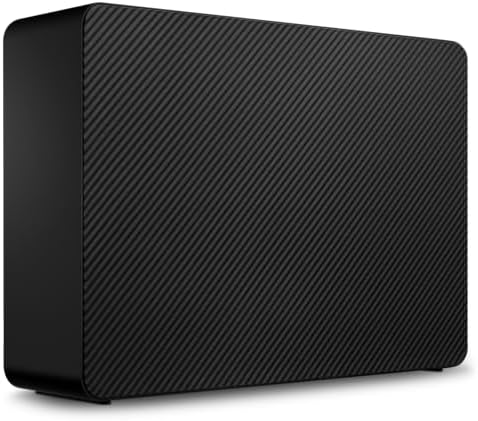
3. Seagate Expansion 24TB Desktop Drive — Best for largest stated capacity
This drive also does not match the encrypted requirement: its listing states no encryption, password protection, or key system. Its angle is capacity and simple setup, with the largest stated size here at 24TB, dimensions of 7.04 inches by 1.65 inches by 4.92 inches, and the heaviest stated weight at 2.95 pounds. The listing states drag-and-drop saving out of the box, automatic recognition of Windows and Mac computers, reformatting required for use with Time Machine, and Rescue Data Recovery Services in its title. Skip it if encryption is a requirement, because the listing states none.
| Spec | From the listing |
|---|---|
| Capacity | 24TB |
| Color | DESKTOP |
| Encryption | The listing does not state it |
| Included service | Rescue Data Recovery Services |
| Dimensions | 7.04 x 1.65 x 4.92 inches |
| Weight | 2.95 pounds |
4. DataLocker DL4 FE 2TB Portable Drive — Best portable encrypted
The DataLocker is the portable entry here, described in its listing as a rugged external hard drive, and the only listing stating AES-XTS encryption. Its listing states a 2TB capacity, 256-bit AES-XTS encryption, a write speed of 100 MB/s, TAA compliance, and a weight of 0.84 pounds, the lightest stated weight of the five by more than 1 pound. The listing gives two different dimension sets for this drive (0.8 x 3 x 4.8 inches and 5.6 x 4.5 x 2.1 inches), so its size is not settled in the listing. Its 2TB capacity is the smallest here, against 18TB to 24TB for the other four.
| Spec | From the listing |
|---|---|
| Capacity | 2TB |
| Encryption | 256-bit AES-XTS |
| Write speed | 100 MB/s |
| Compliance | TAA Compliant |
| Color | The listing does not state it |
| Weight | 0.84 pounds |
5. WD My Book 18TB Desktop Drive — Best for password protection with backup
The WD My Book states 256-bit AES hardware encryption and password protection, plus software for device management and backup. That combination separates it from the BUSlink, which states key control and no backup software. Its listing states an 18TB capacity, a transfer rate of 600.0 megabytes per second, SuperSpeed USB at 5 Gbps with USB 2.0 compatibility, dimensions of 1.9 inches by 6.7 inches by 5.5 inches, a weight of 2.83 pounds, and an operating temperature range of 5 degrees Celsius to 35 degrees Celsius. Skip it if you do not want to download and install software, because the listing states that is required for the management and backup software.
| Spec | From the listing |
|---|---|
| Capacity | 18TB |
| Encryption | 256-bit AES hardware encryption |
| Password protection | Included, with backup and device management software |
| Interface | SuperSpeed USB (5 Gbps); USB 2.0 compatible |
| Dimensions | 1.9 x 6.7 x 5.5 inches |
| Weight | 2.83 pounds |
Shopping Checklist
- Confirm the listing states an encryption method: hardware AES, AES-XTS, or password protection.
- Check stated capacity against your data, noting the 2TB to 24TB range here.
- Measure first, and check stated dimensions and weight for each finalist.
- Check the stated interface, operating system notes, and any reformatting requirement.
- Check whether backup software is stated, and whether download or registration is required.
- Check the return window on the product page, and compare finalists side by side.
FAQ
How can I tell from a listing whether a drive is actually encrypted?
Look for a stated encryption method, such as 256-bit AES hardware encryption or 256-bit AES-XTS, or a stated access system such as a physical key or password protection. Three listings here state such a method and two state none, and a drive whose listing states no encryption should be treated as not encrypted.
Should I choose key-based access or password protection?
Choose based on the access system the listing states. The BUSlink listing states that a CipherKey controls access and that data locks when the key is removed or power is lost, while the WD My Book listing states password protection through software requiring download and installation. Neither listing states the other system.
Does a larger capacity mean a drive is a better encrypted choice?
No, because capacity and encryption are separate stated attributes. The largest drive here states 24TB and no encryption, while the smallest states 2TB and AES-XTS encryption, so compare both figures separately for every drive, and meet the encryption requirement first.
Final Verdict
Based on the listing details, the BUSlink CipherShield 20TB is the strongest match here, stating 256-bit AES hardware encryption, FIPS 140-2 Level 2 validation, and CipherKey access at 20TB. The DataLocker DL4 FE 2TB is the portable alternative, stating AES-XTS encryption at 0.84 pounds but only 2TB. The WD My Book 18TB adds stated password protection and backup software. The WD Elements 20TB and Seagate Expansion 24TB state no encryption, so they fit only a buyer who drops that requirement for capacity.
Prime covers fast, free delivery on eligible items. See whether a Prime free trial is available for your account.
Check Prime on Amazon →Types of External Hard Drives
External hard drives are grouped mainly by physical size and by connection type. 2.5-inch portable drives often run entirely on USB power. 3.5-inch desktop drives hold more capacity per drive but typically need external power beyond USB alone.
An external hard drive is still meaningfully cheaper per terabyte than an external SSD at high capacities, which is part of why it remains common for bulk backup and archival storage despite being slower than flash-based storage.
Frequently Asked Questions
What's the difference between a 2.5-inch and 3.5-inch external hard drive?
2.5-inch (portable) drives are smaller and often run entirely on USB power; 3.5-inch (desktop) drives hold more capacity per drive but usually need external power.
Is an external hard drive still worth buying over an external SSD?
For bulk or archival backup, yes -- hard drives remain meaningfully cheaper per terabyte, even though external SSDs are faster for frequently accessed files.
Related Guides
No internal links were supplied for this post, so this section contains no links.
Product and ASIN Reference
| Product | ASIN | Buy |
|---|---|---|
| BUSlink CipherShield 20TB | B09WGLRV8B | View on Amazon |
| WD Elements 20TB | B09VCXWPQG | View on Amazon |
| Seagate Expansion 24TB | B0DVM1Z46T | View on Amazon |
| DataLocker DL4 FE 2TB | B0H5R3Z4R7 | View on Amazon |
| WD My Book 18TB | B08KTQWV7Z | View on Amazon |







Write Your Review
No reviews yet. Be the first to share your experience!