
If you want a vertical handshake shape for laptop work, start with the Anker, UGREEN, or Logitech Lift listings; if you want a flatter shape in a smaller body, look at the Basics and TECKNET listings, which are ergonomic in design but not vertical. All five are wireless mice for laptop use, so the choice is shape first, then connection type and stated dimensions.
We compared the five listings on stated dimensions and weight, DPI ranges, connection modes, and button layouts. Where a listing states no figure, we say so, and where it contradicts itself on a measurement, we flag that conflict.
As an Amazon Associate, we earn from qualifying purchases.
Pick by Your Need
- Best overall: Anker 2.4G Wireless Vertical Mouse. Vertical handshake shape with three DPI settings and next and previous buttons.
- Best for multi-device use: UGREEN Ergonomic Wireless Mouse. Its listing states connectivity for up to 3 devices.
- Best vertical for small to medium hands: Logitech Lift Vertical Mouse. Its listing describes a fit for small to medium right hands.
- Best compact: TECKNET Dual-Mode Wireless Mouse. At a stated 0.16 pounds, it is the lightest listing here.
- Best simple 2.4 GHz option: Basics Portable Wireless Mouse. Its listing states a 33-foot range.
Quick Answer
For a true vertical shape, compare the Anker, UGREEN, and Logitech Lift first, differing mainly in DPI range, device count, and stated size. For a flatter shape, the TECKNET and Basics models are the alternatives, with the TECKNET adding dual-mode connection and five DPI levels.
Comparison Table
| Product | Best for | Key stated figure | Trade-off |
|---|---|---|---|
| Anker 2.4G Wireless Vertical Mouse | Vertical shape over a USB receiver | 800/1200/1600 DPI, 3 settings | The listing conflicts on footprint, stating 4.72 by 2.94 inches in its size field and 3.98 by 3.23 inches in its length and width fields. |
| UGREEN Ergonomic Wireless Mouse | Connecting up to 3 devices | 1000/1600/2000/4000 DPI, 4 settings | The listing states it is designed for medium to large hands and not suitable for small hands |
| Basics Portable Wireless Mouse | A plain 2.4 GHz laptop mouse | 33-foot stated wireless range | The listing states compatibility only with Windows 7, 8, and 10 |
| TECKNET Dual-Mode Wireless Mouse | Switching between two devices | 800/1600/2400/3200/4000 DPI, 5 settings | The listing conflicts on height, stating 1.6 inches in its description and 0.1 inches in its spec table. |
| Logitech Lift Vertical Mouse | Small to medium right hands | 57-degree vertical angle as stated | The listing describes a right-hand fit, with no left-hand version stated |
Decision Guide
Start with hand position. Three listings — Anker, UGREEN, and Logitech Lift — describe a vertical handshake position, while the TECKNET listing describes a contoured shape and the Basics listing a flatter portable mouse. If the vertical angle matters, the Logitech listing is the only one that states a number for it: 57 degrees. The UGREEN listing states it is designed for medium to large hands, while the Logitech listing describes the Lift as a great fit for small to medium right hands.
Next, count devices. The UGREEN listing states connectivity for up to 3 devices, the TECKNET listing states two devices simultaneously, and the Anker listing describes a USB receiver connection without stating a multi-device count. The Basics listing states a single 2.4 GHz connection with a 33-foot range.
Then check DPI range. The TECKNET listing states the widest spread here, five levels from 800 to 4000 DPI, and the UGREEN listing states four levels from 1000 to 4000 DPI. The Anker listing states three settings, 800, 1200, and 1600 DPI, the narrowest stated range of the five. The Basics listing gives no DPI numbers at all.
Finally, treat two measurements with care. For the Anker listing: The listing conflicts on footprint, stating 4.72 by 2.94 inches in its size field and 3.98 by 3.23 inches in its length and width fields. For the TECKNET listing: The listing conflicts on height, stating 1.6 inches in its description and 0.1 inches in its spec table. Check the product page for current details before ordering. On weight, the TECKNET is the lightest stated at 0.16 pounds and the UGREEN the heaviest stated at 0.37 pounds.
1. Anker 2.4G Wireless Vertical Mouse — Best Overall

The Anker listing describes an ergonomic structure that promotes a neutral handshake wrist and arm position, paired with 800/1200/1600 DPI optical tracking across 3 settings. Against the other vertical listings, it is the one that adds next and previous buttons for webpage browsing, and it states a power-saving mode after 8 minutes of inactivity. Its stated weight is 0.28 pounds and its stated height is 3.15 inches. The listing conflicts on footprint, stating 4.72 by 2.94 inches in its size field and 3.98 by 3.23 inches in its length and width fields. Its footprint should not be quoted as a single settled figure.
Pros
- Vertical handshake position described in the listing
- Three stated DPI settings at 800, 1200, and 1600
- Next and previous buttons stated for webpage browsing
Cons
- DPI range tops out at a stated 1600, below the stated 4000 of two rivals
- Footprint figures conflict within the listing, as noted above
| Spec | From the listing |
|---|---|
| Color | Black |
| Height | 3.15 inches |
| Weight | 0.28 pounds |
| DPI settings | 800/1200/1600 |
2. UGREEN Ergonomic Wireless Mouse — Best for Multi-Device Use

The UGREEN listing combines a vertical handshake design with the broadest connection claim here: Bluetooth and 2.4G wireless for up to 3 devices, plus 4 DPI levels at 1000, 1600, 2000, and 4000. Its stated dimensions are 4.72 inches long and 3.39 inches wide, and its stated weight of 0.37 pounds is the heaviest stated here. The listing states quiet-click buttons and PTFE glide feet. Skip it if your hands are small, because the listing states it is designed for medium to large hands and not suitable for small hands.
Pros
- Up to 3 devices stated across Bluetooth and 2.4G wireless
- Four stated DPI levels, from 1000 up to 4000
- Listing states quiet clicks and PTFE glide feet
Cons
- Listing states it is not suitable for small hands
- Heaviest stated weight here at 0.37 pounds
| Spec | From the listing |
|---|---|
| Color | Black |
| Length | 4.72 inches |
| Width | 3.39 inches |
| Weight | 0.37 pounds |
3. Basics Portable Wireless Mouse — Best Simple 2.4 GHz Option

The Basics listing is the plainest of the five: a portable wireless mouse with a 2.4 GHz connection, a stated 33-foot range, and adjustable DPI, described as designed for navigation over prolonged periods without strain. It is not a vertical mouse, so it belongs here as the flatter alternative. Its stated size is 4.13 inches long, 2.93 inches wide, and 1.48 inches high, with a stated weight of 0.2 pounds. The listing states compatibility with Windows 7, 8, and 10 and states AES-128 encryption, but no DPI numbers and no Bluetooth.
Pros
- Stated 33-foot wireless range on 2.4 GHz
- Stated weight of 0.2 pounds, lighter than the vertical listings
- Listing states AES-128 encryption
Cons
- Listing states compatibility only with Windows 7, 8, and 10
- No DPI numbers are stated in the listing
| Spec | From the listing |
|---|---|
| Color | Black |
| Length | 4.13 inches |
| Width | 2.93 inches |
| Height | 1.48 inches |
| Weight | 0.2 pounds |
4. TECKNET Dual-Mode Wireless Mouse — Best Compact

The TECKNET listing is a contoured, non-vertical design described as fitting the hand’s natural curve, with textured rubber grips, paired with the widest stated DPI spread here: 5 levels at 800, 1600, 2400, 3200, and 4000, plus a memory function that retains the last setting. Its connection is dual-mode, Bluetooth 5.2/3.0 and 2.4G through a USB-A receiver, for two devices at once. Its stated length is 4.3 inches, its stated width is 2.8 inches, and its stated weight of 0.16 pounds is the lightest of the five. The listing conflicts on height, stating 1.6 inches in its description and 0.1 inches in its spec table. The listing states up to 18 months of battery life from a single AA battery, not included.
Pros
- Five stated DPI levels, 800 to 4000, the widest range here
- Dual-mode connection stated for two devices at once
- Lightest stated weight here, 0.16 pounds
Cons
- Listing states the AA battery is not included
- Height figures conflict within the listing, as noted above
| Spec | From the listing |
|---|---|
| Color | Purple |
| Length | 4.3 inches |
| Width | 2.8 inches |
| Weight | 0.16 pounds |
| DPI levels | 800/1600/2400/3200/4000 |
5. Logitech Lift Vertical Mouse — Best Vertical for Small to Medium Hands
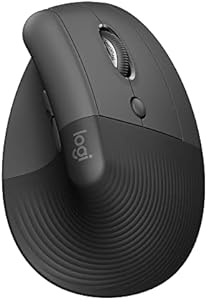
The Logitech Lift listing is the vertical option aimed at the smaller end of the hand-size range: it describes the mouse as a great fit for small to medium right hands, with a vertical shape at a stated 57 degrees, a thumb rest, and a grip described as softly textured. Its stated dimensions are 5.6 inches long, 3.4 inches wide, and 3.0 inches high, making it the longest of the five by stated length, and its stated weight is 0.28 pounds, the same figure the Anker listing states. Connection is by Bluetooth or the included Logi Bolt USB-A receiver, and the listing states quiet clicks and a SmartWheel. Skip it if you need a left-hand mouse, because the listing describes a right-hand fit and states no left-hand version.
Pros
- Stated 57-degree vertical angle, the only angle figure here
- Listing describes a fit for small to medium right hands
- Bluetooth or the included Logi Bolt receiver
Cons
- Right-hand fit only, with no left-hand version stated
- Longest stated length here, 5.6 inches
| Spec | From the listing |
|---|---|
| Color | Graphite |
| Length | 5.6 inches |
| Width | 3.4 inches |
| Height | 3.0 inches |
| Weight | 0.28 pounds |
Shopping Checklist
Use this short list before you settle on one of these five listings:
- Measure your hand and compare it against the hand-size guidance each listing states.
- Check stated dimensions and weight for each finalist, and note where a listing’s figures conflict.
- Check the connection type you need — Bluetooth, 2.4G receiver, or both — against what the listing states.
- Check stated DPI levels and button layout against your main laptop tasks.
- Check the return window on the product page.
- Compare finalists side by side on shape first.
FAQ
Should I choose a vertical or a contoured ergonomic mouse for a laptop?
Choose by hand position first. Three listings here describe a vertical handshake position, while the TECKNET listing describes a contoured shape and the Basics listing a flatter portable shape. On hand size, the UGREEN listing states medium to large hands, and the Logitech listing states small to medium right hands.
How many devices can these mice connect to?
The UGREEN listing states up to 3 devices, and the TECKNET listing states two devices simultaneously. The Logitech listing states connection by Bluetooth or its included receiver without stating a device count, and the Anker and Basics listings state no multi-device count.
What should I check when a listing’s measurements disagree with each other?
Treat the measurement as unsettled and do not plan around either figure alone. Two listings here do this: the Anker listing on footprint and the TECKNET listing on height, both flagged above. Compare the remaining stated figures and confirm the measurement on the product page.
Final Verdict
For a vertical shape, the Anker and Logitech Lift listings are the closest pair to compare, separated mainly by hand-size guidance and stated length. The UGREEN listing is the pick if connecting up to 3 devices matters most, provided your hands fall in its stated medium to large range. The TECKNET listing offers the widest stated DPI range and lightest stated weight in a contoured shape, while the Basics listing is the simplest 2.4 GHz option.
Prime covers fast, free delivery on eligible items. See whether a Prime free trial is available for your account.
Check Prime on Amazon →Related Guides
No internal links were supplied for this post, so this section contains no links.
Product and ASIN Reference
| Product | ASIN |
|---|---|
| Anker 2.4G Wireless Vertical Mouse | B00BIFNTMC |
| UGREEN Ergonomic Wireless Mouse | B0DR1K3DM1 |
| Basics Portable Wireless Mouse | B0787D6SGQ |
| TECKNET Dual-Mode Wireless Mouse | B0BGN6YHC5 |
| Logitech Lift Vertical Mouse | B09J1TB35S |










Write Your Review
No reviews yet. Be the first to share your experience!