
The Brother MFC-L5915DW is the strongest all-round pick here: its listing states print and copy speeds up to 50 ppm and a 70-page auto document feeder, and the Brother MFC-L8930CDW carries the largest stated feeder at 80 pages. Two Canon models, the MegaTank GX7120 and the imageCLASS D1650, name their feeders in the product name (product name) without feeder details in the listing facts, so both grade as partial matches.
The five split by output and pace. The HP Color LaserJet Pro 3304fdw prints color at up to 26 pages per minute, the GX7120 is the lightest of these five at 28.6 pounds, and the D1650 answers with a first print out in as fast as 6.2 seconds.
As an Amazon Associate, we earn from qualifying purchases.

Pick by Your Need
- Best for Ink Supply: Canon MegaTank GX7120. Up to two years of ink by the listing’s own measure; its auto document feeder appears in the product name (product name).
- Best for Monochrome Speed: Brother MFC-L5915DW. Prints and copies at up to 50 ppm behind a 70-page auto document feeder.
- Best for Color Teams: HP Color LaserJet Pro 3304fdw. Color at up to 26 ppm, with an auto document feeder and auto two-sided printing and scanning.
- Best for Fast First Pages: Canon imageCLASS D1650. First print out in as fast as 6.2 seconds; its automatic document feeder is named in the product name (product name).
- Best for Heavy Scanning: Brother MFC-L8930CDW. An 80-page auto document feeder and two-sided scanning up to 104 ipm.
Quick Answer
Choose the Brother MFC-L5915DW for a stated 50 ppm print speed and a 70-page feeder, or the Brother MFC-L8930CDW for the largest stated feeder at 80 pages and two-sided scanning up to 104 ipm. The HP 3304fdw is the color pick with a feeder detailed in its listing facts, while the Canon GX7120 and imageCLASS D1650 are partial matches: their feeders appear in the product name (product name), not in the listing facts.
Comparison Table
| Product | Printer type | Print speed | Document feeder | Weight |
|---|---|---|---|---|
| Canon MegaTank GX7120 (partial match) | Ink tank | not stated | Auto document feeder (product name) | 28.6 lb |
| Brother MFC-L5915DW | Monochrome laser | 50 ppm | 70-page auto document feeder | 38.3 lb |
| HP Color LaserJet Pro 3304fdw | Color laser | 26 ppm color | Auto document feeder | 37.7 lb |
| Canon imageCLASS D1650 (partial match) | Monochrome laser | not stated | Automatic document feeder (product name) | 54.0 lb |
| Brother MFC-L8930CDW | Color laser | 33 ppm | 80-page auto document feeder | 71.2 lb |
Decision Guide
If you scan long stacks daily, choose the Brother MFC-L8930CDW: its 80-page feeder is the largest stated here, with two-sided scanning up to 104 ipm. If you print monochrome at volume, choose the Brother MFC-L5915DW, pairing 50 ppm printing with a 70-page feeder. If a small team needs color, choose the HP Color LaserJet Pro 3304fdw for 26 ppm color and auto two-sided printing and scanning. If weight matters most, the Canon MegaTank GX7120 is the lightest of these five at 28.6 pounds, but its feeder is a product name (product name) detail with no capacity figure. If first-page speed matters, the Canon imageCLASS D1650 prints its first page in as fast as 6.2 seconds, with the same product name (product name) feeder caveat.
1. Canon MegaTank GX7120 Ink Tank All-in-One — Best for Ink Supply

The GX7120 leads on ink: the listing claims up to two years of ink in the box, based on 200 pages printed monthly in default mode. It adds a 2.7-inch LCD touchscreen and Wi-Fi setup without a computer, and at 28.6 pounds in a 15.8 x 16.2 x 12.4 inch body it is the lightest of these five. The trade-off is verification: the auto document feeder appears in the product name (product name), and the listing facts give no feeder capacity or print speed.
Pros
- Up to two years of ink included, measured by the listing at 200 pages per month
- Lightest of these five at 28.6 pounds
- 2.7-inch touchscreen LCD and Wi-Fi setup that needs no computer
Cons
- Feeder capacity is missing from the listing, against stated 70-page and 80-page Brother feeders
- Print speed is missing from the listing while three rivals state 26 to 50 ppm
| Spec | From the listing |
|---|---|
| Document feeder | Auto document feeder (product name) |
| Touchscreen | 2.7-inch LCD |
| Connectivity | Wi-Fi |
| Print speed | The listing does not state it |
| Weight | 28.6 pounds |
2. Brother MFC-L5915DW Monochrome Laser All-in-One — Best for Monochrome Speed

This Brother is the pace setter of the group: print and copy speeds up to 50 ppm make it the fastest stated printer here, and its 70-page auto document feeder scans single-pass and two-sided at up to 56 ipm over a legal-size document glass. It ships with a 3,000-page toner cartridge; an 18,000-page ultra high-yield replacement is also listed. Gigabit Ethernet and dual-band wireless cover sharing, at 38.3 pounds in a 19.5 x 18.6 x 19.1 inch body. The trade-off is output: it prints monochrome only.
Pros
- Fastest stated print speed of these five, at up to 50 ppm
- 70-page feeder with single-pass, two-sided scanning up to 56 ipm
- Gigabit Ethernet plus dual-band wireless for shared office use
Cons
- Monochrome output only, while the HP and the other Brother print in color
- At 38.3 pounds it outweighs the HP 3304fdw and the Canon GX7120
| Spec | From the listing |
|---|---|
| Output | Monochrome laser |
| Print and copy speed | Up to 50 ppm |
| Document feeder | 70-page auto document feeder |
| Scan speed | Up to 56 ipm, single-pass two-sided |
| Weight | 38.3 pounds |
3. HP Color LaserJet Pro 3304fdw — Best for Color Teams
The HP brings color to smaller teams: up to 26 color pages per minute, auto two-sided printing and scanning, and an auto document feeder, plus fax. Its scan-to-email flow uses HP AI to generate subject lines, file names and summaries, and the Wi-Fi reconnects on its own. At 37.7 pounds and 16.5 x 16.46 x 13.44 inches, it is the second lightest of these five. The trade-off is feeder detail: the listing confirms the feeder but gives no page capacity for it.
Pros
- Color output at up to 26 ppm with auto two-sided printing and scanning
- Scan-to-email with generated subject lines, file names and summaries
- Wi-Fi that automatically reconnects to stay online
Cons
- Feeder capacity is missing from the listing, against stated 70-page and 80-page Brother feeders
- Stated color speed trails the 33 ppm Brother color laser
| Spec | From the listing |
|---|---|
| Output | Color laser |
| Print speed | Up to 26 color ppm |
| Document feeder | Auto document feeder |
| Feeder capacity | The listing does not state it |
| Weight | 37.7 pounds |
4. Canon imageCLASS D1650 Monochrome Laser — Best for Fast First Pages
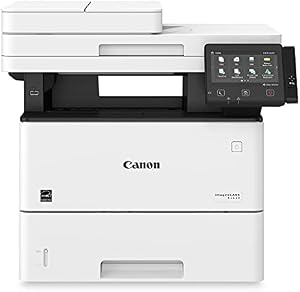
The D1650 is built around quick, smaller jobs: its first print out lands in as fast as 6.2 seconds, the only first-print figure given among these five. Security settings sit behind an administrator log-in, and mobile printing and scanning solutions are supported. At 54.0 pounds it measures 19.4 x 18.3 x 17.8 inches; its size line reads 17.8 x 19.5 x 18.3 inches against a 19.4 inch length in its dimension fields, so re-check the product page before trusting either figure. The trade-off mirrors the other Canon: the automatic document feeder appears in the product name (product name), with no capacity in the listing facts.
Pros
- First print out in as fast as 6.2 seconds
- Security settings protected behind an administrator log-in
- Supports mobile solutions for printing and scanning
Cons
- Feeder appears only in the product name (product name), with no capacity figure in the listing facts
- Second heaviest of these five at 54.0 pounds, and its listing gives no print speed
| Spec | From the listing |
|---|---|
| Output | Monochrome laser |
| First print out | As fast as 6.2 seconds |
| Document feeder | Automatic document feeder (product name) |
| Print speed | The listing does not state it |
| Weight | 54.0 pounds |
5. Brother MFC-L8930CDW Color Laser All-in-One — Best for Heavy Scanning

The second Brother is the scanning heavyweight: an 80-page auto document feeder, the largest stated here, pairs with two-sided scanning up to 104 ipm, the fastest stated scan speed of these five. It prints color at up to 33 ppm and ships with 3,000-page black and 1,800-page color toner cartridges. A 7-inch color touchscreen, the largest stated display here, runs scan previews and menus, with dual-band wireless and Gigabit Ethernet. The trade-off is size: at 71.2 pounds it is the heaviest of these five, and at 21.6 inches tall it needs the most vertical room.
Pros
- Largest stated feeder at 80 pages, with two-sided scanning up to 104 ipm
- Color printing up to 33 ppm, faster than the HP’s stated 26 ppm
- 7-inch color touchscreen, the largest stated display of these five
Cons
- Heaviest of these five at 71.2 pounds
- Tallest body here at 21.6 inches
| Spec | From the listing |
|---|---|
| Output | Color laser |
| Print speed | Up to 33 ppm |
| Document feeder | 80-page auto document feeder |
| Scan speed | Up to 104 ipm, two-sided |
| Weight | 71.2 pounds |
Shopping Checklist
- Confirm the feeder is detailed in the listing facts; two Canon models here name it only in the product name (product name).
- Match feeder capacity to your stacks: stated capacities here run from 70 to 80 pages.
- Check two-sided scan speed for duplex stacks: stated figures here run from 56 to 104 ipm.
- Measure your space first: heights run from 12.4 to 21.6 inches and weights from 28.6 to 71.2 pounds.
- Decide color versus monochrome first: two of these five print monochrome only.
FAQ
What does an auto document feeder do on an all-in-one printer?
It feeds a loaded stack through the scanner for copying, scanning or faxing, so you skip placing pages on the glass one at a time. Stated capacities here run from 70 to 80 pages, and two models name the feeder only in the product name (product name), which makes the product page worth a second look.
Does feeder capacity or scan speed matter more?
They solve different problems: capacity sets how large a stack you can load at once, while scan speed, in images per minute, sets how fast that stack moves. Two-sided scan speeds stated here run from 56 to 104 ipm, so a high-capacity feeder paired with a high ipm figure suits long duplex stacks best.
Should I pick an ink tank or a laser for heavy document work?
The lasers here state speeds from 26 to 50 ppm and ship with toner cartridges rated in thousands of pages. The ink tank model ships with up to two years of ink by its listing’s own 200-page monthly measure, but its listing gives no print speed, so pace comparisons rest on the laser figures.
Final Verdict
The Brother MFC-L5915DW takes the top spot, pairing the fastest stated print speed at 50 ppm with a 70-page feeder and single-pass two-sided scanning. The Brother MFC-L8930CDW is the pick for scan-heavy color work, with the largest stated feeder at 80 pages and 104 ipm two-sided scanning, while the HP 3304fdw covers smaller color teams at 26 ppm. The Canon GX7120 and imageCLASS D1650 stay partial matches: both are genuine all-in-one printers, but their document feeders appear in the product name (product name) without feeder details in the listing facts, so verify the feeder on the product page before choosing either for stack scanning.
Prime covers fast, free delivery on eligible items. See whether a Prime free trial is available for your account.
Check Prime on Amazon →Product and ASIN Reference
| Product | ASIN | Grade |
|---|---|---|
| Canon MegaTank GX7120 | B0DSWT7FXL | PARTIAL |
| Brother MFC-L5915DW | B0CRZGP525 | MATCH |
| HP Color LaserJet Pro 3304fdw | B0GWJFNZBG | MATCH |
| Canon imageCLASS D1650 | B07N21QWZP | PARTIAL |
| Brother MFC-L8930CDW | B0FR8Y4VDW | MATCH |










Write Your Review
No reviews yet. Be the first to share your experience!